Mayo clinic release of information 2025

Get Form
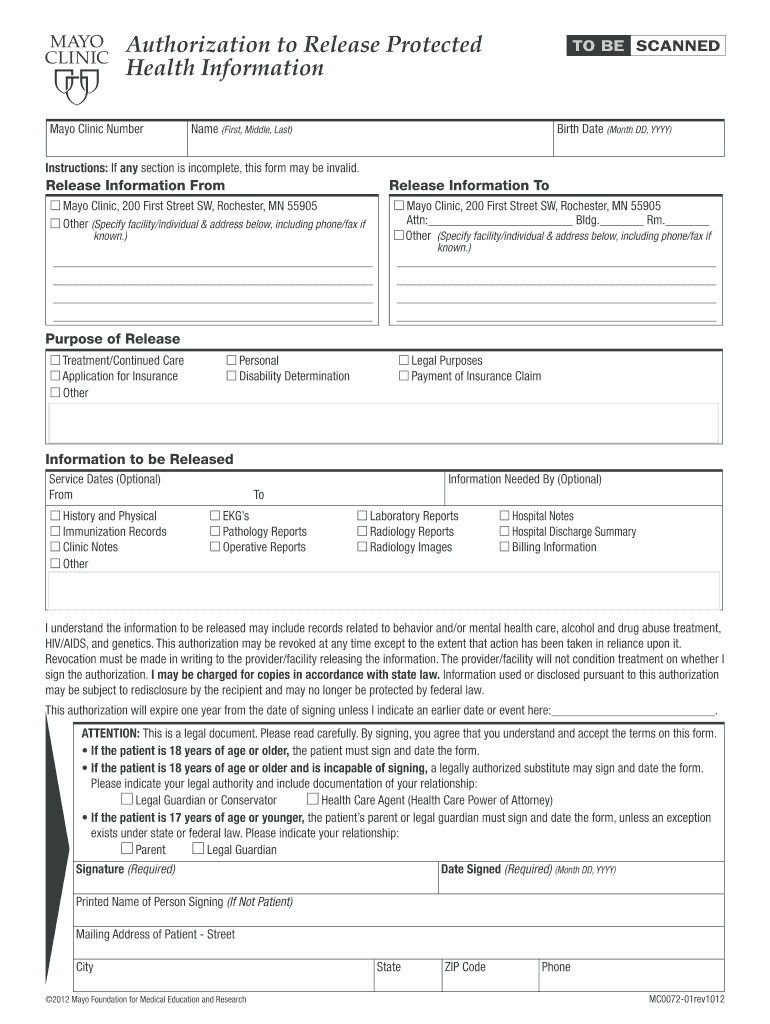
mayo clinic release of information form Preview on Page 1

Here's how it works

01. Edit your mayo clinic release of information form online
Type text, add images, blackout confidential details, add comments, highlights and more.
02. Sign it in a few clicks
Draw your signature, type it, upload its image, or use your mobile device as a signature pad.
03. Share your form with others
Send mayo release of information via email, link, or fax. You can also download it, export it or print it out.

How to use or fill out mayo clinic release of information with our platform

Form edit decoration
9.5
Ease of Setup
DocHub User Ratings on G2
9.0
Ease of Use
DocHub User Ratings on G2
  1. Click ‘Get Form’ to open the Mayo Clinic Release of Information in the editor.
  2. Begin by entering your Mayo Clinic Number, followed by your full name (First, Middle, Last) and birth date in the specified format (Month DD, YYYY).
  3. In the 'Release Information From' section, specify whether you are releasing information from the Mayo Clinic or another facility. If it's another facility, provide the name and address.
  4. Next, indicate where the information is being sent in the 'Release Information To' section. Again, include details for both Mayo Clinic and any other specified entity.
  5. Select the purpose of release from options such as Treatment/Continued Care or Legal Purposes. This helps clarify why you need this information shared.
  6. Choose what specific information you want released by checking relevant boxes like History and Physical or Laboratory Reports.
  7. Finally, ensure that all required fields are completed before signing and dating the form at the bottom. If applicable, indicate your legal authority if you're signing on behalf of someone else.

Start using our platform today to easily complete your Mayo Clinic Release of Information form online for free!

be ready to get more

Complete this form in 5 minutes or less

Get form

Got questions?

We have answers to the most popular questions from our customers. If you can't find an answer to your question, please contact us.
Contact us

Sure, and it’s really straightforward! DocHub is an online PDF editor with advanced document management functions that allow you promptly adjust your forms, fill out blank fields and insert new ones for other people to fill out, and create eSignatures in several ways. Import your mayo records request, give information as requested, and select how you want to eSign your document - by typing your name, drawing your signature, uploading its image, or using a QR code.

You may get and edit your mayo clinic release of information online by using DocHub. Its straightforward yet feature-rich design allows you to begin effective work right after you register your account. Create your profile and add your document, and then our user interface will guide you through our stress-free form completion experience.

Phase 1: Recording, Tracking and Verifying the Request. Phase 2: Retrieving Your PHI. Phase 3: Safeguarding Your Sensitive Information. Phase 4: Releasing Your PHI. Phase 5: Completing the Request and Preparing an Invoice. The Value of Using an Electronic Health Information Exchange.
The ROI form gives the healthcare organization \u2014 like a hospital \u2014 the authority to release a specific portion of your medical record. When the healthcare organization receives the ROI request, the ROI department immediately records it. They also check whether or not the authorization is valid.
The core elements of a valid authorization include: A meaningful description of the information to be disclosed. The name of the individual or the name of the person authorized to make the requested disclosure. The name or other identification of the recipient of the information.

People also ask

Call the Board of Medical Practice at (612) 617-2130 or 1-800-657-3709. Ask if they have any information on your doctor's current location.
Recorded the date and time the request was received. Identified the date and time the requested information was needed. Identified to whom the information was to be sent. Confirmed that the request included a valid authorization.
An authorization is a detailed document that gives covered entities permission to use protected health information for specified purposes, which are generally other than treatment, payment, or health care operations, or to disclose protected health information to a third party specified by the individual.
PATIENT INFORMATION SHEET. ... List ALL MEDICATIONS you take, including over-the-counter (OTC) medications and vitamins. ... Other medical problems not listed above: Surgical History: Please list all prior surgeries and approximate dates performed. SOCIAL / CULTURAL HISTORY:
Phase 1: Recording, Tracking and Verifying the Request. Phase 2: Retrieving Your PHI. Phase 3: Safeguarding Your Sensitive Information. Phase 4: Releasing Your PHI. Phase 5: Completing the Request and Preparing an Invoice. The Value of Using an Electronic Health Information Exchange.

signed release of information