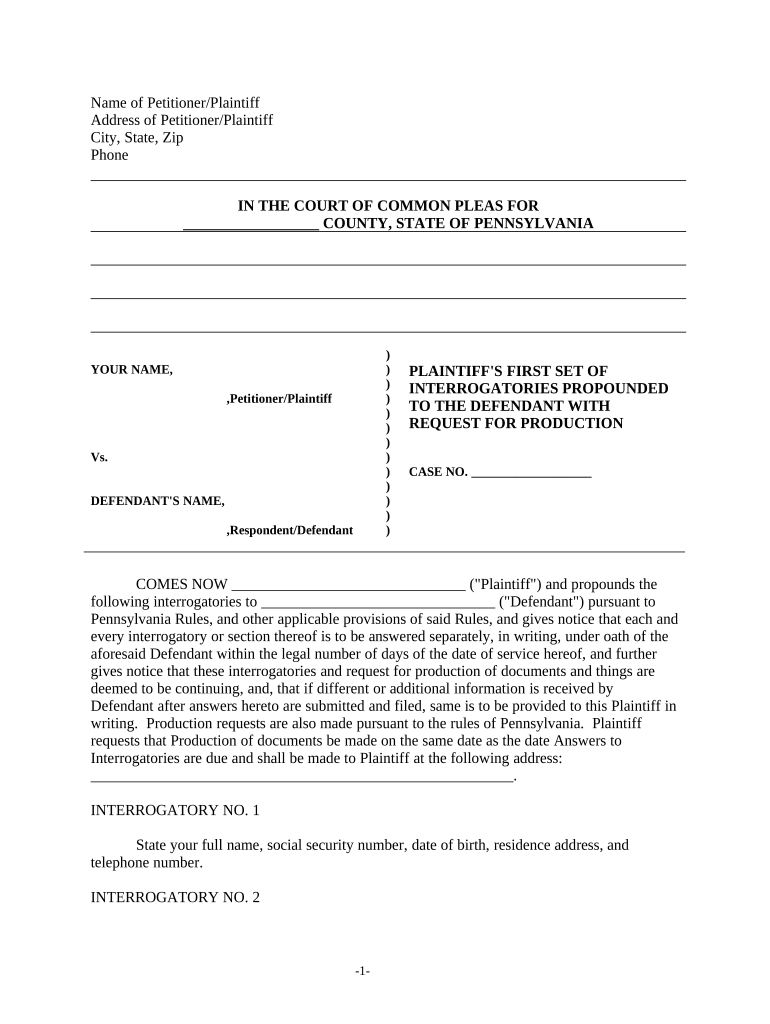
Interrogatories pennsylvania 2026

Get Form
pa rcp 4009 Preview on Page 1

Here's how it works

01. Edit your pa rcp 4009 online
Type text, add images, blackout confidential details, add comments, highlights and more.
02. Sign it in a few clicks
Draw your signature, type it, upload its image, or use your mobile device as a signature pad.
03. Share your form with others
Send it via email, link, or fax. You can also download it, export it or print it out.

How to use or fill out interrogatories Pennsylvania with our platform

Form edit decoration
9.5
Ease of Setup
DocHub User Ratings on G2
9.0
Ease of Use
DocHub User Ratings on G2
  1. Click ‘Get Form’ to open the interrogatories Pennsylvania document in the editor.
  2. Begin by entering the name and address of the Petitioner/Plaintiff at the top of the form. Ensure all details are accurate for proper identification.
  3. Proceed to fill in the case number and court information, which is essential for legal processing.
  4. Answer each interrogatory carefully. For example, in Interrogatory No. 1, provide your full name, social security number, date of birth, residence address, and telephone number.
  5. For requests requiring documentation, such as income tax returns in Interrogatory No. 2, attach copies directly within our platform for seamless submission.
  6. Continue through each interrogatory systematically, ensuring that you provide complete and truthful answers as required by law.
  7. Once completed, review your responses for accuracy before signing and submitting the document electronically through our editor.

Start using our platform today to efficiently complete your interrogatories Pennsylvania form online for free!

be ready to get more

Complete this form in 5 minutes or less

Get form

Got questions?

We have answers to the most popular questions from our customers. If you can't find an answer to your question, please contact us.
Contact us

Of course, it is possible with DocHub. This trustworthy and compliant online solution has a phone-based signing option. When you log in to your DocHub account and add your interrogatories pennsylvania to our editor, complete all empty areas and use the Sign feature on the top barf. Click on Create your signature and select Phone from the available options. Here, you scan a QR code with your smartphone and draw your signature on your phone display, as you normally do when approving physical papers. If you access DocHub right from your mobile device, you can eSign your paperwork by drawing your electronic signature, adding its photo, or simply with a typed name.

With DocHub, you have several convenient ways to edit your interrogatories pennsylvania online. You can drag and drop the form and edit it straight at the DocHub site or use our browser extension to fill out your form immediately. On top of that, you can edit your PDF on your phone, as DocHub is compatible with all the accessible mobile platforms.

These Interrogatories must be answered as provided in Pa. R.C.P. 4006 and the Answers must be served on all other parties within thirty (30) days after the Interrogatories are deemed served.
In California, you have 30 days to respond to an interrogatory. If you do not respond within this time, the opposing side can file a motion to compel with the court. The court may require them to first consult with you about your failure to respond before officially filing a motion to compel.
(a)(1) Answers to interrogatories shall be in writing and verified. The answers shall be inserted in the spaces provided in the interrogatories.