Type text, add images, blackout confidential details, add comments, highlights and more.
02. Sign it in a few clicks
Draw your signature, type it, upload its image, or use your mobile device as a signature pad.
03. Share your form with others
Send it via email, link, or fax. You can also download it, export it or print it out.
How to use or fill out Alabama Husband Wife with our platform
Ease of Setup
DocHub User Ratings on G2
Ease of Use
DocHub User Ratings on G2
Click ‘Get Form’ to open the Alabama Husband Wife document in the editor.
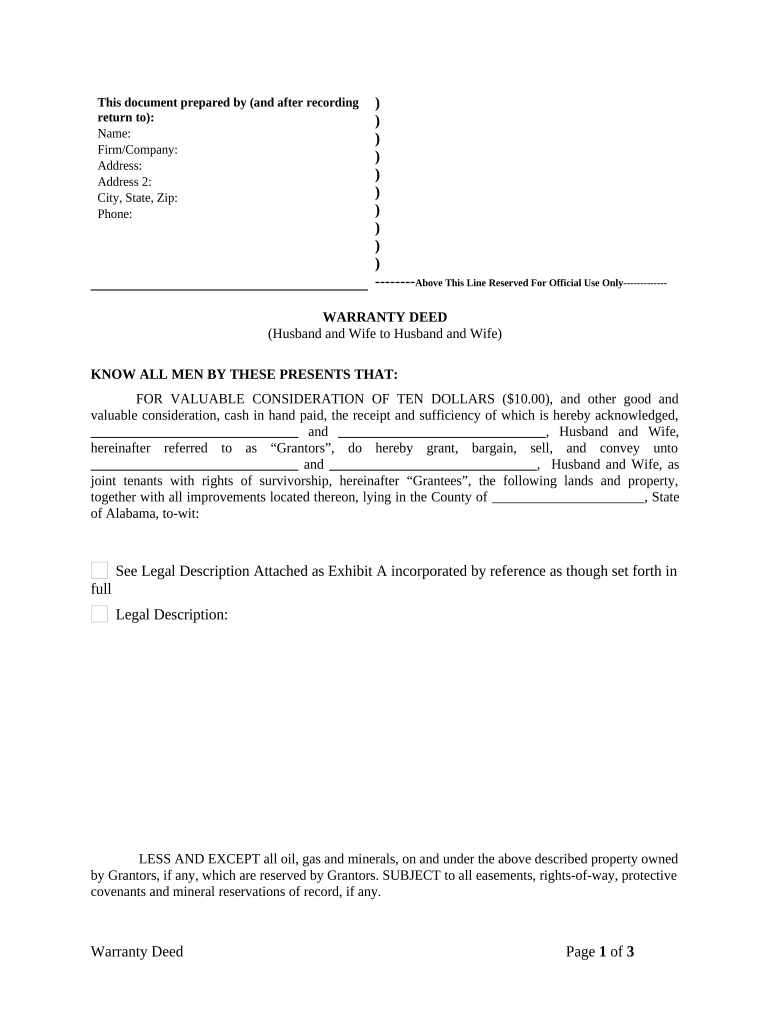
Begin by filling in the 'Prepared by' section at the top. Enter your name, firm/company, address, city, state, zip code, and phone number.
In the 'Grantors' section, input the names of both husband and wife who are transferring property. Ensure that both names are clearly written.
Next, fill in the 'Grantees' section with the names of both husband and wife receiving the property. This should match exactly as intended for legal purposes.
Provide a detailed legal description of the property being conveyed in the designated area. If you have an attachment (Exhibit A), ensure it is referenced correctly.
Both Grantors must sign and print their names at the bottom of the form. Make sure to include the date of signing.
Finally, complete the notary section by having a notary public witness and certify your signatures.
Start using our platform today to easily fill out your Alabama Husband Wife form for free!
Kynath William Terry Jr.Precious JohnsonPrecious Johnson Birmingham, ALAlabama murder-suicideAlabama shootingMurder-suicide in Birmingham AlabamaMan kills himself and wifeAlabama shooting today
Security and compliance
At DocHub, your data security is our priority. We follow HIPAA, SOC2, GDPR, and other standards, so you can work on your documents with confidence.
The spousal elective share, or forced share, is a doctrine designed to protect the rights of a surviving spouse.1 The basic premise, although it var-.Read more
Alabama recognizes common law marriages. Husband and wife both must be residents of Alabama to use this filing status. Once you file a joint return, you mayRead more
Cookie consent notice
This site uses cookies to enhance site navigation and personalize your experience.
By using this site you agree to our use of cookies as described in our Privacy Notice.
You can modify your selections by visiting our Cookie and Advertising Notice.