Invoice agreement 2026

Get Form
free invoice printable template Preview on Page 1

Here's how it works

01. Edit your free invoice printable template online
Type text, add images, blackout confidential details, add comments, highlights and more.
02. Sign it in a few clicks
Draw your signature, type it, upload its image, or use your mobile device as a signature pad.
03. Share your form with others
Send invoice agreement via email, link, or fax. You can also download it, export it or print it out.

How to use or fill out invoice agreement with our platform

Form edit decoration
9.5
Ease of Setup
DocHub User Ratings on G2
9.0
Ease of Use
DocHub User Ratings on G2
  1. Click ‘Get Form’ to open the invoice agreement in the editor.
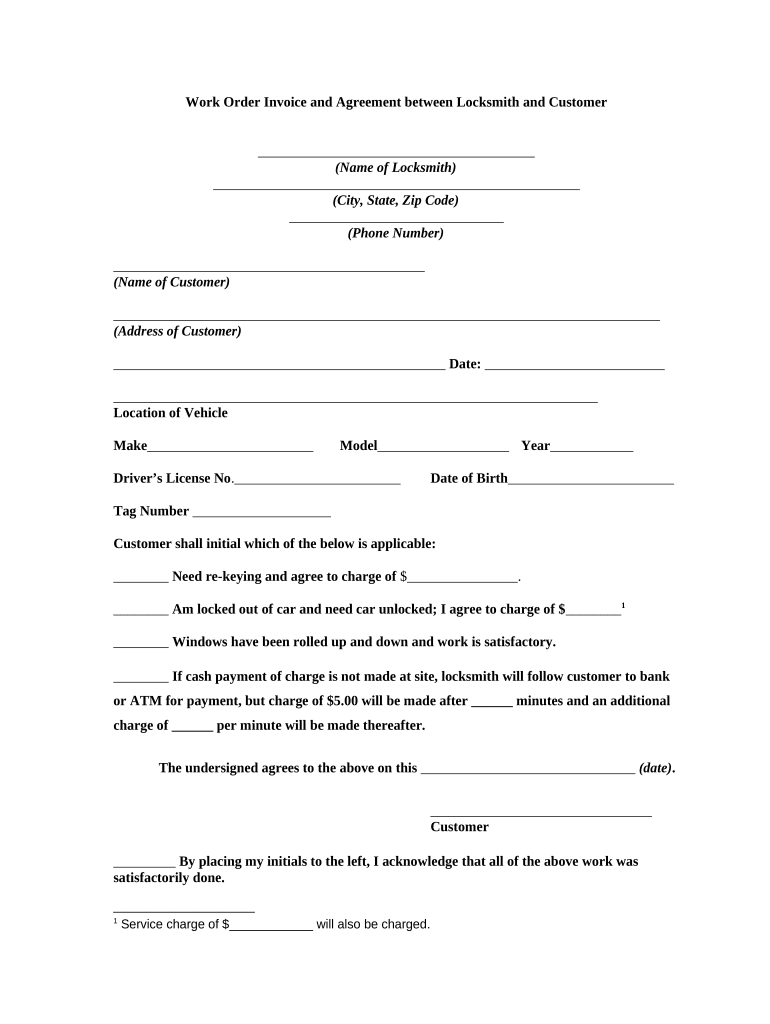
  2. Begin by entering the name of the locksmith and their contact details, including city, state, zip code, and phone number.
  3. Next, fill in the customer's name and address accurately to ensure proper identification.
  4. Enter the date of the agreement and provide details about the vehicle's location, make, model, year, driver's license number, date of birth, and tag number.
  5. Instruct the customer to initial next to their selected service option—whether they need re-keying or are locked out—and specify any applicable charges.
  6. Ensure that all additional charges for payment delays are clearly noted and agreed upon by having the customer initial where required.
  7. Finally, have the customer sign and date at the bottom of the form to confirm their agreement.

Start using our platform today for free to streamline your invoice agreements effortlessly!

be ready to get more

Complete this form in 5 minutes or less

Get form

Got questions?

We have answers to the most popular questions from our customers. If you can't find an answer to your question, please contact us.
Contact us
Invoices record a transaction between the 2 parties, usually for goods or services provided by a business to a customer. It does not serve as a legally binding document if the receiving party doesnt sign or agree to the invoice. In contrast, both parties must sign a contract for it to be valid.
How can businesses make contract invoices clear and effective? Make payment terms explicit. Use detailed descriptions of charges. Include important visuals. Reference the contract. Proofread. Be consistent with timing. Consider using invoicing software.
Payment terms: The payment terms detailed in an invoice, such as due dates or late fees, can serve as a reminder of agreed-upon terms. If these terms were established in a contractual context, then they are legally binding.

Security and compliance

At DocHub, your data security is our priority. We follow HIPAA, SOC2, GDPR, and other standards, so you can work on your documents with confidence.

Learn more
ccpa2
pci-dss
gdpr-compliance
hipaa
soc-compliance