Type text, add images, blackout confidential details, add comments, highlights and more.
02. Sign it in a few clicks
Draw your signature, type it, upload its image, or use your mobile device as a signature pad.
03. Share your form with others
Send it via email, link, or fax. You can also download it, export it or print it out.
How to use or fill out Warranty Deed from Individual to a Trust - South Carolina
Ease of Setup
DocHub User Ratings on G2
Ease of Use
DocHub User Ratings on G2
Click ‘Get Form’ to open it in the editor.
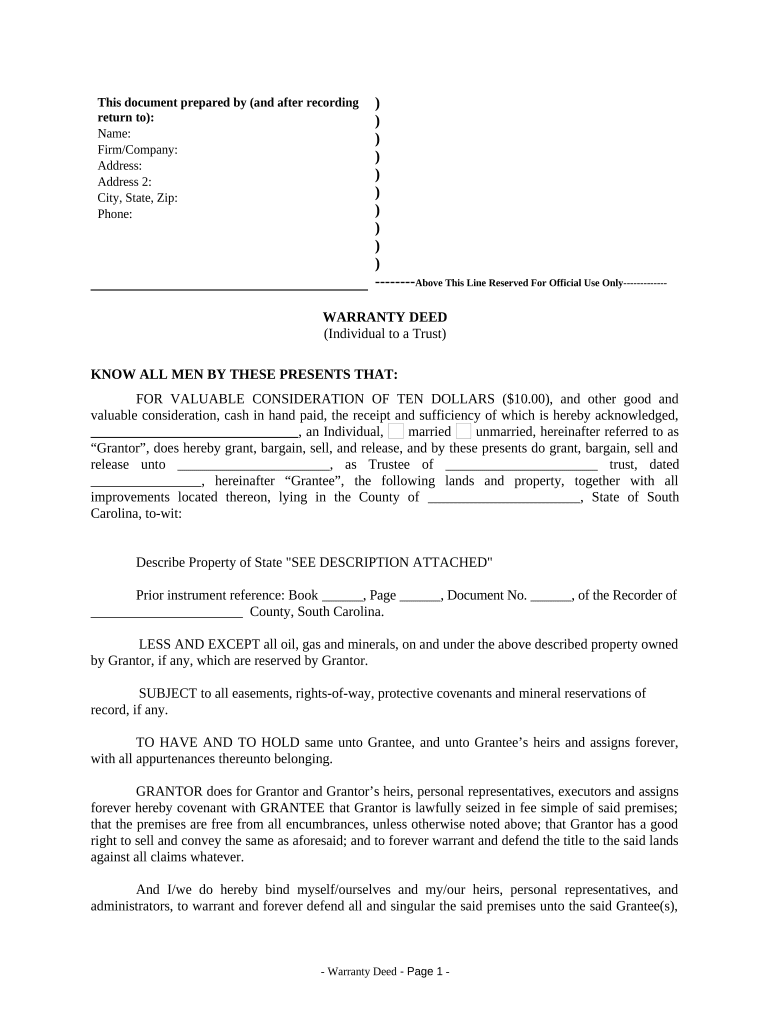
Begin by entering the Grantor's name, marital status, and address in the designated fields. Ensure accuracy as this identifies the individual transferring property.
Next, input the Grantee's name and trust details. This section specifies who will receive the property, so double-check for correctness.
Describe the property being transferred. If there is an attachment with a detailed description, indicate 'SEE DESCRIPTION ATTACHED' in the appropriate field.
Complete any prior instrument references if applicable. This helps establish a clear chain of title.
Fill in the date of transfer and ensure all signatures are collected from both Grantor and Witnesses where indicated.
Finally, review all entries for completeness before saving or exporting your document for filing.
Start using our platform today to streamline your Warranty Deed process effortlessly!
Fill out Warranty Deed from Individual to a Trust - South Carolina online It's free
Warranty deed from individual to a trust south carolina templateWarranty deed from individual to a trust south carolina sampleWarranty deed from individual to a trust south carolina pdfWarranty deed from individual to a trust south carolina formWarranty deed from individual to a trust south carolina exampleFree warranty deed from individual to a trust south carolinaSouth Carolina deed transfer formSouth Carolina deed requirements
Security and compliance
At DocHub, your data security is our priority. We follow HIPAA, SOC2, GDPR, and other standards, so you can work on your documents with confidence.
Enter in appropriate block for each party: name, address, and, if appropriate, character of entity. e.g. corporation, partnership, limited liability company.Read more
by CG Ferguson 1969 The South Carolina Supreme Court once stated that an instru- ment in form and substance an ordinary trust deed conveying real estate in trust . . . must beRead more
The members of the Interstate Technology Regulatory Council (ITRC) Permeable Reactive. Barriers Team wish to acknowledge the individuals, organizations, andRead more
Cookie consent notice
This site uses cookies to enhance site navigation and personalize your experience.
By using this site you agree to our use of cookies as described in our Privacy Notice.
You can modify your selections by visiting our Cookie and Advertising Notice.