Type text, add images, blackout confidential details, add comments, highlights and more.
02. Sign it in a few clicks
Draw your signature, type it, upload its image, or use your mobile device as a signature pad.
03. Share your form with others
Send it via email, link, or fax. You can also download it, export it or print it out.
How to Use or Fill Out Demand Payment with Our Platform
Ease of Setup
DocHub User Ratings on G2
Ease of Use
DocHub User Ratings on G2
Click ‘Get Form’ to open the demand payment document in the editor.
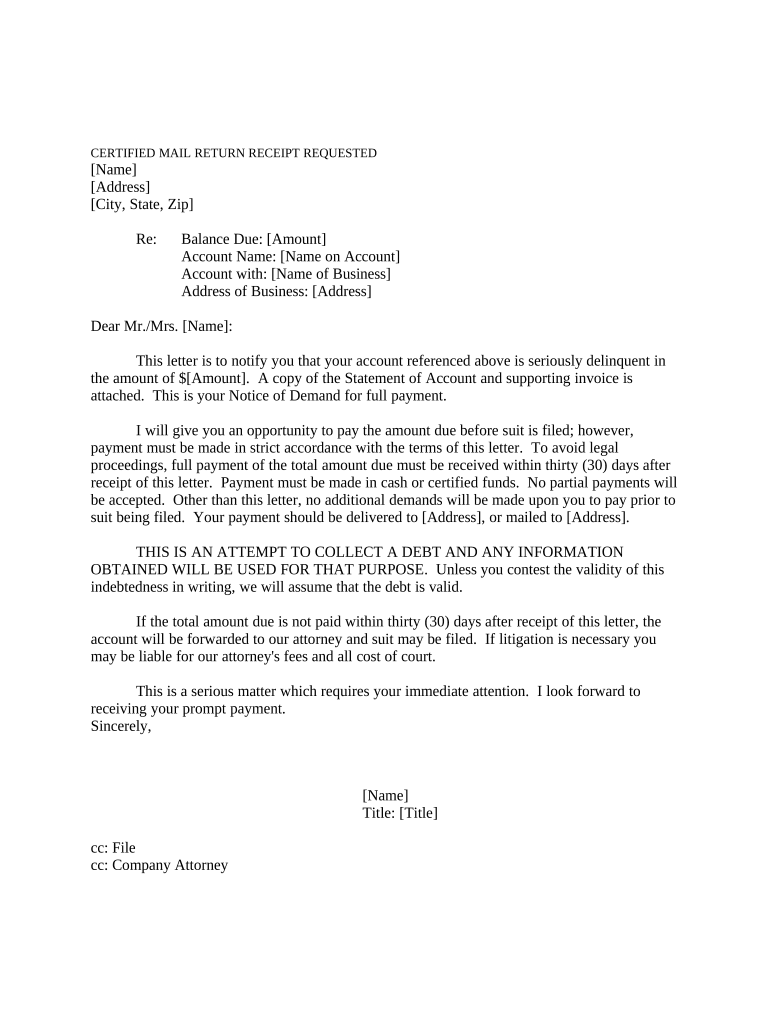
Begin by entering your name and address in the designated fields at the top of the form. Ensure that all information is accurate to avoid any delays.
In the 'Balance Due' section, input the total amount owed. This should match the amount specified in your records.
Fill in the 'Account Name' and 'Account with' sections with the relevant details pertaining to your account and business.
Review the body of the letter carefully. Make any necessary adjustments to personalize it for your situation, ensuring clarity on payment terms and deadlines.
Finally, sign off on the document by adding your name and title at the bottom before saving or sending it directly through our platform.
Start using our platform today for free to streamline your demand payment process!
Demand payment meaningDemand payment synonymDemand payment from crossword 3 lettersDemand payment crossword clue 7 lettersDemand payment from crossword clue 6 lettersPaylocity on demand payDemand payment from crossword 5 lettersPaylocity on demand pay not working today
Security and compliance
At DocHub, your data security is our priority. We follow HIPAA, SOC2, GDPR, and other standards, so you can work on your documents with confidence.
31 CFR 901.2 - Demand for payment. - Law.Cornell.Edu
Demand letters shall inform the debtor of: (1) The basis for the indebtedness and the rights, if any, the debtor may have to seek review within the agency.Read more
Dec 20, 2025 This page contains details about Fallen London Actions. The most satisfying part of the job: Billing. How shall you request payment?Read more
Cookie consent notice
This site uses cookies to enhance site navigation and personalize your experience.
By using this site you agree to our use of cookies as described in our Privacy Notice.
You can modify your selections by visiting our Cookie and Advertising Notice.