South carolina trust 2026

Get Form
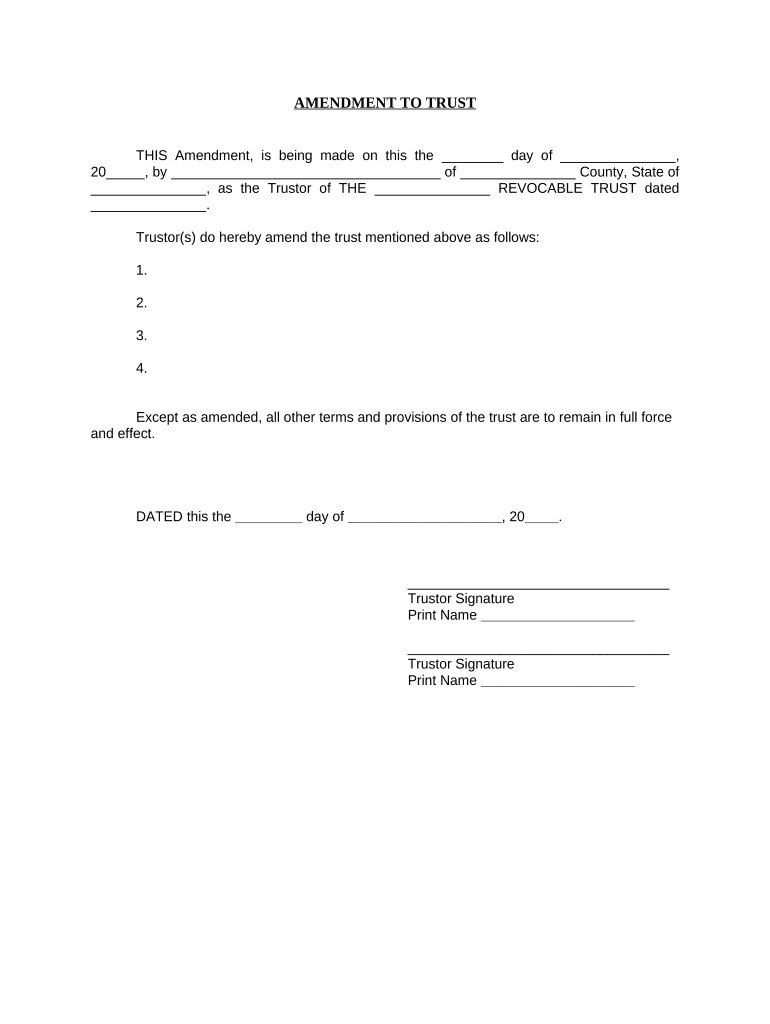
south carolina trust Preview on Page 1

Here's how it works

01. Edit your form online
Type text, add images, blackout confidential details, add comments, highlights and more.
02. Sign it in a few clicks
Draw your signature, type it, upload its image, or use your mobile device as a signature pad.
03. Share your form with others
Send it via email, link, or fax. You can also download it, export it or print it out.

How to use or fill out South Carolina Trust with our platform

Form edit decoration
9.5
Ease of Setup
DocHub User Ratings on G2
9.0
Ease of Use
DocHub User Ratings on G2
  1. Click ‘Get Form’ to open the South Carolina Trust Amendment in the editor.
  2. Begin by entering the date of the amendment in the first blank field. This should reflect the day, month, and year when you are making the amendment.
  3. In the next section, provide your name as the Trustor along with your county and state of residence. Ensure that all information is accurate for legal purposes.
  4. List any amendments to the trust in the designated numbered fields. Be clear and concise about each change you are making.
  5. At the bottom of the form, sign and print your name as Trustor. If there are multiple Trustors, ensure that each one completes this section.
  6. Finally, complete the notary section by providing details such as date of acknowledgment and notary public's information. This step is crucial for validating your amendment.

Start using our platform today to easily edit and complete your South Carolina Trust Amendment online for free!

be ready to get more

Complete this form in 5 minutes or less

Get form

Got questions?

We have answers to the most popular questions from our customers. If you can't find an answer to your question, please contact us.
Contact us
The cost of creating a living trust in South Carolina will depend on the method you use. If you want to make a living trust yourself with an online program, it will cost a few hundred dollars. You can also hire a lawyer to help you create your trust, which will likely run more than $1,000.
Typically, youll name yourself as the trustee of your trust. This means that you retain control of the trust and its property while youre alive. In your trust document, youll also name a successor trustee to take over and manage the trust (including distributing your property) after you die.
Once you transfer the home to a trust, the legal ownership right will go to the trustee and youll become the grantor. A trustee is a person who manages the property and passes it to the beneficiaries according to your wishes after your death.
Wills become public records during probate, making them accessible to anyone who wishes to see them. In contrast, trusts remain private documents, with details known only to the successor trustee and beneficiaries. This makes a living trust more suitable if privacy is a priority.
A will can cover basic wishes and guardianship, while a trust can manage assets more efficiently and privately. An estate planning attorney can leverage either or both to help secure your assets.

Security and compliance

At DocHub, your data security is our priority. We follow HIPAA, SOC2, GDPR, and other standards, so you can work on your documents with confidence.

Learn more
ccpa2
pci-dss
gdpr-compliance
hipaa
soc-compliance

People also ask

South Carolina taxable income of estates and trusts are taxed either to the fiduciary or to the beneficiaries, and in the same manner as federal Income Tax purposes.

Related links