Type text, add images, blackout confidential details, add comments, highlights and more.
02. Sign it in a few clicks
Draw your signature, type it, upload its image, or use your mobile device as a signature pad.
03. Share your form with others
Send quitclaim deed to add spouse to title via email, link, or fax. You can also download it, export it or print it out.
How to use or fill out Quitclaim Deed from Individual to Husband and Wife - Oregon with DocHub
Ease of Setup
DocHub User Ratings on G2
Ease of Use
DocHub User Ratings on G2
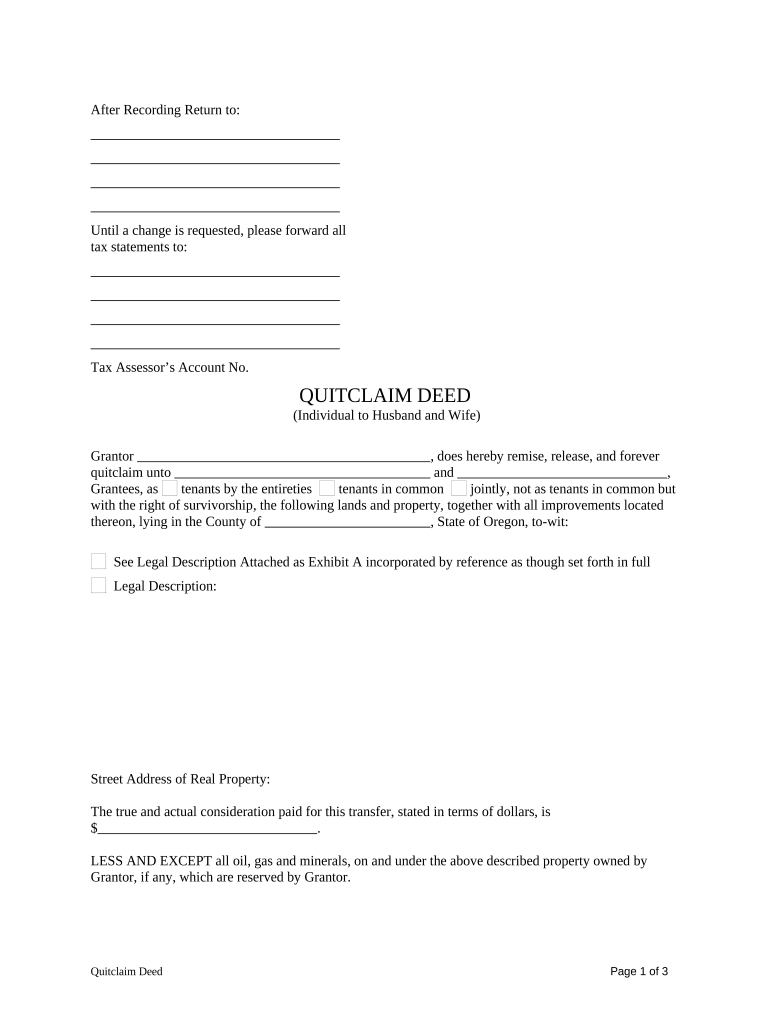
Click ‘Get Form’ to open the Quitclaim Deed in our editor.
Begin by entering the Grantor's name in the designated field, followed by the names of both Grantees. Choose whether they will hold the property as tenants by the entireties, tenants in common, or with rights of survivorship.
Fill in the legal description of the property. If there is an attached Exhibit A, ensure it is referenced correctly.
Provide the street address of the real property and state the actual consideration paid for this transfer in dollars.
Indicate any reservations regarding oil, gas, and minerals owned by the Grantor.
Complete any necessary tax proration details between Grantor and Grantees for the specified tax year.
Have both parties sign and date the document. Ensure that a notary public acknowledges the signatures as required.
Start using our platform today to easily complete your Quitclaim Deed for free!
Fill out Quitclaim Deed from Individual to Husband and Wife - Oregon online It's free
Effect in Montana of Community-Source Property Acquired
by CW Willey 2008 Cited by 16 ick227 upheld a quitclaim deed from wife to husband, even though the husband paid her only $3,000 in exchange for her half interest in the family homeRead more
Cookie consent notice
This site uses cookies to enhance site navigation and personalize your experience.
By using this site you agree to our use of cookies as described in our Privacy Notice.
You can modify your selections by visiting our Cookie and Advertising Notice.