Type text, add images, blackout confidential details, add comments, highlights and more.

02. Sign it in a few clicks
Draw your signature, type it, upload its image, or use your mobile device as a signature pad.

03. Share your form with others
Send it via email, link, or fax. You can also download it, export it or print it out.

How to use or fill out term sheet with our platform
Ease of Setup
DocHub User Ratings on G2
Ease of Use
DocHub User Ratings on G2
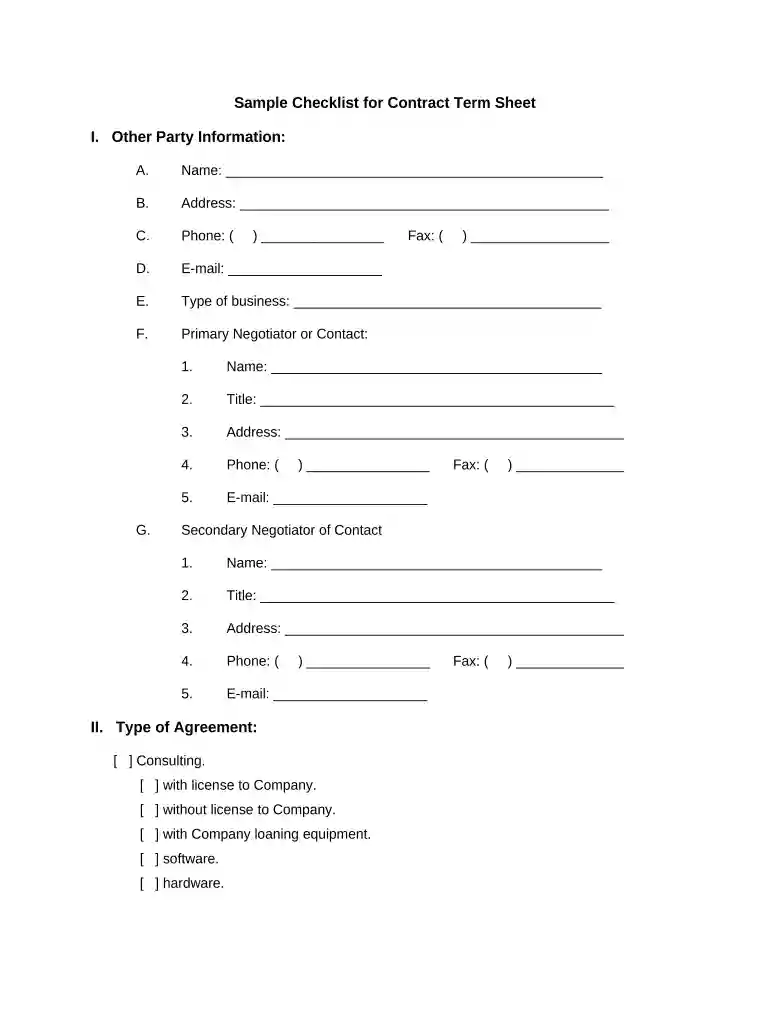
Click ‘Get Form’ to open the term sheet in the editor.
Begin by filling out the 'Other Party Information' section. Enter the name, address, phone number, email, type of business, and details for both primary and secondary negotiators.
Move to the 'Type of Agreement' section. Check all applicable boxes that describe the nature of your agreement, such as consulting or development.
In the 'Purpose or Goal of this Agreement' field, provide a clear description of what you aim to achieve through this agreement.
Complete the sections on obligations for both parties. Check relevant responsibilities and specify any additional requirements as needed.
Fill in the 'Compensation' section by selecting payment structures and entering amounts where necessary.
Review sections on Intellectual Property Rights and License Rights carefully, ensuring all options reflect your intentions accurately.
Finally, complete the 'Confidential Information Handling' section by indicating your understanding of procedures and signing off with your name and date.
Start using our platform today to streamline your document editing process for free!
These Financing Terms and Conditions (the Term Sheet) are a summary of basic business terms and conditions and do not constitute a commitment to lend.Read more
Cookie consent notice
This site uses cookies to enhance site navigation and personalize your experience.
By using this site you agree to our use of cookies as described in our Privacy Notice.
You can modify your selections by visiting our Cookie and Advertising Notice.