Type text, add images, blackout confidential details, add comments, highlights and more.
02. Sign it in a few clicks
Draw your signature, type it, upload its image, or use your mobile device as a signature pad.
03. Share your form with others
Send it via email, link, or fax. You can also download it, export it or print it out.
How to use or fill out mississippi joint with our platform
Ease of Setup
DocHub User Ratings on G2
Ease of Use
DocHub User Ratings on G2
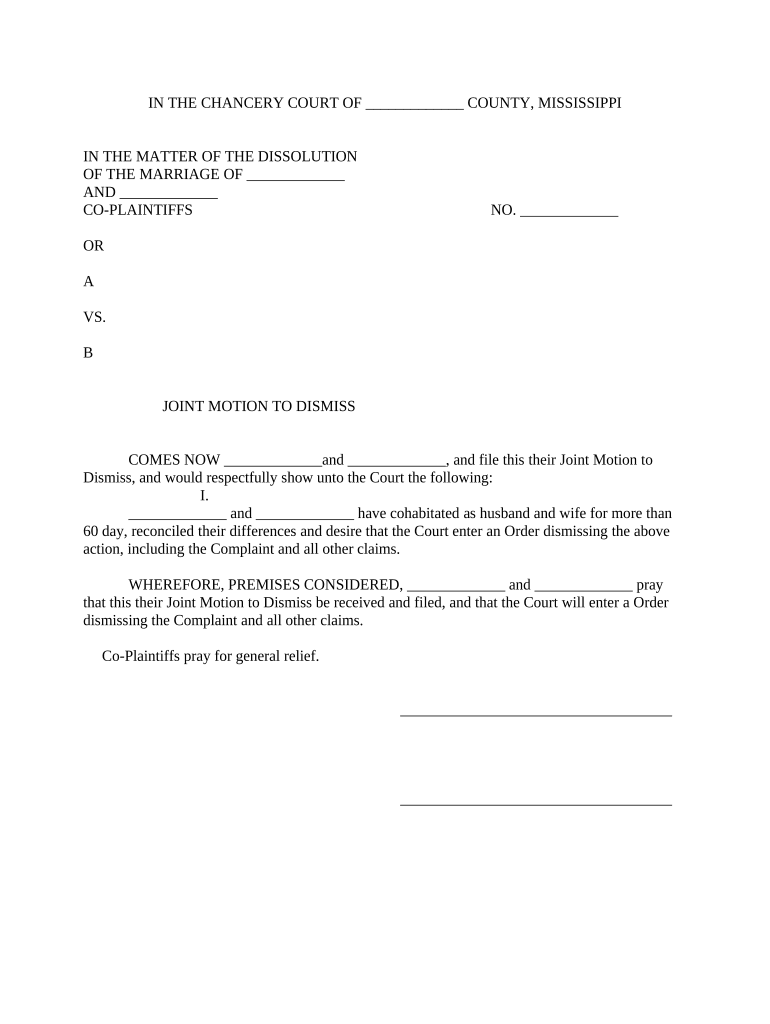
Click ‘Get Form’ to open the Mississippi Joint Motion to Dismiss in the editor.
Begin by filling in the names of the co-plaintiffs in the designated fields at the top of the form. Ensure that both parties' names are clearly stated.
In section I, indicate how long you have cohabitated as husband and wife. This is crucial for establishing your relationship status.
Next, express your desire for the court to dismiss the action by checking or marking any relevant boxes if applicable, and ensure all claims are included.
Proceed to sign and date the document where indicated. Each co-plaintiff must provide their signature along with the date of signing.
Finally, complete the notary section by providing details such as commission expiration dates and signatures from a notary public.
Start using our platform today to fill out your Mississippi Joint Motion for free!
Juke joint MississippiClarksdale Blues Festival 2026 scheduleJuke Joint Festival 2027Willie Po Monkey SeaberryJuke Joint Festival 2027 datesJuke Joint Clarksdale, MSJuke Joint Festival Clarksdale, MSJuke joint years
Security and compliance
At DocHub, your data security is our priority. We follow HIPAA, SOC2, GDPR, and other standards, so you can work on your documents with confidence.
South Mississippi Electric Power Association (SME) serves seven member systems, including Coast, Dixie, Magnolia, Pearl River Valley, Singing River, SouthwestRead more
The University of Mississippi Medical Center Orthopaedics joint replacement program uses the latest surgical procedures to reduce knee and hip pain and restoreRead more
Cookie consent notice
This site uses cookies to enhance site navigation and personalize your experience.
By using this site you agree to our use of cookies as described in our Privacy Notice.
You can modify your selections by visiting our Cookie and Advertising Notice.