Type text, add images, blackout confidential details, add comments, highlights and more.
02. Sign it in a few clicks
Draw your signature, type it, upload its image, or use your mobile device as a signature pad.
03. Share your form with others
Send correction deed form via email, link, or fax. You can also download it, export it or print it out.
How to use or fill out correction deed with our platform
Ease of Setup
DocHub User Ratings on G2
Ease of Use
DocHub User Ratings on G2
Click ‘Get Form’ to open the correction deed in the editor.
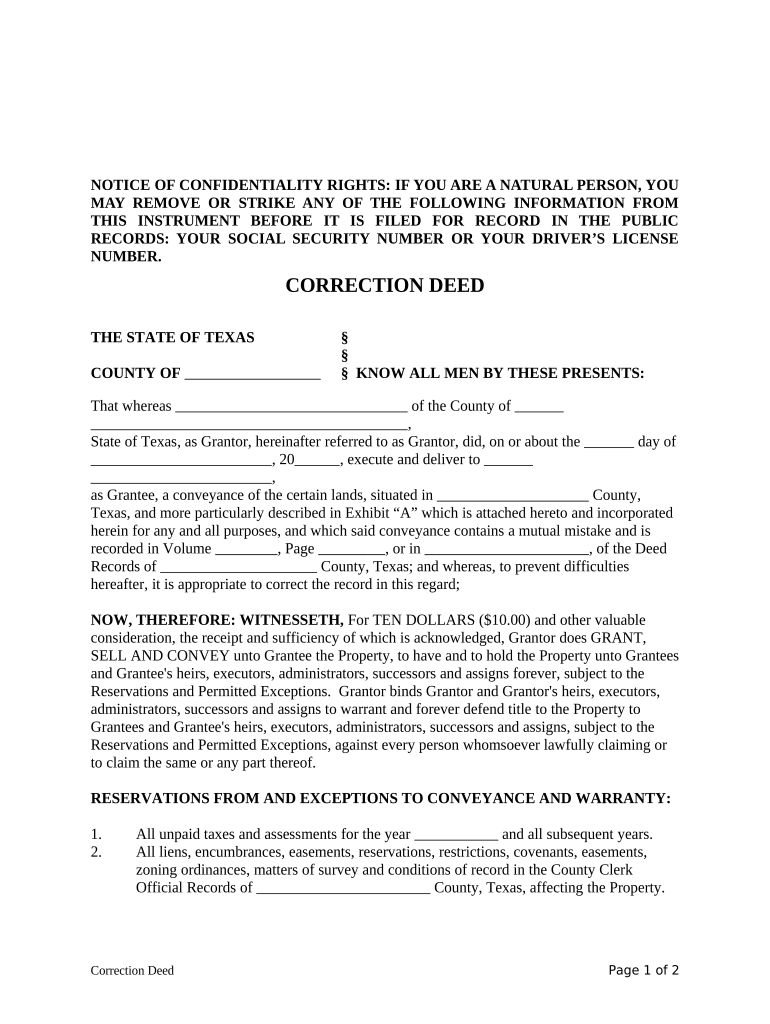
Begin by filling in the Grantor's name and address in the designated fields. Ensure accuracy as this identifies the party making the correction.
Next, enter the Grantee's name and address. This is crucial as it specifies who will receive the corrected title.
In the section regarding the property description, refer to Exhibit 'A' for detailed information about the property being conveyed. Make sure all details match existing records.
Fill in any reservations or exceptions that apply to this conveyance. This includes unpaid taxes or any liens affecting the property.
Finally, have the Grantor sign and date the document. If required, include a notary acknowledgment to validate the deed.
Start using our platform today for free to streamline your correction deed process!
Correction deed vs corrective deedHow to get a correction deedCorrection deed templateDeed of correction VirginiaCorrection deed texasCorrection deed New YorkCorrection deed CaliforniaDeed of correction Kentucky
Security and compliance
At DocHub, your data security is our priority. We follow HIPAA, SOC2, GDPR, and other standards, so you can work on your documents with confidence.
Allows obvious description errors or typographical or other minor errors in a recorded deed, deed of trust, or other instrument purporting to convey or transferRead more
A deed of correction may be prepared to clear up a defect in title or to correct a mistake. An example may be the number of acres, or a source of title.Read more
Cookie consent notice
This site uses cookies to enhance site navigation and personalize your experience.
By using this site you agree to our use of cookies as described in our Privacy Notice.
You can modify your selections by visiting our Cookie and Advertising Notice.