Type text, add images, blackout confidential details, add comments, highlights and more.
02. Sign it in a few clicks
Draw your signature, type it, upload its image, or use your mobile device as a signature pad.
03. Share your form with others
Send it via email, link, or fax. You can also download it, export it or print it out.
How to use or fill out losses damages with our platform
Ease of Setup
DocHub User Ratings on G2
Ease of Use
DocHub User Ratings on G2
Click ‘Get Form’ to open the losses damages document in the editor.
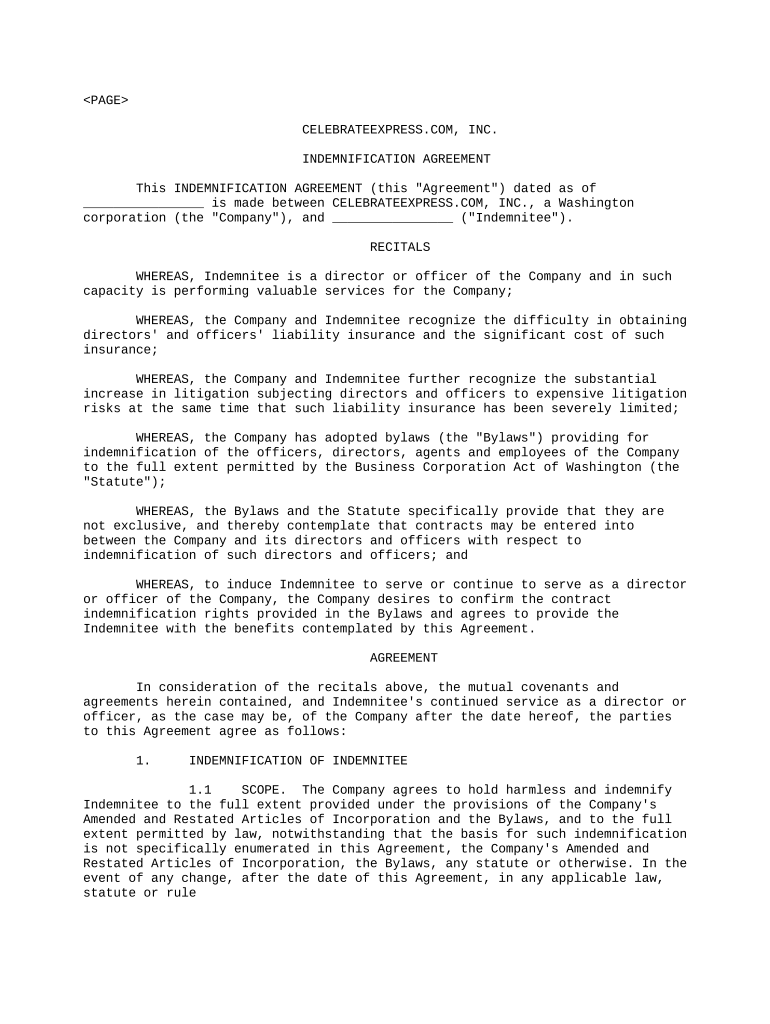
Begin by entering your name and contact information in the designated fields. This ensures that all correspondence regarding the indemnification is directed to you.
In the 'Scope' section, review the indemnification terms carefully. Ensure you understand what is covered and any limitations that may apply.
Fill out any specific details regarding past claims or proceedings you have been involved in, as required by the form. This information is crucial for determining your eligibility for indemnification.
Review the 'Expense Advances' section and provide any necessary undertakings if applicable. This may include affirming your good faith belief regarding conduct standards.
Finally, ensure all sections are completed accurately before submitting. Use our platform’s tools to save your progress and make edits as needed.
Start using our platform today to streamline your losses damages form completion for free!
Aggravated damagesContemptuous damagesDamages in lawDamage and damages meaning in lawConsequential damagesPunitive damagesContemptuous damages exampleType of damages
Security and compliance
At DocHub, your data security is our priority. We follow HIPAA, SOC2, GDPR, and other standards, so you can work on your documents with confidence.
Reference Guide on Estimation of Economic Losses in
by RE Hall Cited by 25 losses, antitrust losses, securities losses, and liquidated damages). Our discussion follows the structure of the standard damages study, as shown in FigureRead more
Cookie consent notice
This site uses cookies to enhance site navigation and personalize your experience.
By using this site you agree to our use of cookies as described in our Privacy Notice.
You can modify your selections by visiting our Cookie and Advertising Notice.