Type text, add images, blackout confidential details, add comments, highlights and more.
02. Sign it in a few clicks
Draw your signature, type it, upload its image, or use your mobile device as a signature pad.
03. Share your form with others
Send it via email, link, or fax. You can also download it, export it or print it out.
How to use or fill out cemetery fund with our platform
Ease of Setup
DocHub User Ratings on G2
Ease of Use
DocHub User Ratings on G2
Click ‘Get Form’ to open the cemetery fund document in the editor.
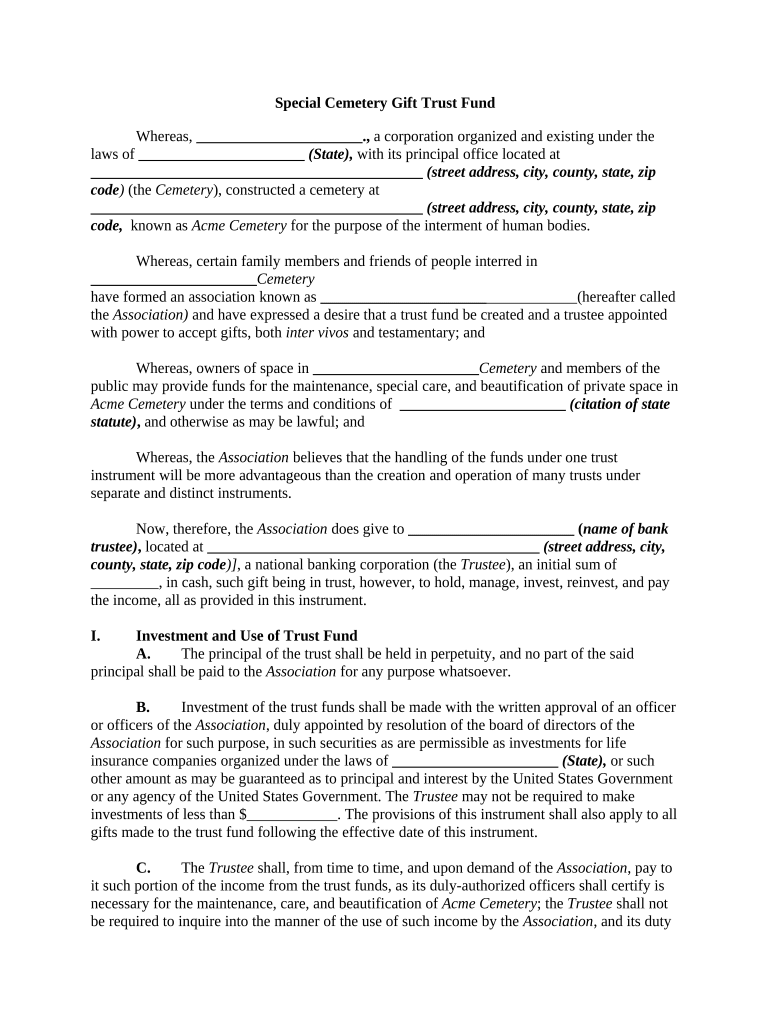
Begin by filling in the name of the corporation and its principal office address at the top of the form. This identifies the Cemetery responsible for managing the trust fund.
In the section regarding contributions, specify the initial sum being gifted to the trust fund. Ensure that this amount is clearly stated as it will be crucial for future management.
Complete the Investment and Use of Trust Fund section by detailing how funds will be managed and used. Include any necessary approvals required from Association officers for investments.
For Additions to Trust Fund, indicate if there are any future gifts planned and specify their intended use, whether for general maintenance or specific crypts.
Finally, review all sections for accuracy before saving your changes. Once completed, you can easily share or print your finalized document directly from our platform.
Start using our platform today to streamline your cemetery fund documentation process!
Cemetery fund near meCemetery fund costVirginia historical african american cemetery and graves fundUnity Cemetery preservation FundCemetery surveyCemetery clean-up near meAfrican American cemetery grantsPerpetual care meaning
Security and compliance
At DocHub, your data security is our priority. We follow HIPAA, SOC2, GDPR, and other standards, so you can work on your documents with confidence.
2000-year-old Germanic cemetery discovered in western Poland
Dec 11, 2018 Polish archaeologists have discovered dozens of iron and bronze artefacts including a sword and decorative buckles in a nearly 2000 yearsRead more
The African American Cemeteries and Graves Fund (AACGF) provide grants to support the ongoing care and maintenance of historic burial grounds established on orRead more
Cookie consent notice
This site uses cookies to enhance site navigation and personalize your experience.
By using this site you agree to our use of cookies as described in our Privacy Notice.
You can modify your selections by visiting our Cookie and Advertising Notice.