Type text, add images, blackout confidential details, add comments, highlights and more.
02. Sign it in a few clicks
Draw your signature, type it, upload its image, or use your mobile device as a signature pad.
03. Share your form with others
Send it via email, link, or fax. You can also download it, export it or print it out.
How to use or fill out Indiana Closing with Our Platform
Ease of Setup
DocHub User Ratings on G2
Ease of Use
DocHub User Ratings on G2
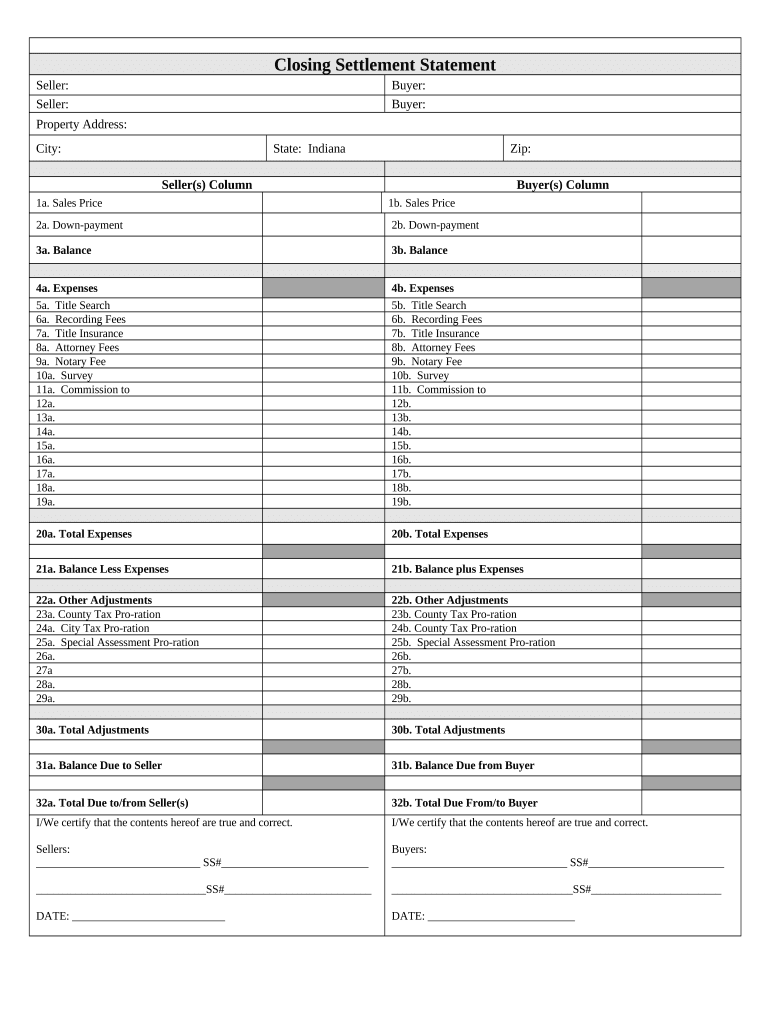
Click ‘Get Form’ to open the Indiana Closing Settlement Statement in the editor.
Begin by entering the Seller and Buyer information in the designated fields. Ensure that names are spelled correctly for accurate documentation.
Fill in the Property Address, City, State (Indiana), and Zip Code to specify the location of the transaction.
In the Seller(s) Column, input details such as Sales Price, Down-payment, and Balance. Repeat this for the Buyer(s) Column to maintain clarity between both parties.
Complete the Expenses section by detailing costs like Title Search, Recording Fees, Title Insurance, and Attorney Fees. This ensures transparency regarding financial obligations.
Review Total Expenses and Balances Less/Plus Expenses to confirm accuracy before finalizing your document.
Lastly, certify that all information is true and correct by signing in the designated areas for both Sellers and Buyers.
Start using our platform today for free to streamline your Indiana Closing process!
School delays and closings near meIndiana closings todayIndiana closings tomorrowSchool delays and closings near Indianapolis in todaySchool delays and closings today2 hour delays today Indianapolis schoolsIndiana closings and delaysSchool delays and closings near Marion in
Security and compliance
At DocHub, your data security is our priority. We follow HIPAA, SOC2, GDPR, and other standards, so you can work on your documents with confidence.
Closing Information - Emergency - Indiana University Northwest
Alert messages will be posted on the IU Northwest homepage at 6:00 am and 3:00 pm in the event of a campus closing or cancellation of classes.Read more
INDOT monitors road conditions to provide with the most-up-to-date information regarding road traffic conditions, road restrictions and closures,Read more
Cookie consent notice
This site uses cookies to enhance site navigation and personalize your experience.
By using this site you agree to our use of cookies as described in our Privacy Notice.
You can modify your selections by visiting our Cookie and Advertising Notice.