01. Edit your rent guidelines board increases chart 2022 online
Type text, add images, blackout confidential details, add comments, highlights and more.
02. Sign it in a few clicks
Draw your signature, type it, upload its image, or use your mobile device as a signature pad.
03. Share your form with others
Send it via email, link, or fax. You can also download it, export it or print it out.
How to Use or Fill Out Rent Increase Form
Ease of Setup
DocHub User Ratings on G2
Ease of Use
DocHub User Ratings on G2
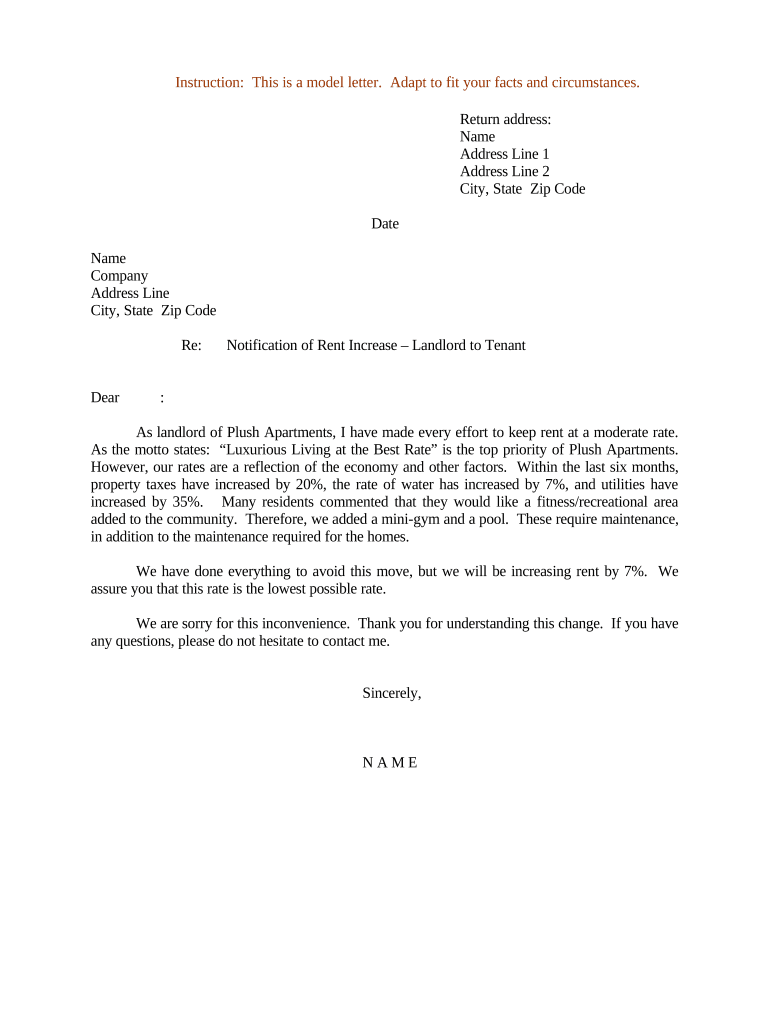
Click ‘Get Form’ to open the rent increase document in our editor.
Begin by entering your return address at the top of the form. Include your name, address line 1, address line 2 (if applicable), city, state, and zip code.
Next, input the date of the notification. This is important for record-keeping and ensures that tenants are aware of when the notice was issued.
Fill in the tenant's details in the designated section. Include their name and address to ensure clarity on who is receiving this notification.
In the body of the letter, clearly explain the reasons for the rent increase. Mention any relevant economic factors such as property tax increases or added amenities that justify this change.
Conclude with a polite closing statement expressing understanding and offering assistance for any questions regarding the increase.
Start using our platform today to easily fill out your rent increase form for free!
Rent Control Annual General Adjustment - Richmond, CA
Rent Board Adopts 2025 Annual General Adjustment in the Amount of 1.62%. (Effective 09/01/2025). At their meeting on June 18, 2025, the Rent Board adoptedRead more
What is an escalation clause in a lease? It allows landlords to increase rent periodically based on inflation or operating costs. Common in commercial leases.Read more
Cookie consent notice
This site uses cookies to enhance site navigation and personalize your experience.
By using this site you agree to our use of cookies as described in our Privacy Notice.
You can modify your selections by visiting our Cookie and Advertising Notice.