Type text, add images, blackout confidential details, add comments, highlights and more.
02. Sign it in a few clicks
Draw your signature, type it, upload its image, or use your mobile device as a signature pad.
03. Share your form with others
Send it via email, link, or fax. You can also download it, export it or print it out.
How to use or fill out private agreement with our platform
Ease of Setup
DocHub User Ratings on G2
Ease of Use
DocHub User Ratings on G2
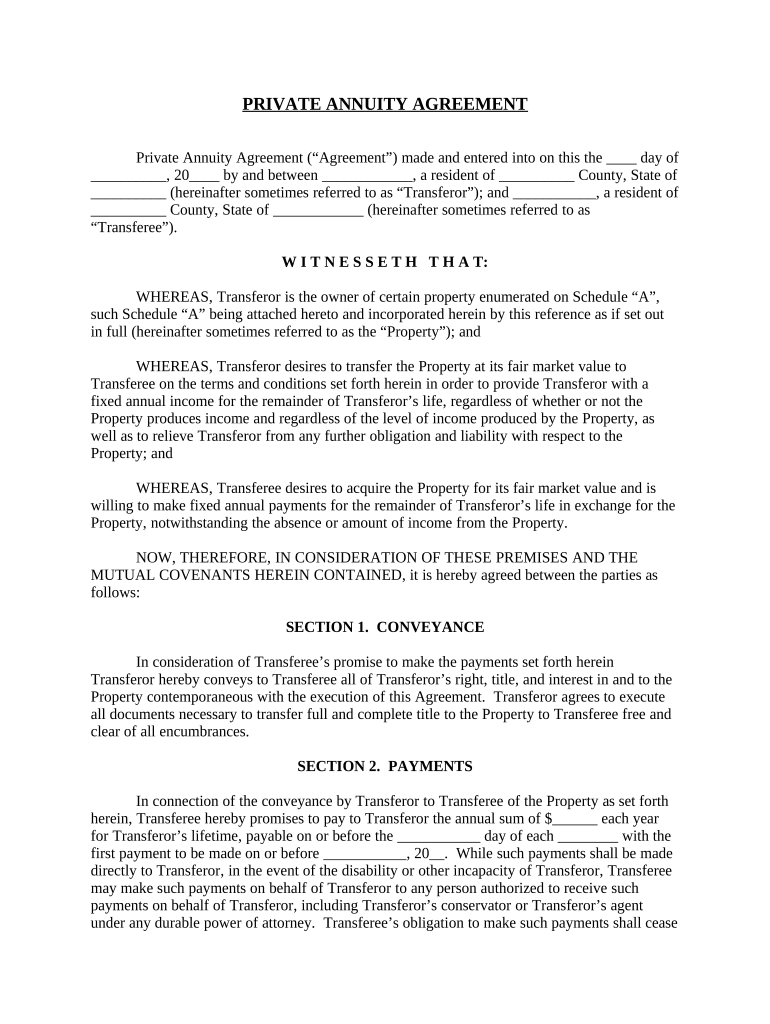
Click ‘Get Form’ to open the Private Annuity Agreement in the editor.
Begin by filling in the date at the top of the document, followed by the names and addresses of both the Transferor and Transferee. This establishes who is involved in the agreement.
In Section 1, conveyance, ensure you accurately describe the property being transferred. Attach Schedule 'A' if necessary, detailing all relevant property information.
Proceed to Section 2 to specify the annual payment amount and due dates. Fill in these fields carefully to reflect your agreed terms.
Review Sections 3 through 6 for obligations and rights regarding payments and property. Make any necessary adjustments based on your specific agreement.
Finally, complete Sections 7 and 8 by indicating applicable state laws and confirming that this document represents the entire agreement between parties.
Start using our platform today to streamline your private agreement process for free!
Private agreement crosswordPrivate agreement nytPrivate agreement synonymPersonal contract exampleWhat is contract in business4 essential elements of a contractTypes of contractLaw of contract PDF
Security and compliance
At DocHub, your data security is our priority. We follow HIPAA, SOC2, GDPR, and other standards, so you can work on your documents with confidence.
Apply for Private Construction Agreement Executive Orders, check status of Executive Order, and search your application history. Private Construction AgreementsRead more
This Virtual Private Network Agreement is entered into between the User and (^Company^), effective the date this agreement is executed by (^Company^)sRead more
Cookie consent notice
This site uses cookies to enhance site navigation and personalize your experience.
By using this site you agree to our use of cookies as described in our Privacy Notice.
You can modify your selections by visiting our Cookie and Advertising Notice.