01. Edit your north carolina employment termination notice online
Type text, add images, blackout confidential details, add comments, highlights and more.
02. Sign it in a few clicks
Draw your signature, type it, upload its image, or use your mobile device as a signature pad.
03. Share your form with others
Send north carolina termination paperwork via email, link, or fax. You can also download it, export it or print it out.
How to use or fill out nc termination with our platform
Ease of Setup
DocHub User Ratings on G2
Ease of Use
DocHub User Ratings on G2
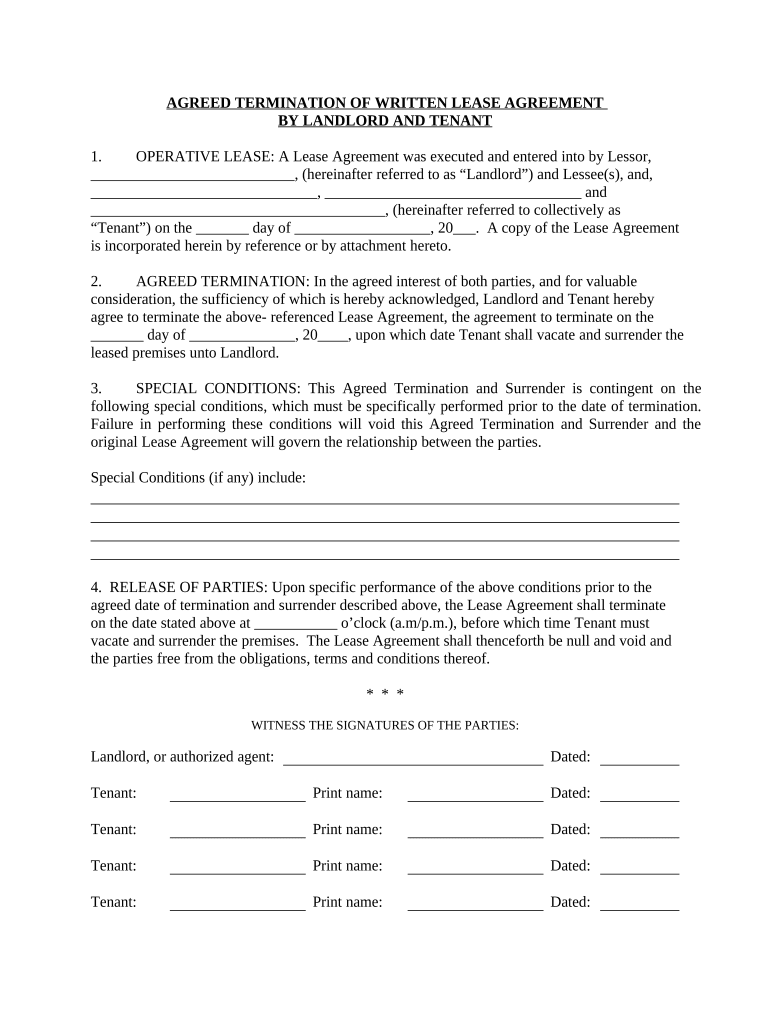
Click ‘Get Form’ to open the nc termination document in the editor.
Begin by filling in the names of the Landlord and Tenant(s) in the designated fields. Ensure accuracy as these details are crucial for identification.
Enter the date when the original Lease Agreement was executed. This is important for establishing the timeline of your agreement.
Specify the agreed termination date, ensuring it aligns with both parties' expectations for vacating the premises.
If there are any special conditions that must be met before termination, list them clearly in the provided section to avoid misunderstandings.
Finally, ensure all parties sign and date the document where indicated. This finalizes your agreement and releases both parties from further obligations.
Start using our platform today to streamline your nc termination process for free!
Wrongful termination NCWrongful termination NC payoutWrongful termination lawyer Raleigh, NCCan you sue for wrongful termination in NCWrongful termination NC statute limitationsNC REDANC REDA complaint formIs N.C. an employment at-will state
Security and compliance
At DocHub, your data security is our priority. We follow HIPAA, SOC2, GDPR, and other standards, so you can work on your documents with confidence.
Termination of Registration and Related Obligations | UNC
2026). The 10-year waiting period to petition to terminate registration begins on the date the person initially registers in North Carolina. The North CarolinaRead more
Notice of Termination of Extended Benefits (EB) - English | DES
Please note that this is a secure facility. Customers needing assistance with their unemployment insurance claim should contact us via phone at 888-737-0259.Read more
Cookie consent notice
This site uses cookies to enhance site navigation and personalize your experience.
By using this site you agree to our use of cookies as described in our Privacy Notice.
You can modify your selections by visiting our Cookie and Advertising Notice.