Permission medical care 2026

Get Form
permission medical care Preview on Page 1

Here's how it works

01. Edit your form online
Type text, add images, blackout confidential details, add comments, highlights and more.
02. Sign it in a few clicks
Draw your signature, type it, upload its image, or use your mobile device as a signature pad.
03. Share your form with others
Send it via email, link, or fax. You can also download it, export it or print it out.

How to use or fill out permission medical care with our platform

Form edit decoration
9.5
Ease of Setup
DocHub User Ratings on G2
9.0
Ease of Use
DocHub User Ratings on G2
  1. Click ‘Get Form’ to open the permission medical care document in the editor.
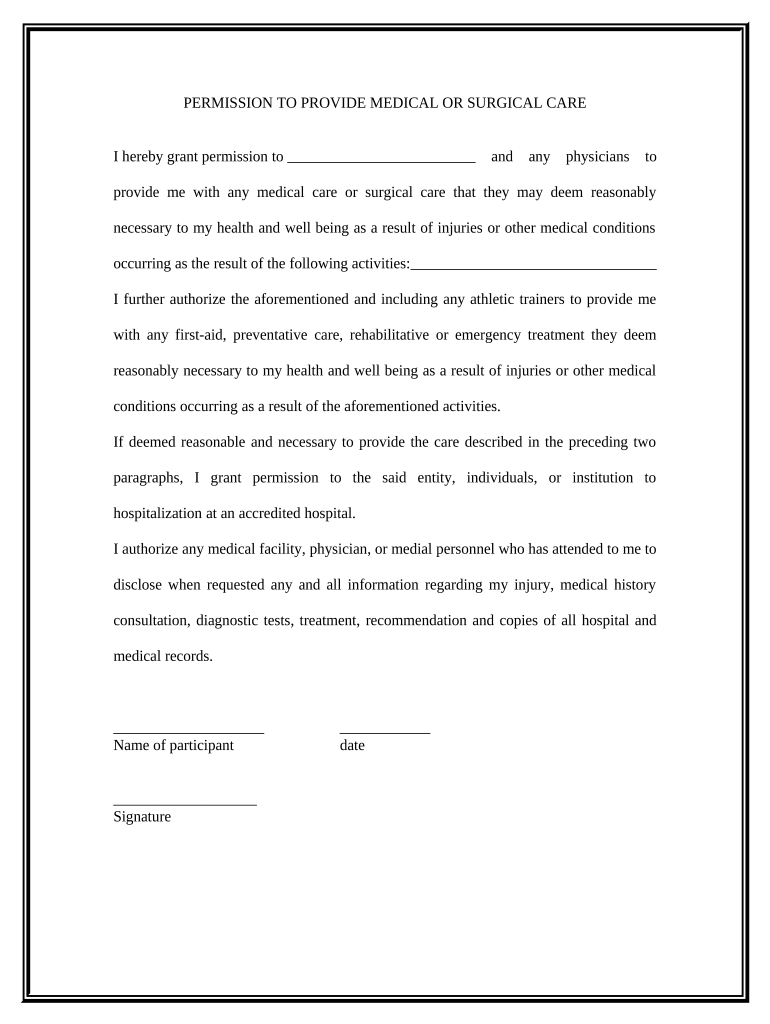
  2. Begin by entering your name in the designated field for the participant. This identifies who is granting permission for medical care.
  3. Next, provide the names of any physicians or healthcare providers you authorize to administer care. Ensure this section is filled out accurately to avoid any confusion during emergencies.
  4. Review the sections regarding activities that may lead to injuries. Clearly outline these activities to ensure comprehensive coverage under this permission.
  5. Sign and date the form at the bottom. Your signature confirms your consent for medical treatment as described in the document.

Start using our platform today to easily complete your permission medical care form online, for free!

be ready to get more

Complete this form in 5 minutes or less

Get form

Got questions?

We have answers to the most popular questions from our customers. If you can't find an answer to your question, please contact us.
Contact us
A medical agreement is a contract between a physician and patient that determines the terms and conditions surrounding the doctor-patient relationship. This crucial piece of documentation includes information about what services are offered, what they cost, and what insurances are accepted.
Any person age of 16 or over or married may consent to routine emergency medical or surgical care. Persons under eighteen (18) years of age may give legal consent for testing, examination, and/or treatment for any reportable communicable disease.
The word consent comes from the Latin words con and sentire. Con means together and sentire means feeling. Together, they form the word consentire, which in English translates to consent. Broadly, consent as a noun means permission for something to happen or an agreement to do something.
When you give your informed consent, you say its OK for your healthcare provider to move forward with a certain treatment or test. You understand what theyve explained and feel ready to decide. You might give your signature on a document that says you understand the risks, benefits and other options.
There are 4 components of informed consent including decision capacity, documentation of consent, disclosure, and competency. Doctors will give you information about a particular treatment or test in order for you to decide whether or not you wish to undergo a treatment or test.

Security and compliance

At DocHub, your data security is our priority. We follow HIPAA, SOC2, GDPR, and other standards, so you can work on your documents with confidence.

Learn more
ccpa2
pci-dss
gdpr-compliance
hipaa
soc-compliance

People also ask

Informed consent is a cornerstone of medicine, ensuring ethical treatment decisions and patient-centered care. Patients have the right to make informed and voluntary treatment decisions. Informed consent is more than merely a signature on a document; it is a communication process between the clinician and the patient.
Consent to treatment is an important and necessary part of medical treatment. It means that a person must give authorization before they receive any type of treatment.
Informed consent is a process in which a healthcare professional educates a patient about the risks, benefits, and alternatives of a given procedure or intervention. The history of informed consent in medicine is rooted in a broader evolution of ethical practices and legal standards surrounding patient autonomy.

Related links