Surviving spouse form 2026

Get Form
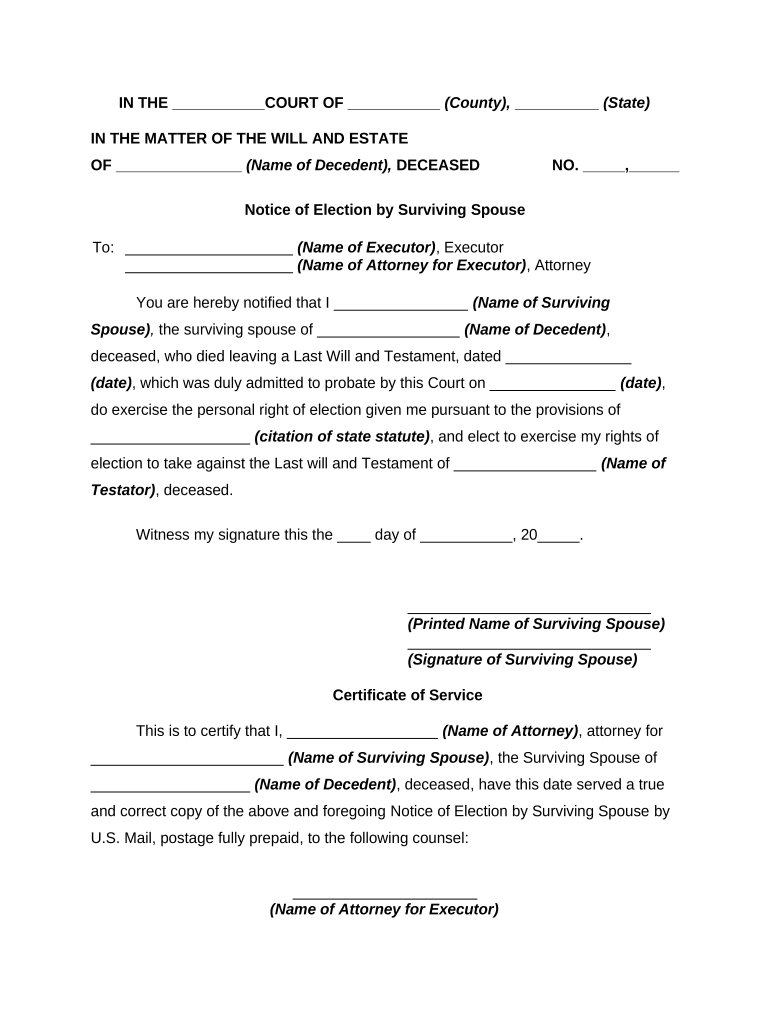
surviving spouse form Preview on Page 1

Here's how it works

01. Edit your form online
Type text, add images, blackout confidential details, add comments, highlights and more.
02. Sign it in a few clicks
Draw your signature, type it, upload its image, or use your mobile device as a signature pad.
03. Share your form with others
Send it via email, link, or fax. You can also download it, export it or print it out.

How to use or fill out the surviving spouse form with our platform

Form edit decoration
9.5
Ease of Setup
DocHub User Ratings on G2
9.0
Ease of Use
DocHub User Ratings on G2
  1. Click ‘Get Form’ to open the surviving spouse form in the editor.
  2. Begin by entering your name as the surviving spouse in the designated field. This is crucial for identifying your rights.
  3. Fill in the name of the decedent, ensuring accuracy as this links directly to the estate you are addressing.
  4. Input the date of the Last Will and Testament and ensure it matches what is recorded in probate documents.
  5. In the section regarding your election rights, reference the appropriate state statute that grants you these rights.
  6. Sign and print your name at the bottom of the form. This confirms your intent and completes your notification.
  7. If applicable, fill out the Certificate of Service section, including details about how you served copies to relevant parties.

Start using our platform today to easily complete your surviving spouse form online for free!

be ready to get more

Complete this form in 5 minutes or less

Get form

Got questions?

We have answers to the most popular questions from our customers. If you can't find an answer to your question, please contact us.
Contact us

Signing documents on a mobile device is fast, straightforward, and doesn’t require software installation when you have an account with DocHub. Log in from any browser, complete your blank fields with your data, and click on Sign → Create your signature. You can draw your eSignature the same way you usually do on paper, add its picture to your surviving spouse form, or type in your name and stylize its look. Whatever option you select, your paperwork will be valid.

You can easily edit fill out your surviving spouse form on any iOS device. Open an internet browser of your choice, visit the DocHub website, authorize or create a new account, upload your file for editing, and make your required changes. Our service is mobile-friendly, so utilizing its features on your phone will be a no-brainer, even on the first try.

Security and compliance

At DocHub, your data security is our priority. We follow HIPAA, SOC2, GDPR, and other standards, so you can work on your documents with confidence.

Learn more
ccpa2
pci-dss
gdpr-compliance
hipaa
soc-compliance
be ready to get more

Complete this form in 5 minutes or less

Get form