Employment independent contractor 2026

Get Form
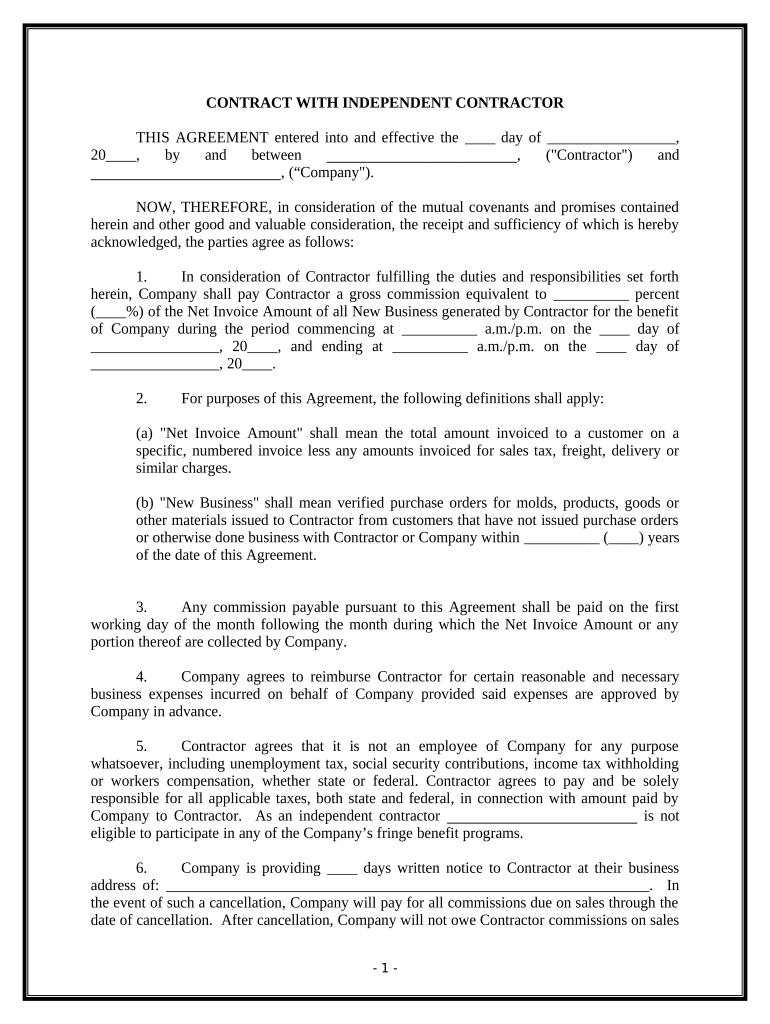
employment independent contractor Preview on Page 1

Here's how it works

01. Edit your form online
Type text, add images, blackout confidential details, add comments, highlights and more.
02. Sign it in a few clicks
Draw your signature, type it, upload its image, or use your mobile device as a signature pad.
03. Share your form with others
Send it via email, link, or fax. You can also download it, export it or print it out.

How to use or fill out employment independent contractor with our platform

Form edit decoration
9.5
Ease of Setup
DocHub User Ratings on G2
9.0
Ease of Use
DocHub User Ratings on G2
  1. Click ‘Get Form’ to open the employment independent contractor agreement in the editor.
  2. Begin by filling in the date at the top of the form, specifying the day and month when the agreement becomes effective.
  3. In the first section, enter the names of both parties: the Contractor and the Company. Ensure accuracy as these details are crucial for legal purposes.
  4. Next, specify the commission percentage that will be paid to the Contractor based on the Net Invoice Amount. This is a key financial detail.
  5. Define 'New Business' by indicating any time frame relevant to previous business interactions between Contractor and Company.
  6. Fill in any necessary details regarding reimbursement for business expenses, ensuring prior approval is noted.
  7. Complete sections outlining duties and responsibilities of both parties, including specific tasks and areas of representation.
  8. Finally, ensure all signatures are collected at the bottom of the document to validate this agreement legally.

Start using our platform today to streamline your document editing and signing process for free!

be ready to get more

Complete this form in 5 minutes or less

Get form

Got questions?

We have answers to the most popular questions from our customers. If you can't find an answer to your question, please contact us.
Contact us
If you (or the IRS) determine that the extra work being completed meets the Independent Contractor guidelines, you can pay them as both an employee and an independent contractor. If you elect to do this, be sure to keep accurate records.
The general rule is that an individual is an independent contractor if the person for whom the services are performed has the right to control or direct only the result of the work and not what will be done and how it will be done. If you are an independent contractor, then you are self-employed.
A 1099 employee is an independent contractor. The name comes from Internal Revenue Service (IRS) Form 1099, which contract workers must complete to report their earnings. In contrast, regular employees receive a W-2 Form.
If you are a business owner or contractor who provides services to other businesses, then you are generally considered self-employed. For more information on your tax obligations if you are self-employed (an independent contractor), see our Self-employed individuals tax center.
If the economic realities show that the worker is economically dependent on the employer for work, then the worker is an employee. If the economic realities show that the worker is in business for themself, then the worker is an independent contractor.

Security and compliance

At DocHub, your data security is our priority. We follow HIPAA, SOC2, GDPR, and other standards, so you can work on your documents with confidence.

Learn more
ccpa2
pci-dss
gdpr-compliance
hipaa
soc-compliance