Credit authorization form 2026

Get Form
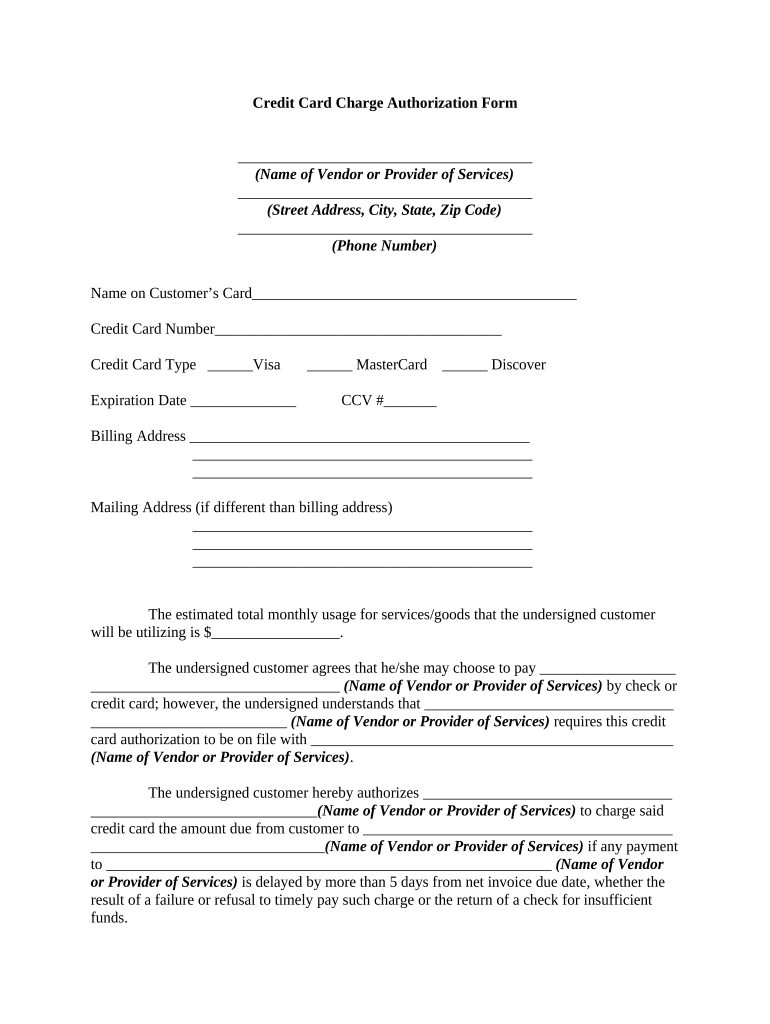
credit authorization form Preview on Page 1

Here's how it works

01. Edit your credit authorization form online
Type text, add images, blackout confidential details, add comments, highlights and more.
02. Sign it in a few clicks
Draw your signature, type it, upload its image, or use your mobile device as a signature pad.
03. Share your form with others
Send it via email, link, or fax. You can also download it, export it or print it out.

How to use or fill out credit authorization form with our platform

Form edit decoration
9.5
Ease of Setup
DocHub User Ratings on G2
9.0
Ease of Use
DocHub User Ratings on G2
  1. Click ‘Get Form’ to open the credit authorization form in the editor.
  2. Begin by entering the name of the vendor or service provider at the top of the form, followed by their street address, city, state, and zip code.
  3. Fill in the phone number of the vendor for any necessary communication.
  4. Input the name on your credit card and provide the credit card number along with selecting the type (Visa, MasterCard, or Discover).
  5. Enter the expiration date and CCV number for security purposes.
  6. Complete both billing and mailing addresses if they differ. This ensures accurate processing of charges.
  7. Estimate your total monthly usage for services or goods and fill it in accordingly.
  8. Review and authorize charges by signing at the bottom of the form, confirming your agreement to all terms outlined.

Start using our platform today to easily complete your credit authorization form online for free!

be ready to get more

Complete this form in 5 minutes or less

Get form

Got questions?

We have answers to the most popular questions from our customers. If you can't find an answer to your question, please contact us.
Contact us
**Definition:**Credit card authorization is an approval from a card issuer, usually through a credit card processor, that the customer has sufficient funds to cover the cost of the transaction.
A credit card authorization form is a document that, when filled out and signed by a customer, gives a merchant permission to charge their credit card. That way, if the customer illegitimately disputes a transaction, the merchant has evidence on file to help them fight the chargeback.
When used properly, a hotel credit card authorization form offers a safe way to authorize charges and protect the guest and hotel from unauthorized transactions or billing disputes.
What is a credit card authorization form? A credit card authorization form is a document, signed by a cardholder, that grants a merchant permission to charge their credit card for recurring payments during a period of time as written in that document.
Credit card authorisation is a crucial step in the payment transaction process, where the card issuer validates the cardholders details and verifies whether the transaction can be approved or declined.

Security and compliance

At DocHub, your data security is our priority. We follow HIPAA, SOC2, GDPR, and other standards, so you can work on your documents with confidence.

Learn more
ccpa2
pci-dss
gdpr-compliance
hipaa
soc-compliance
be ready to get more

Complete this form in 5 minutes or less

Get form

People also ask

The payment information recorded on an authorization form is sensitive and must be handled in a PCI-compliant manner to prevent cardholder details from being stolen. Details to reference: Cardholders name. Credit card number.
A credit card authorization form is a document, signed by the cardholder, that grants a merchant permission to charge their credit card for a period of time, as written in that document. The form is often used to give businesses the ongoing authority to charge the cardholder on a recurring basis.
Its when the issuer confirms that a transaction relates to a valid account that holds enough funds to fulfil the request. As such, credit card authorization is vital to meet payment industry regulations and security codes. It also protects the cardholder from purchasing products they cannot pay for.

Related links