Type text, add images, blackout confidential details, add comments, highlights and more.
02. Sign it in a few clicks
Draw your signature, type it, upload its image, or use your mobile device as a signature pad.
03. Share your form with others
Send it via email, link, or fax. You can also download it, export it or print it out.
How to use or fill out Land Deed of Trust with our platform
Ease of Setup
DocHub User Ratings on G2
Ease of Use
DocHub User Ratings on G2
Click ‘Get Form’ to open the Land Deed of Trust in the editor.
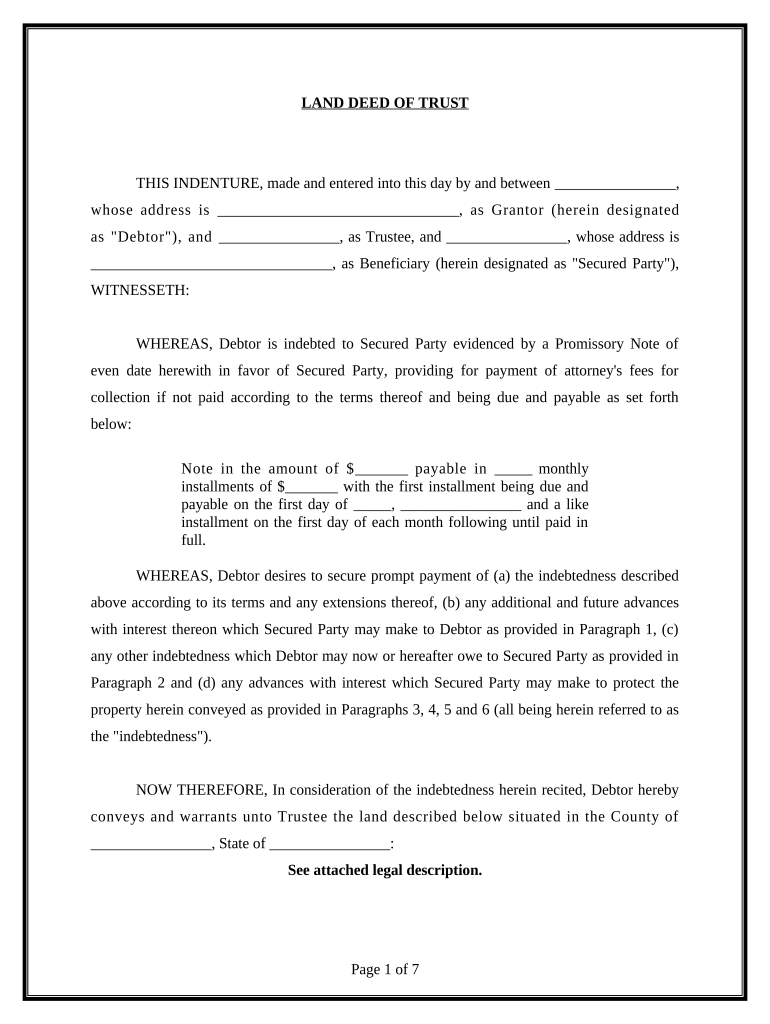
Begin by filling in the Grantor's name and address at the top of the form. This identifies who is borrowing against the property.
Next, enter the Trustee's name and Beneficiary's name along with their addresses. These parties are crucial as they hold and benefit from the trust.
In the section regarding indebtedness, specify the amount of the Promissory Note, monthly installments, and due dates. This outlines repayment terms clearly.
Complete the legal description of the property being secured. Ensure accuracy to avoid future disputes.
Review all covenants and conditions outlined in paragraphs 1 through 12 to understand obligations and rights under this deed.
Finally, sign and date at the bottom of the document. If required, add an acknowledgment for your state to finalize.
Start using our platform today for free to streamline your Land Deed of Trust process!
Does deed of trust show ownershipLand deed of trust templateLand deed of trust pdfLand deed of trust sampleLand deed of trust exampleDeed of trust vs mortgageDeed of trust exampleLand deed of trust california
Security and compliance
At DocHub, your data security is our priority. We follow HIPAA, SOC2, GDPR, and other standards, so you can work on your documents with confidence.
deed of trust | Wex | US Law | LII / Legal Information Institute
A deed of trust involves three parties: a lender, a borrower, and a trustee. The lender gives the borrower money. In exchange, the borrower gives the lenderRead more
25 U.S.C. 5135. - Mortgages and deeds of trust by individual
All mortgages and deeds of trust to such land heretofore approved by the Secretary of the Interior are ratified and confirmed. ((b)) In the event such land is
Cookie consent notice
This site uses cookies to enhance site navigation and personalize your experience.
By using this site you agree to our use of cookies as described in our Privacy Notice.
You can modify your selections by visiting our Cookie and Advertising Notice.