Ca purchase 2026

Get Form
ca purchase Preview on Page 1

Here's how it works

01. Edit your form online
Type text, add images, blackout confidential details, add comments, highlights and more.

02. Sign it in a few clicks
Draw your signature, type it, upload its image, or use your mobile device as a signature pad.

03. Share your form with others
Send it via email, link, or fax. You can also download it, export it or print it out.

How to use or fill out ca purchase with our platform

Form edit decoration
9.5
Ease of Setup
DocHub User Ratings on G2
9.0
Ease of Use
DocHub User Ratings on G2
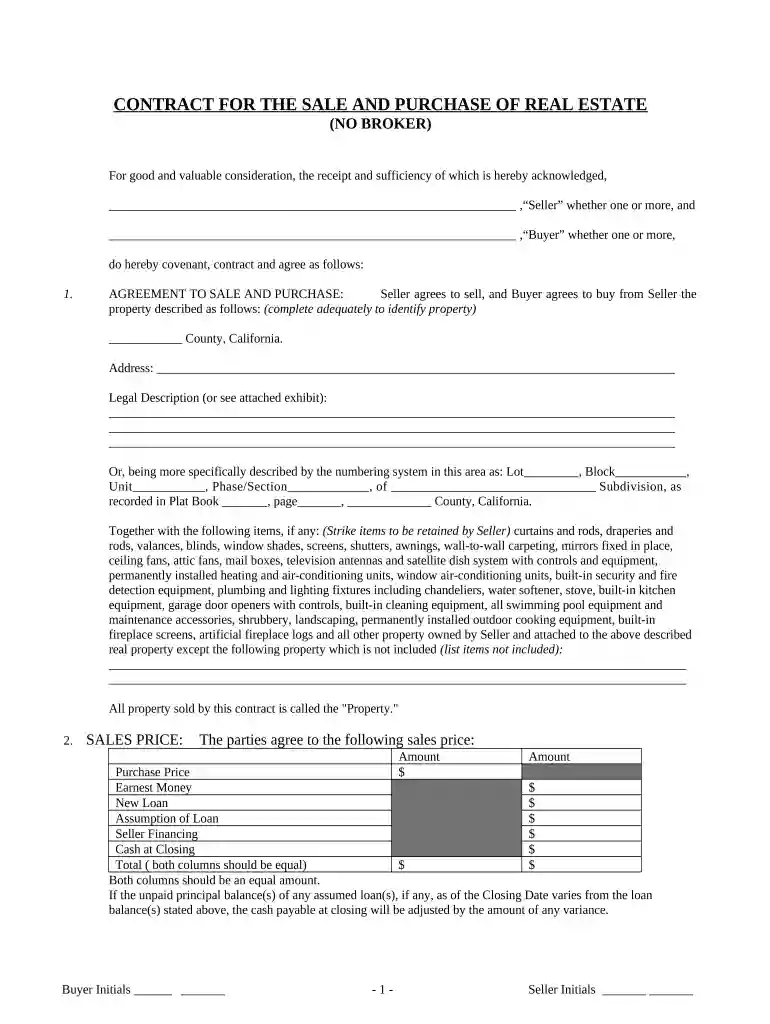
  1. Click ‘Get Form’ to open the ca purchase document in the editor.
  2. Begin by filling in the 'AGREEMENT TO SALE AND PURCHASE' section. Clearly identify the property by entering the county, address, and legal description.
  3. In the 'SALES PRICE' section, input the agreed purchase price and any relevant financial details such as earnest money and loan amounts. Ensure both columns equal each other.
  4. Proceed to the 'FINANCING' section. Indicate whether this is a cash sale or if financing is involved. Fill in details regarding loans or seller financing as applicable.
  5. Complete the 'EARNEST MONEY' field by specifying the amount deposited upon contract execution.
  6. Review and fill out all necessary disclosures, including any natural hazard disclosures and lead-based paint hazards if applicable.
  7. Finalize by signing and dating where indicated, ensuring all parties have initialed where required.

Start using our platform today for free to streamline your document editing and signing process!

be ready to get more

Complete this form in 5 minutes or less

Get form

Got questions?

We have answers to the most popular questions from our customers. If you can't find an answer to your question, please contact us.
Contact us
Benefits No cost program (no membership or annual fees) Expanded supplier base. Suppliers paid promptly. Prompt payment and volume sales incentives (rebates) No minimum card count or spend. Obtain goods and services when needed. Purchase through point of sale, telephone and internet orders.
A base sales and use tax rate of 7.25 percent is applied statewide. In addition to the statewide sales and use tax rate, some cities and counties have voter- or local government-approved district taxes. District tax areas consist of both counties and cities.
The CAL-Card is offered in California through NASPO tax- funded agencies. The combined spend volume of the entire NASPO consortium results in docHub financial benefits for all members.
CAL-Card provides a flexible payment mechanism for the acquisition of goods and services with flexible spending limits and merchant category codes (MCC) for each card. Cards are issued in the name of the cardholder and billed to the agency. CAL-Card is NOT a procurement approach or acquisition method.

Security and compliance

At DocHub, your data security is our priority. We follow HIPAA, SOC2, GDPR, and other standards, so you can work on your documents with confidence.
Learn more
ccpa2
pci-dss
gdpr-compliance
hipaa
soc-compliance