Type text, add images, blackout confidential details, add comments, highlights and more.
02. Sign it in a few clicks
Draw your signature, type it, upload its image, or use your mobile device as a signature pad.
03. Share your form with others
Send it via email, link, or fax. You can also download it, export it or print it out.
How to use or fill out utah reply with our platform
Ease of Setup
DocHub User Ratings on G2
Ease of Use
DocHub User Ratings on G2
Click ‘Get Form’ to open the Utah Reply document in the editor.
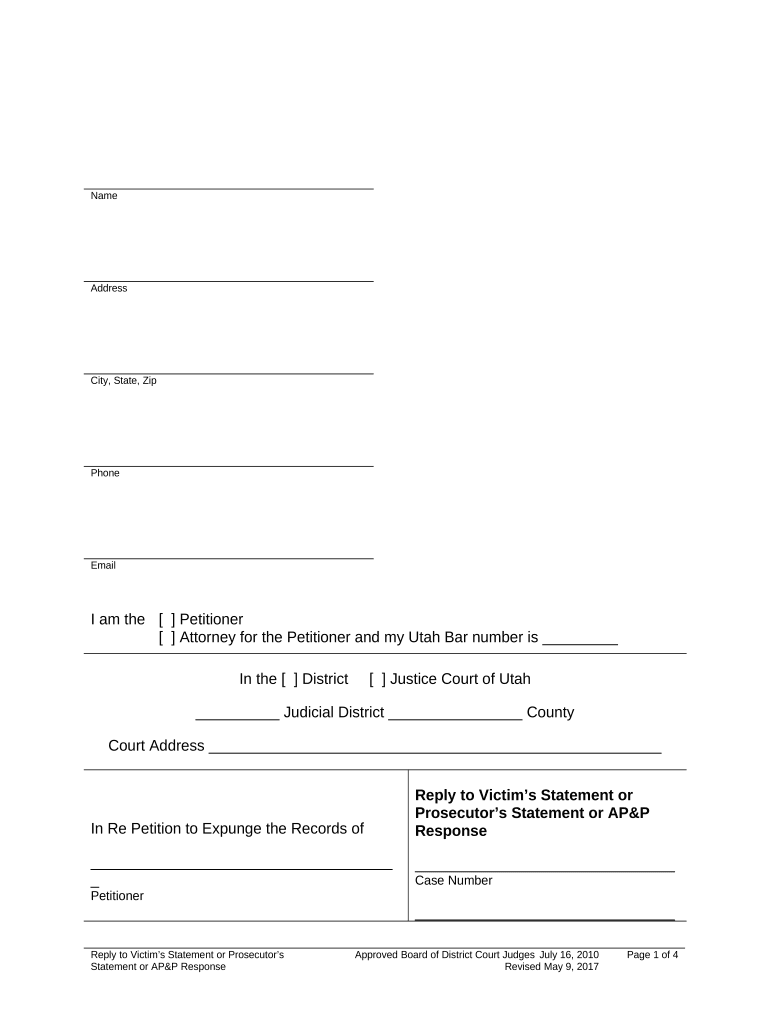
Begin by filling in your personal information at the top, including your name, address, city, state, zip code, phone number, and email.
Indicate your role by checking the appropriate box: Petitioner or Attorney for the Petitioner. If you are an attorney, enter your Utah Bar number.
Specify the court details by selecting either District or Justice Court of Utah and filling in the Judicial District and County.
In the section titled 'I say as follows:', clearly state any disagreements with statements made by the prosecutor, victim, or Adult Probation and Parole (AP&P).
Provide a brief explanation for your disagreement in the next field.
Sign and date the document at the bottom to affirm that all information is true under penalty of law.
Complete the Certificate of Service section by listing individuals served and their method of service. Ensure all required fields are filled out accurately.
Start using our platform today to easily complete your Utah Reply form online for free!
Sample response to a petitionUtah Court formsUrcp Rule 101Findings of Fact and Conclusions of Law Divorce UtahUrcp 15How to answer a summons without an attorneyUrcp 58AUrcp 8
Security and compliance
At DocHub, your data security is our priority. We follow HIPAA, SOC2, GDPR, and other standards, so you can work on your documents with confidence.
This page will help you respond by filing an answer. If you want to do something else, see our page on finding legal help. Step 1 - choose your case type.Read more
Vacation Auto-Reply Messages - Kahlert School of Computing
Once in the Tools ribbon, you will see the Out of Office reply option, select it. Internal response: for people who are emailing you from a utah.edu address.Read more
Cookie consent notice
This site uses cookies to enhance site navigation and personalize your experience.
By using this site you agree to our use of cookies as described in our Privacy Notice.
You can modify your selections by visiting our Cookie and Advertising Notice.