Type text, add images, blackout confidential details, add comments, highlights and more.
02. Sign it in a few clicks
Draw your signature, type it, upload its image, or use your mobile device as a signature pad.
03. Share your form with others
Send it via email, link, or fax. You can also download it, export it or print it out.
How to use or fill out petition claims with our platform
Ease of Setup
DocHub User Ratings on G2
Ease of Use
DocHub User Ratings on G2
Click ‘Get Form’ to open the petition claims document in the editor.
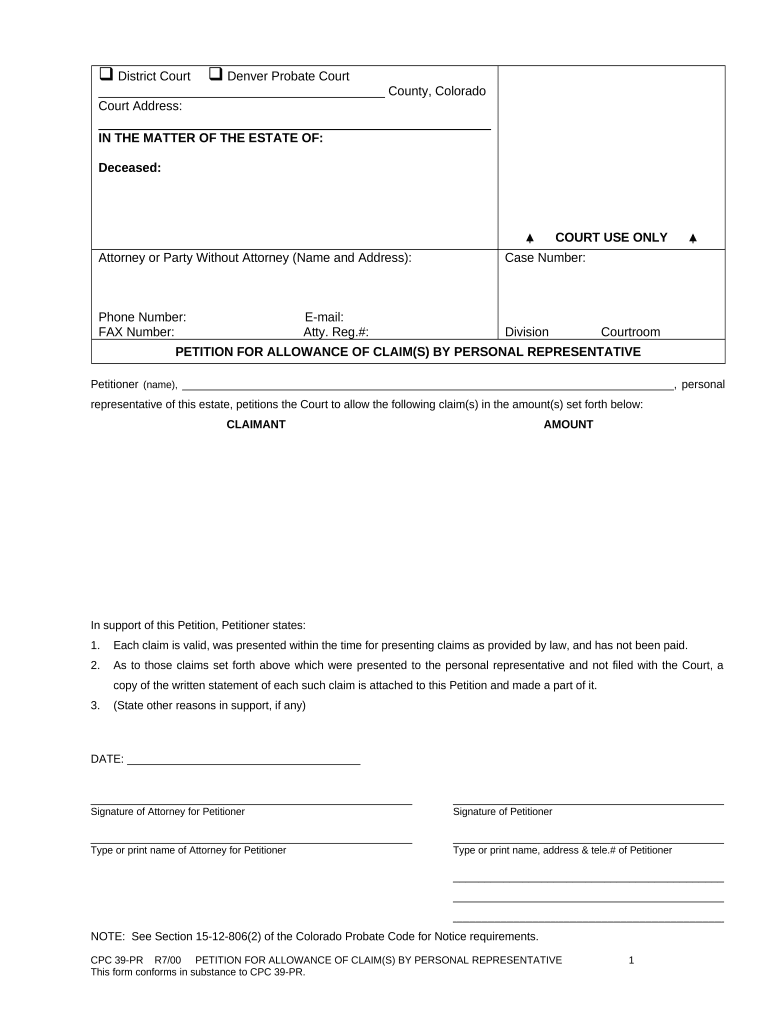
Begin by entering the court address and selecting the appropriate court type, either District Court or Denver Probate Court.
Fill in the details of the deceased, including their name and any relevant case number.
Provide your contact information as the attorney or party without an attorney, including your name, address, phone number, fax number, email, and attorney registration number if applicable.
In the section for claims, list each claimant's name alongside the corresponding claim amount. Ensure that all claims are valid and presented within legal timeframes.
Attach any written statements for claims not filed with the court as indicated in the form.
Complete any additional reasons supporting your petition in the designated area.
Finally, sign and date the document as both petitioner and attorney (if applicable), ensuring all names are printed clearly.
Start using our platform today to streamline your petition claims process for free!
Post petition claimsPost petition debt chapter 11Post petition debt Chapter 13How to file a petition in court without an attorneyPetition for remission/MITIGATION FORMFile a petition onlineForfeiture gov filing petitionHow to claim seized property
Security and compliance
At DocHub, your data security is our priority. We follow HIPAA, SOC2, GDPR, and other standards, so you can work on your documents with confidence.
Fairness to All Persons in the Context of Admini by Stephen
by SD Hurd 1998 Cited by 7 The filing of a petition creates the bankruptcy estate, which is a distinct legal entity from the debtor. Creditors with claims against the debtor arisingRead more
A chapter 11 case begins with the filing of a petition with the bankruptcy court serving the area where the debtor has a domicile, residence, or principal placeRead more
Jul 14, 2021 On its website, it states that the petition is to petition the U.S. Congress to act immediately to lower gasoline prices (and diesel andRead more
Cookie consent notice
This site uses cookies to enhance site navigation and personalize your experience.
By using this site you agree to our use of cookies as described in our Privacy Notice.
You can modify your selections by visiting our Cookie and Advertising Notice.