Fines 2026

Get Form
fines Preview on Page 1

Here's how it works

01. Edit your form online
Type text, add images, blackout confidential details, add comments, highlights and more.
02. Sign it in a few clicks
Draw your signature, type it, upload its image, or use your mobile device as a signature pad.
03. Share your form with others
Send it via email, link, or fax. You can also download it, export it or print it out.

How to use or fill out fines with our platform

Form edit decoration
9.5
Ease of Setup
DocHub User Ratings on G2
9.0
Ease of Use
DocHub User Ratings on G2
  1. Click ‘Get Form’ to open it in the editor.
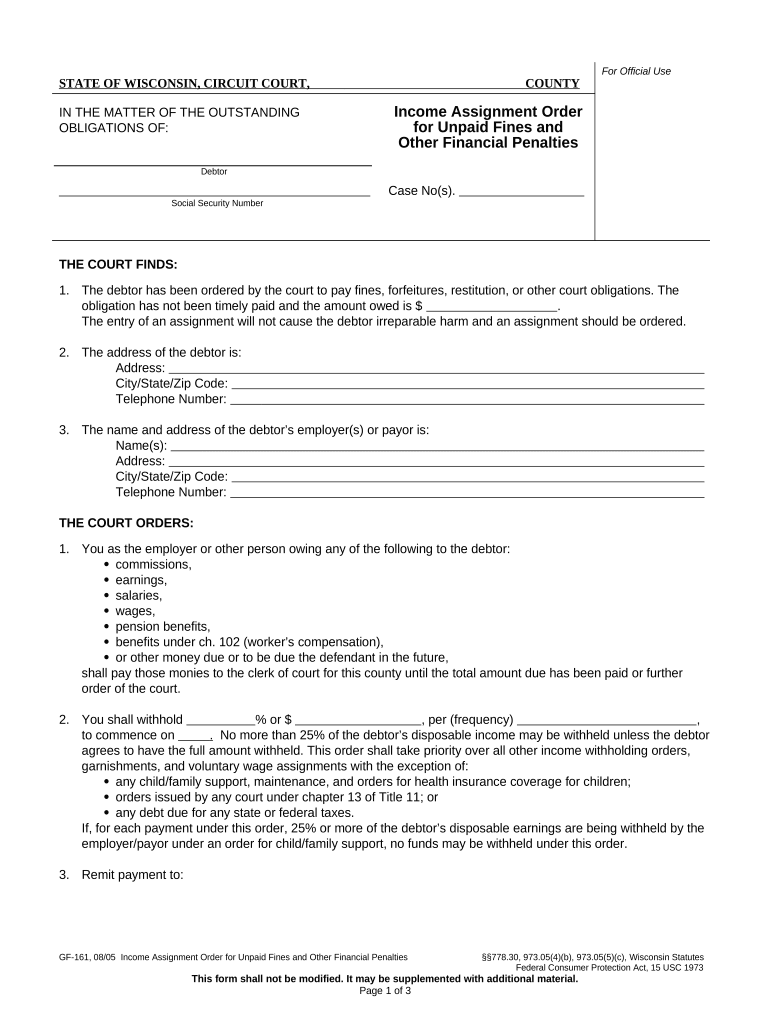
  2. Begin by entering the debtor's information, including their name, case number, and social security number in the designated fields.
  3. Fill in the address details of the debtor, ensuring accuracy for effective communication. Include city, state, and zip code.
  4. Provide the name and address of the debtor’s employer or payor. This is crucial for processing payments related to fines.
  5. Specify the percentage or amount to be withheld from the debtor’s income per payment frequency. Ensure this complies with legal limits.
  6. If applicable, check the box indicating any other assignments received for unpaid fines and sign where required. Remember to return a copy to the clerk of court within 10 days.

Start using our platform today for free to streamline your document editing and form completion!

be ready to get more

Complete this form in 5 minutes or less

Get form

Got questions?

We have answers to the most popular questions from our customers. If you can't find an answer to your question, please contact us.
Contact us
The most usual use of the term is for financial punishments for the commission of crimes, especially minor crimes, or as the settlement of a claim. One typical example of a fine is money paid for violations of traffic laws.
Fines are primarily associated with legal and regulatory enforcement, focusing on the punishment of offenses committed against public welfare, order, or specific laws. Penalties, being a broader term, can extend beyond legal and regulatory enforcement.
Definition. A fine is a penalty that requires the convicted person to pay to the public treasure a sum of money fixed by law after an offense has been committed. The fine may be increased if the payment deadlines are not respected.
Fine refers to some special case, penalty is more general and can refer to a number of things. Fine is always a monetary charge imposed upon someone who has committed a crime or an offence of a minor degree (for example, breaking the Highway Code).
A fine is the amount of money a judge decides you have to pay as punishment for an offence. The court decides the amount to be paid and the number of days allowed for payment.

Security and compliance

At DocHub, your data security is our priority. We follow HIPAA, SOC2, GDPR, and other standards, so you can work on your documents with confidence.

Learn more
ccpa2
pci-dss
gdpr-compliance
hipaa
soc-compliance

People also ask

Fines are the most common type of sentence given by the courts. That is because they are given for lower-level crimes such as minor driving offences or minor theft. The court sets the amount of a fine after considering how serious the offence is and how much money the offender can pay based on their income.
The record for an individual fine is $200 million (122 million), which Michael Milken agreed to pay on 24 April 1990 in settlement of a criminal racketeering and securities fraud suit brought by the US government. In addition, he agreed to settle civil charges filed by the Securities and Exchange Commision.
One typical example of a fine is money paid for violations of traffic laws. In English common law, relatively small fines are used either in place of or alongside community service orders for low-level criminal offences.

Related links