Type text, add images, blackout confidential details, add comments, highlights and more.
02. Sign it in a few clicks
Draw your signature, type it, upload its image, or use your mobile device as a signature pad.
03. Share your form with others
Send it via email, link, or fax. You can also download it, export it or print it out.
How to use or fill out judicial employment with our platform
Ease of Setup
DocHub User Ratings on G2
Ease of Use
DocHub User Ratings on G2
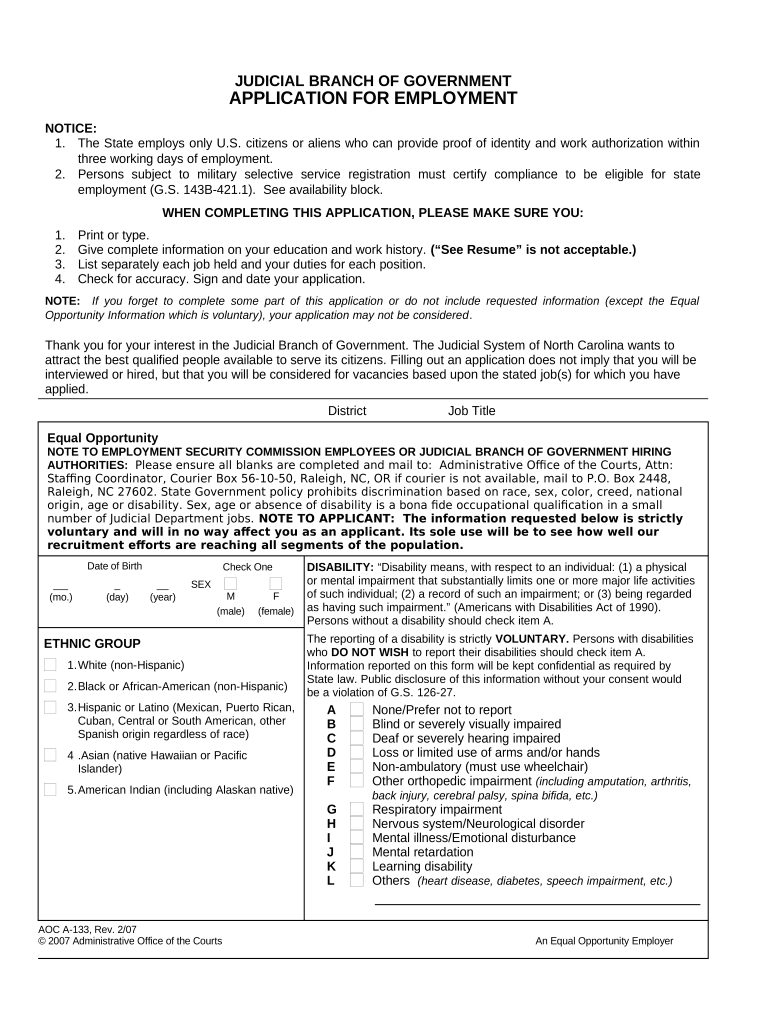
Click ‘Get Form’ to open the judicial employment application in the editor.
Begin by entering your personal information, including your name, address, and contact details. Ensure all fields are filled accurately.
In the 'Education' section, list your educational background. Include the names of institutions attended, dates, and degrees obtained. Avoid using 'See Resume' as it is not acceptable.
Proceed to the 'Work History' section. Detail each job held, including duties and responsibilities. Be specific and thorough to enhance your application.
Complete the 'Skills' section by checking relevant skills you possess. This helps highlight your qualifications for the position.
Finally, review all entries for accuracy before signing and dating your application at the bottom of the form.
Start filling out your judicial employment application today for free on our platform!
Judicial employment near meJudicial Branch Jobs and dutiesEntry level courthouse jobsJudicial jobs near MeUs Supreme Court jobsFederal judicial branch jobsJudicial employment californiaEntry level courthouse jobs near me
Security and compliance
At DocHub, your data security is our priority. We follow HIPAA, SOC2, GDPR, and other standards, so you can work on your documents with confidence.
Diverse career opportunities await within the federal courts, probation and pretrial services, public defender organizations, and other judicial branch
The term judicial employee means any employee of the judicial branch of the Government, of the United States Sentencing Commission, of the Tax Court.Read more
Sep 13, 2022 Recent district court opinions on Exemption 6 ; New Orleans Workers Center For Racial Justice et al v. U.S. Immigration And Customs Enforcement.Read more
Cookie consent notice
This site uses cookies to enhance site navigation and personalize your experience.
By using this site you agree to our use of cookies as described in our Privacy Notice.
You can modify your selections by visiting our Cookie and Advertising Notice.