Type text, add images, blackout confidential details, add comments, highlights and more.
02. Sign it in a few clicks
Draw your signature, type it, upload its image, or use your mobile device as a signature pad.
03. Share your form with others
Send it via email, link, or fax. You can also download it, export it or print it out.
How to use or fill out Oregon Notice with our platform
Ease of Setup
DocHub User Ratings on G2
Ease of Use
DocHub User Ratings on G2
Click ‘Get Form’ to open the Oregon Notice in the editor.
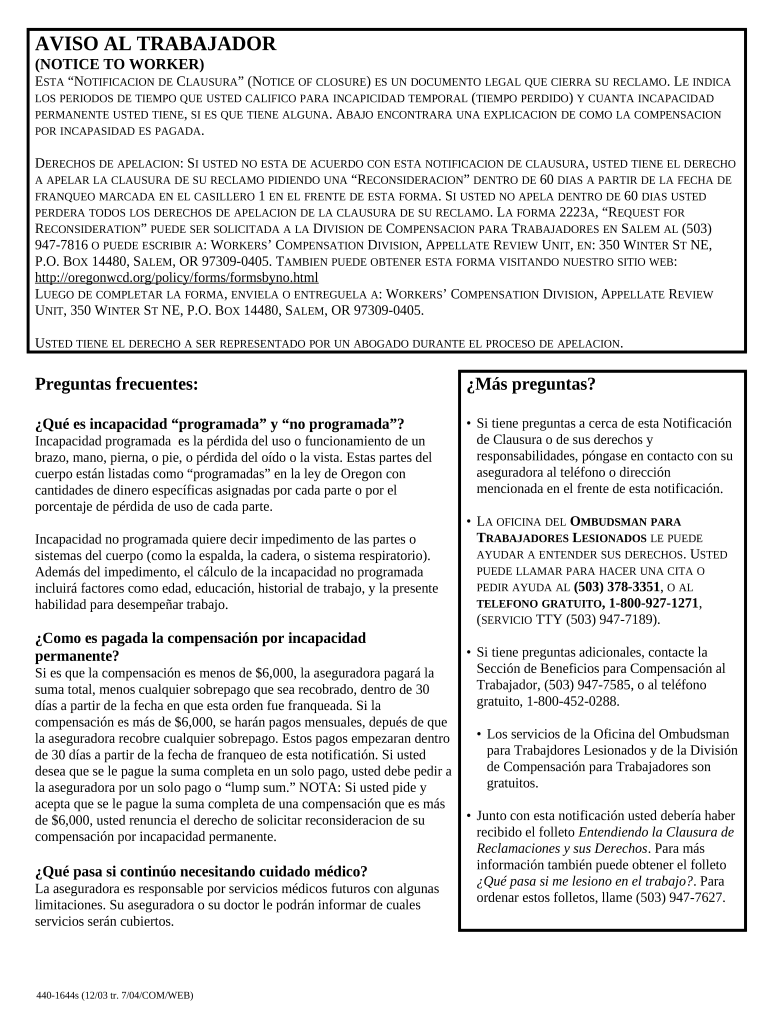
Begin by reviewing the sections that outline your temporary disability periods. Fill in any required dates and details regarding your claim.
Next, check the section detailing permanent disability. If applicable, indicate the percentage of permanent disability you have been assigned.
In the appeal rights section, ensure you understand your right to appeal within 60 days. If you wish to appeal, note down the necessary contact information for submitting your request.
Finally, review all filled fields for accuracy before saving or exporting your completed form. You can easily share it directly from our platform.
Start using our editor today to complete your Oregon Notice quickly and efficiently!
Oregon DEQOregon sepaSalem, Oregon boil water advisoryOregon Drinking water ProgramOregon DEQ public NoticesOregon DEQ Public Records requestEPA OregonOregon DEQ Wastewater
Security and compliance
At DocHub, your data security is our priority. We follow HIPAA, SOC2, GDPR, and other standards, so you can work on your documents with confidence.
(1) Any public notice of any description, the publication of which is now or hereafter required by law, shall be published in any newspaper, as defined in ORSRead more
Oregon and coal - Global Energy Monitor - GEM.wiki
Oregon ranks 42nd out of the 50 states in terms of coal energy production. However, nearly 40% of Oregons power comes from coal, half of which is produced outRead more
Cookie consent notice
This site uses cookies to enhance site navigation and personalize your experience.
By using this site you agree to our use of cookies as described in our Privacy Notice.
You can modify your selections by visiting our Cookie and Advertising Notice.