Appoint guardian for 2026

Get Form
appoint guardian for Preview on Page 1

Here's how it works

01. Edit your form online
Type text, add images, blackout confidential details, add comments, highlights and more.
02. Sign it in a few clicks
Draw your signature, type it, upload its image, or use your mobile device as a signature pad.
03. Share your form with others
Send it via email, link, or fax. You can also download it, export it or print it out.

How to use or fill out appoint guardian for with our platform

Form edit decoration
9.5
Ease of Setup
DocHub User Ratings on G2
9.0
Ease of Use
DocHub User Ratings on G2
  1. Click ‘Get Form’ to open it in the editor.
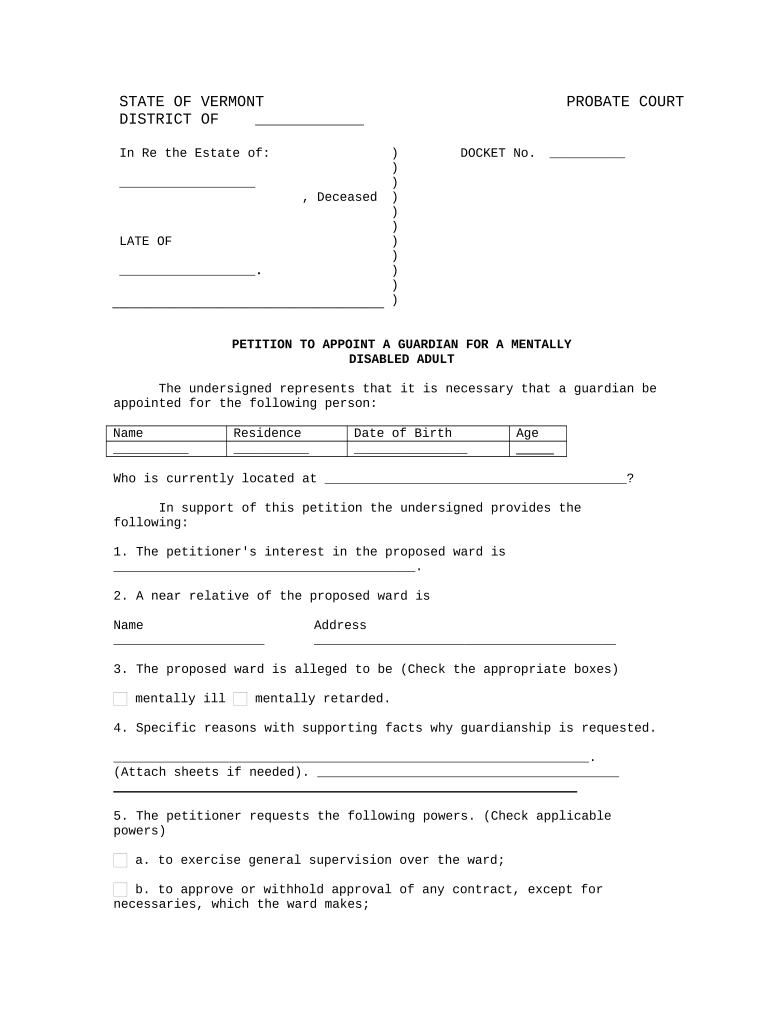
  2. Begin by entering the name of the proposed ward in the designated field. Ensure accuracy as this is crucial for legal documentation.
  3. Fill in the residence and date of birth of the proposed ward. This information helps establish their identity and location.
  4. Indicate the age of the proposed ward and their current location, providing a complete picture for the court.
  5. In section one, describe your interest in becoming the guardian. Be clear about your relationship to the proposed ward.
  6. List a near relative of the proposed ward, including their name and address, which may be relevant for court considerations.
  7. Check appropriate boxes regarding the mental status of the proposed ward, ensuring you select all that apply.
  8. Provide specific reasons why guardianship is necessary, attaching additional sheets if needed for clarity.
  9. Select applicable powers you wish to request as a guardian by checking each box that applies to your situation.
  10. Complete details about your relationship to the proposed ward and provide your consent by signing and dating at the end of the form.

Start using our platform today to easily fill out your appoint guardian form online for free!

be ready to get more

Complete this form in 5 minutes or less

Get form

Got questions?

We have answers to the most popular questions from our customers. If you can't find an answer to your question, please contact us.
Contact us
Q: How long does it take for the court to grant a guardianship? A: From the time that the petition for guardianship is filed, it may take up to four months for the guardianship to be granted.
Each parent can nominate a guardian in their Last Will and Testament to look after the children if both parents are deceased. However, both parents usually agree on the appointed guardian.
Guardians are appointed when a court determines that an individual is at risk because they cannot make decisions for themselves and there is no less restrictive way to meet the individuals needs. Guardianship may remove a broad spectrum of rights from the individual.
Steps for appointing a legal guardian Step 1: Determine if you have the authority to appoint your childs guardian. Step 2: Determine legal and preferred guardianship criteria. Step 3: Narrow guardian candidates and finalize your decision. Step 4: Discuss the responsibilities with your chosen guardian.
You will need to file the necessary forms in the court of the county where the minor lives. You may take the forms in person or mail them to the court clerk. There will be a filing fee to start the process. In Monterey, the fee is $225 for guardianship of the person, but the fee in your county may vary.

Security and compliance

At DocHub, your data security is our priority. We follow HIPAA, SOC2, GDPR, and other standards, so you can work on your documents with confidence.

Learn more
ccpa2
pci-dss
gdpr-compliance
hipaa
soc-compliance

People also ask

A guardian will take on the responsibility of making major decisions for your child and on behalf of you. This same guardian will also assist the underage minors with any necessary contractual matters.
In most counties, youll need to pay a filing fee of $225 to the clerk when you file your forms for a guardianship of the person. For a guardianship of the estate or of the person and the estate, the fee is $435. In a few counties, the fee is $35-$50 more.

Related links