Type text, add images, blackout confidential details, add comments, highlights and more.
02. Sign it in a few clicks
Draw your signature, type it, upload its image, or use your mobile device as a signature pad.
03. Share your form with others
Send it via email, link, or fax. You can also download it, export it or print it out.
How to use or fill out hawaii appearance with our platform
Ease of Setup
DocHub User Ratings on G2
Ease of Use
DocHub User Ratings on G2
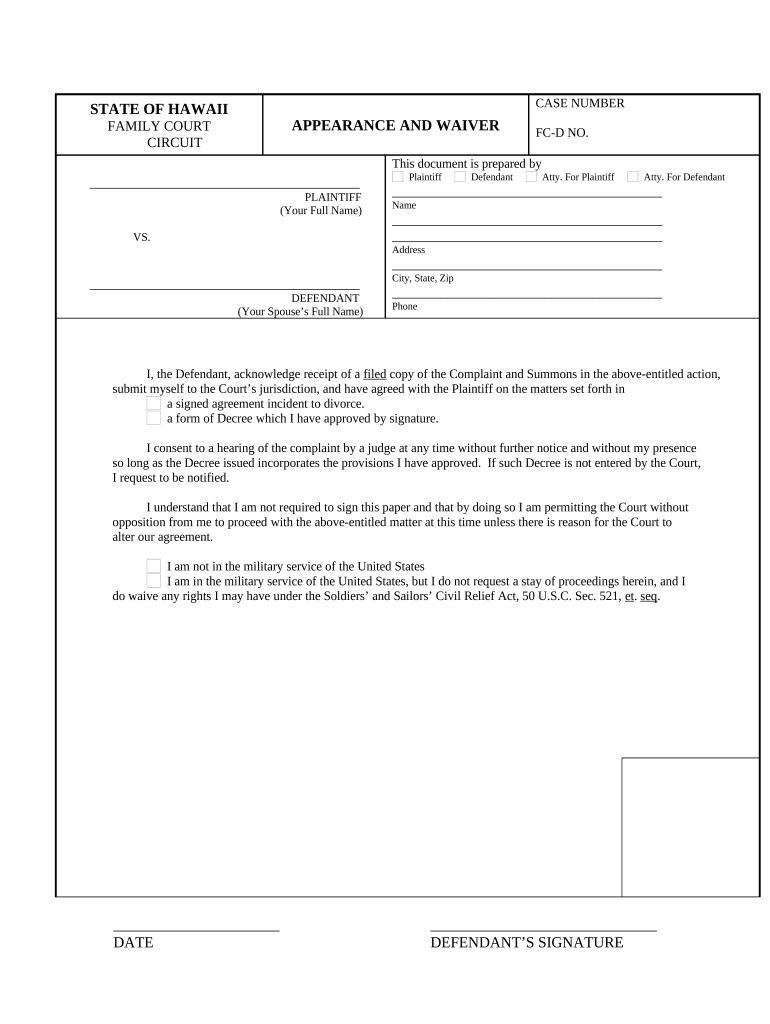
Click ‘Get Form’ to open the Hawaii Appearance and Waiver document in the editor.
Begin by entering your full name in the designated field for the Plaintiff. This is crucial as it identifies you in the case.
Next, fill in the Defendant's information, which includes your spouse’s full name, address, city, state, zip code, and phone number. Ensure accuracy to avoid any delays.
Review the acknowledgment section carefully. Confirm that you understand your rights and responsibilities regarding the complaint and summons.
Sign and date the document at the bottom. Your signature indicates consent to proceed without further notice.
If applicable, indicate your military status by checking the appropriate box. This is important for legal compliance.
Start using our platform today to streamline your document completion process for free!
Haw. Code R. 15-219-23 - Appearances before the authority
The attorney who appears before the authority shall be authorized to practice law in Hawaii and be a member in good standing with the Hawaii state bar.Read more
(1) all owners of the property securing this appearance bond are included on the bond;. (2) the property is not subject to claims, except as described above;Read more
Cookie consent notice
This site uses cookies to enhance site navigation and personalize your experience.
By using this site you agree to our use of cookies as described in our Privacy Notice.
You can modify your selections by visiting our Cookie and Advertising Notice.