Type text, add images, blackout confidential details, add comments, highlights and more.
02. Sign it in a few clicks
Draw your signature, type it, upload its image, or use your mobile device as a signature pad.
03. Share your form with others
Send it via email, link, or fax. You can also download it, export it or print it out.
How to use or fill out Ohio Addendum with our platform
Ease of Setup
DocHub User Ratings on G2
Ease of Use
DocHub User Ratings on G2
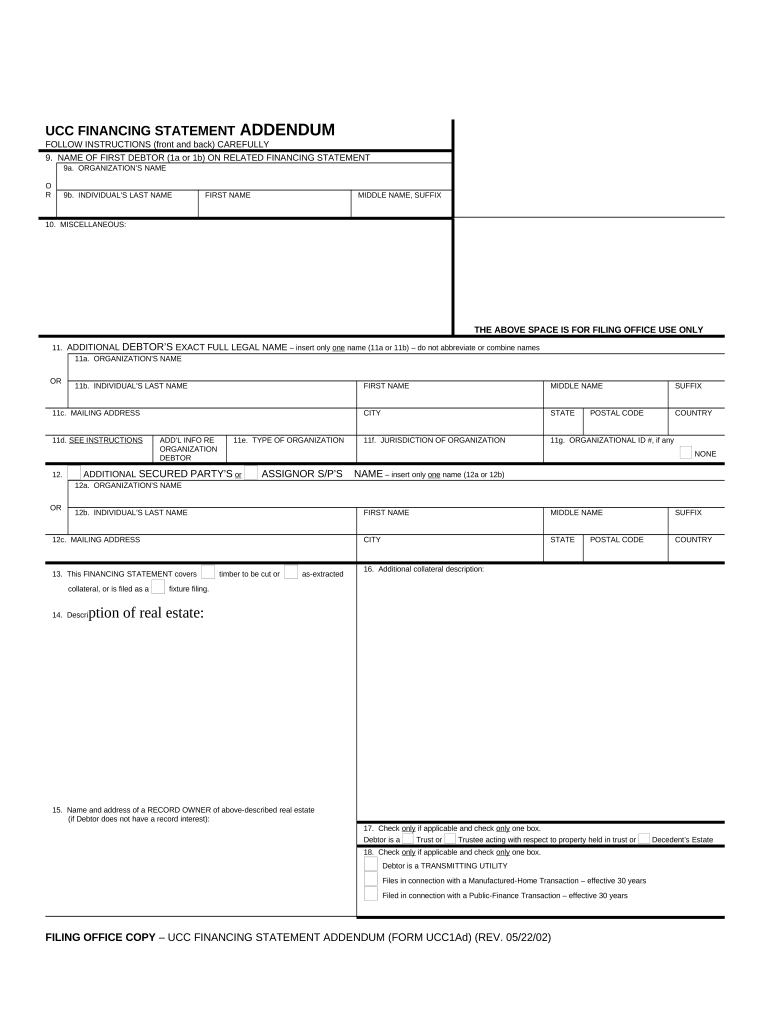
Click ‘Get Form’ to open the Ohio Addendum in the editor.
Begin by entering the name of the first debtor in section 9. You can choose between an organization’s name or an individual’s last name, along with their first and middle names if applicable.
In section 11, provide the additional debtor's full legal name. Ensure you do not abbreviate or combine names. Include their mailing address in section 11c.
If there is additional information regarding the organization debtor, fill out section 12. This includes details like type of organization and jurisdiction.
For collateral descriptions, complete sections 13 to 16 as necessary. Specify if it involves timber or real estate and provide adequate descriptions.
Finally, review all entries for accuracy before saving your document. Utilize our platform's features to sign and distribute your completed form seamlessly.
Start using our platform today for free to streamline your Ohio Addendum completion!
Purchase agreement Addendum PDF free DownloadBlank Addendum to REAL ESTATE ContractAddendum to purchase agreement templateOhio real estate contract addendumContingency AddendumMLS addendumFinancing AddendumReal estate Contract addendum PDF
Security and compliance
At DocHub, your data security is our priority. We follow HIPAA, SOC2, GDPR, and other standards, so you can work on your documents with confidence.
TITLE: Addendum to Carnegie Mellons Staff Handbook: A Human Resources Guide for employees based in Ohio. In This Section. 1. Ohio Addendum. 4. MilitaryRead more
Jan 30, 2026 CPV Oregon Energy Center power station is a power station in pre-construction in Oregon, Lucas, Ohio addendum---post-meeting.pdf.Read more
Cookie consent notice
This site uses cookies to enhance site navigation and personalize your experience.
By using this site you agree to our use of cookies as described in our Privacy Notice.
You can modify your selections by visiting our Cookie and Advertising Notice.