01. Edit your check restraining order status colorado online
Type text, add images, blackout confidential details, add comments, highlights and more.
02. Sign it in a few clicks
Draw your signature, type it, upload its image, or use your mobile device as a signature pad.
03. Share your form with others
Send it via email, link, or fax. You can also download it, export it or print it out.
How to use or fill out Order Vacating Restraining Order - Colorado with DocHub
Ease of Setup
DocHub User Ratings on G2
Ease of Use
DocHub User Ratings on G2
Click ‘Get Form’ to open the Order Vacating Restraining Order in our editor.
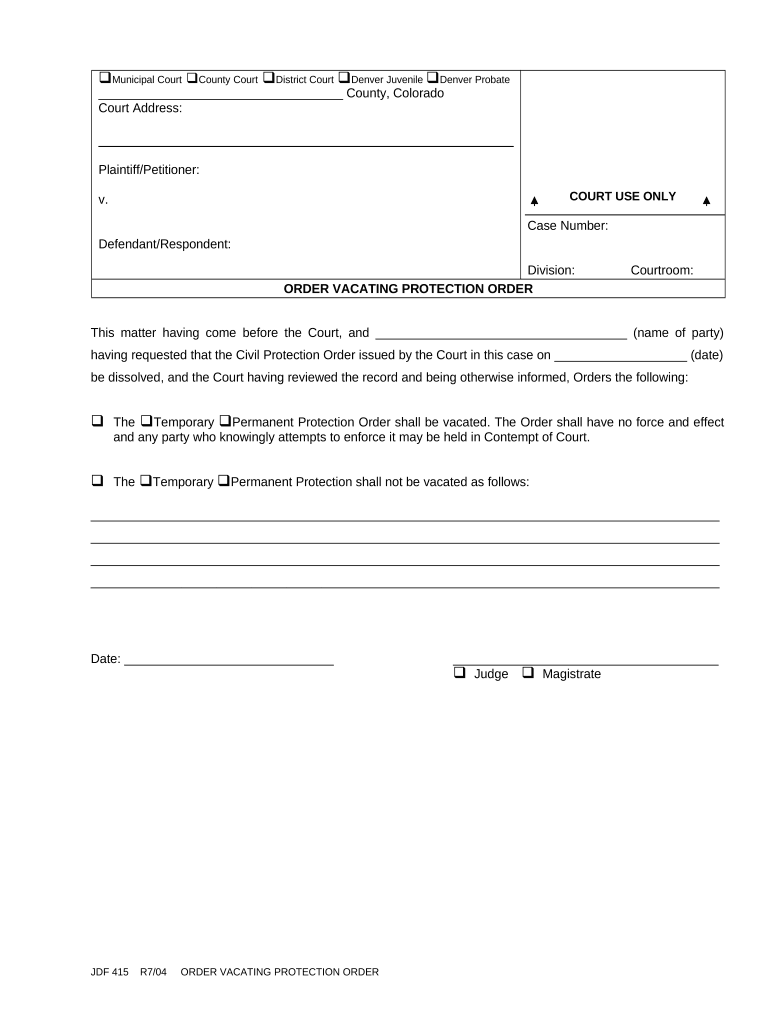
Begin by entering the court information at the top of the form, including the type of court and its address.
Fill in the plaintiff/petitioner and defendant/respondent names, along with the case number and division details.
In the section regarding the request to dissolve the Civil Protection Order, specify the name of the party requesting this action and include the date when the original order was issued.
Select whether you are vacating a temporary or permanent protection order by checking the appropriate box.
If applicable, provide any additional details regarding why the order should not be vacated in the designated space.
Finally, sign and date your submission at the bottom of the form to complete it.
Start using our platform today to fill out your Order Vacating Restraining Order for free!
Fill out Order Vacating Restraining Order - Colorado online It's free
File a restraining order online ColoradoRestraining order Colorado rulesRestraining order DenverDouglas County restraining orderArapahoe County restraining orderCivil protection order vs restraining orderMesa County Restraining orderEl Paso County restraining order paperwork
Security and compliance
At DocHub, your data security is our priority. We follow HIPAA, SOC2, GDPR, and other standards, so you can work on your documents with confidence.
Barker v. District Court In and For Larimer County
memorandum brief, rules to discharge order, orders vacating temporary restraining order and other assorted pleadings and documents prepared by the parties
A Decision Framework for Applying Monitored Natural
by CUN Cu 2010 Established in 1995, the Interstate Technology Regulatory Council (ITRC) is a state-led, national coalition of personnel from the environmental regulatoryRead more
Please see QR code for trial livestream - select Boulder County, Courtroom G. Self-Help Center - Room S116 at the El Paso County Judicial Building. Image
Cookie consent notice
This site uses cookies to enhance site navigation and personalize your experience.
By using this site you agree to our use of cookies as described in our Privacy Notice.
You can modify your selections by visiting our Cookie and Advertising Notice.