Type text, add images, blackout confidential details, add comments, highlights and more.
02. Sign it in a few clicks
Draw your signature, type it, upload its image, or use your mobile device as a signature pad.
03. Share your form with others
Send it via email, link, or fax. You can also download it, export it or print it out.
How to use or fill out deferred disposition with our platform
Ease of Setup
DocHub User Ratings on G2
Ease of Use
DocHub User Ratings on G2
Click ‘Get Form’ to open the deferred disposition document in the editor.
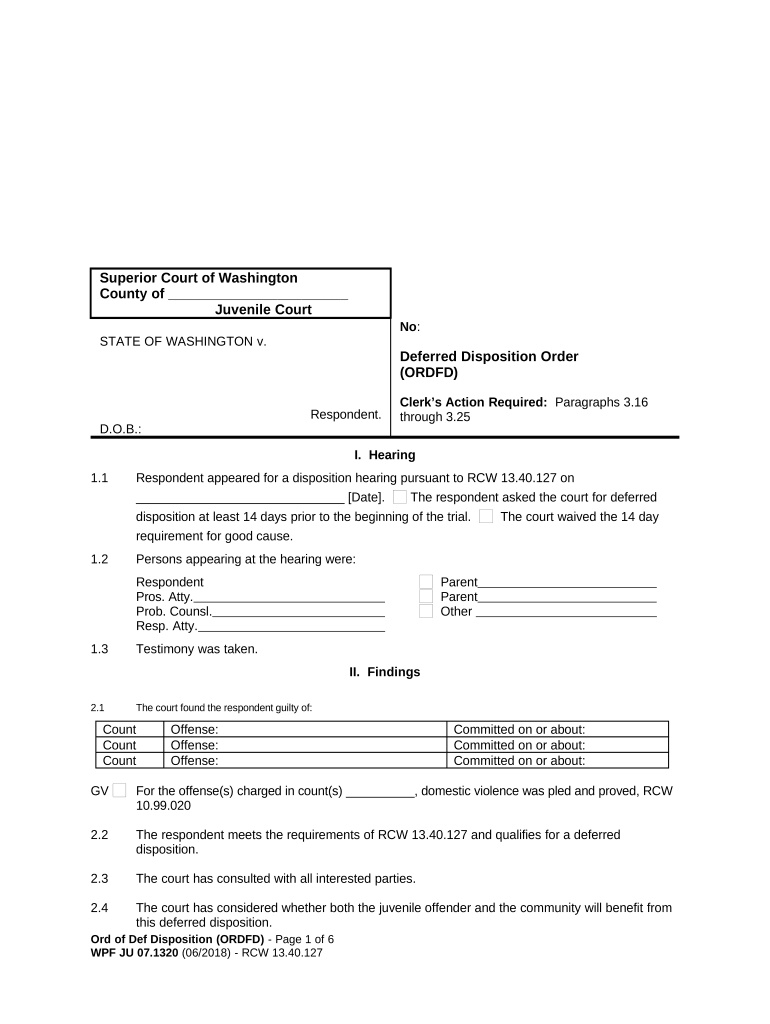
Begin by entering the respondent's name and date of birth in the designated fields at the top of the form.
In Section I, Hearing, fill in the date of the disposition hearing and list all individuals present during the hearing.
Proceed to Section II, Findings. Here, indicate any counts and offenses for which the respondent is found guilty, along with relevant dates.
In Section III, Order, specify the duration of deferred disposition and check applicable conditions such as community supervision or counseling requirements.
Complete any financial obligations listed under Section III.16 to III.25, ensuring accurate amounts are entered for fines and restitution.
Finally, review all entries for accuracy before saving or sharing your completed form directly from our platform.
Start using our editor today to streamline your deferred disposition process for free!
What is Deferred Disposition? Deferred Disposition is a suspended sentence. On your plea of guilty or no contest, the court will defer a finding of guilt,Read more
Differences between Deferred Adjudication and Probation - diff.wiki
Deferred adjudication, available in many jurisdictions, works differently. In this arrangement, a defendant typically pleads guilty or no contest, but the
Defendant is eligible for deferred disposition. 1. Defendant must enter plea of guilty or nolo (or be found guilty at trial). 2. Defendant must special expenseRead more
Cookie consent notice
This site uses cookies to enhance site navigation and personalize your experience.
By using this site you agree to our use of cookies as described in our Privacy Notice.
You can modify your selections by visiting our Cookie and Advertising Notice.