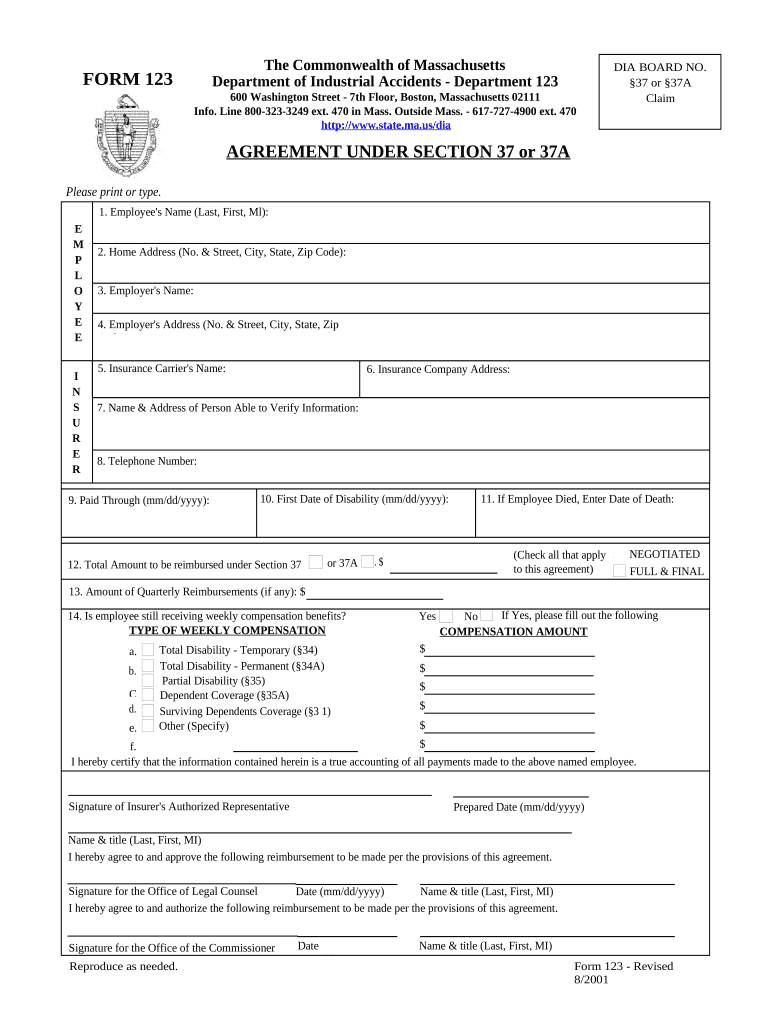
Agreement Under 37 37a for Workers' Compensation - Massachusetts 2026

Get Form
Agreement Under 37 37a for Workers' Compensation - Massachusetts Preview on Page 1

Here's how it works

01. Edit your form online
Type text, add images, blackout confidential details, add comments, highlights and more.
02. Sign it in a few clicks
Draw your signature, type it, upload its image, or use your mobile device as a signature pad.
03. Share your form with others
Send it via email, link, or fax. You can also download it, export it or print it out.

How to use or fill out Agreement Under 37 37a for Workers' Compensation - Massachusetts with our platform

Form edit decoration
9.5
Ease of Setup
DocHub User Ratings on G2
9.0
Ease of Use
DocHub User Ratings on G2
  1. Click ‘Get Form’ to open it in the editor.
  2. Begin by entering the Employee's Name in the designated field. Ensure you include the last name, first name, and middle initial.
  3. Fill in the Home Address of the employee, including street number, city, state, and zip code.
  4. Next, provide the Employer's Name and their corresponding address in the following fields.
  5. Input the Insurance Carrier's Name and their address to ensure proper documentation.
  6. Complete sections regarding verification by providing a contact person's name, address, and telephone number.
  7. Indicate important dates such as 'Paid Through' and 'First Date of Disability' using the mm/dd/yyyy format.
  8. Specify the total amount to be reimbursed under Section 37 or 37A and check all applicable agreement types.
  9. If applicable, fill out details regarding any quarterly reimbursements and whether the employee is still receiving weekly compensation benefits.
  10. Finally, ensure that all signatures are completed by authorized representatives before submitting your form.

Start using our platform today to streamline your document editing process for free!

be ready to get more

Complete this form in 5 minutes or less

Get form

Got questions?

We have answers to the most popular questions from our customers. If you can't find an answer to your question, please contact us.
Contact us

With DocHub, it’s pretty simple. The platform offers users an add-on called DocHub for Gmail, which you can find in the Google Workspace Marketplace without being charged. Install it and grant it access to your Google account. Open your email with your Agreement Under 37 37a for Workers' Compensation - Massachusetts attached and click on the add-on button in the right-side panel. Log in to your DocHub account, and import the form to our editor, where you can fill it out and sign.

You may easily fill out, modify, and even eSign your Agreement Under 37 37a for Workers' Compensation - Massachusetts using DocHub. Create a new profile and start your free trial. After that, you may upload the file with the form and easily make all the required edits. No need to print on paper or use a third-party application to sign it, as you can put your electronic signature on your document faster via DocHub.

Security and compliance

At DocHub, your data security is our priority. We follow HIPAA, SOC2, GDPR, and other standards, so you can work on your documents with confidence.

Learn more
ccpa2
pci-dss
gdpr-compliance
hipaa
soc-compliance