Type text, add images, blackout confidential details, add comments, highlights and more.
02. Sign it in a few clicks
Draw your signature, type it, upload its image, or use your mobile device as a signature pad.
03. Share your form with others
Send it via email, link, or fax. You can also download it, export it or print it out.
How to use or fill out Idaho Judgment with our platform
Ease of Setup
DocHub User Ratings on G2
Ease of Use
DocHub User Ratings on G2
Click ‘Get Form’ to open the Idaho Judgment document in the editor.
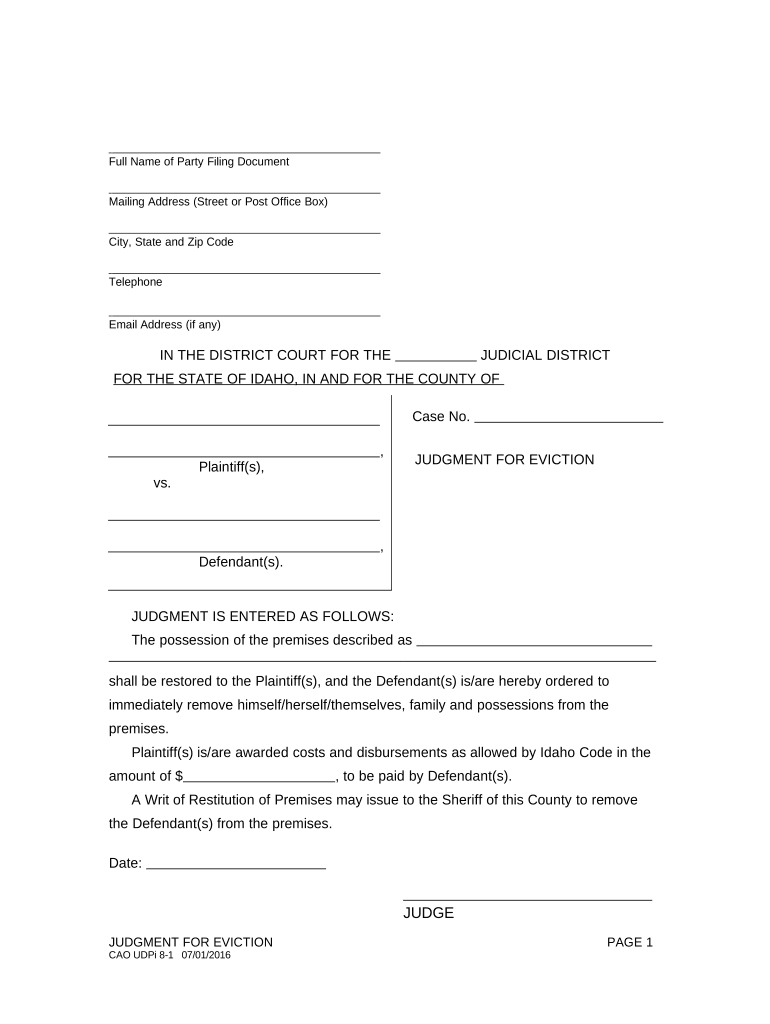
Begin by entering the Full Name of the Party Filing Document in the designated field. This identifies who is initiating the judgment.
Fill in your Mailing Address, including Street or Post Office Box, City, State, and Zip Code. Accurate contact information is crucial for legal correspondence.
Provide your Telephone number and Email Address (if any) to ensure you can be reached regarding this case.
In the section labeled 'JUDGMENT IS ENTERED AS FOLLOWS', specify the premises description that is subject to eviction. This should be clear and precise.
Indicate the amount awarded for costs and disbursements as allowed by Idaho Code in the provided field.
Finally, enter the Date and have it signed by a Judge. Ensure all parties involved are correctly listed in the Clerk’s Certificate of Service section before submitting.
Start using our platform today to fill out your Idaho Judgment form easily and for free!
judgment, input from all stakeholders, and consideration of the legal framework. Discussion will likely center on the definition of DocHub changesRead more
UNITED STATES, Petitioner v. IDAHO, EX REL. DIRECTOR
The State District Court granted Idaho summary judgment on this issue, and the State Supreme Court affirmed. Held: The McCarran Amendment does not waive theRead more
Cookie consent notice
This site uses cookies to enhance site navigation and personalize your experience.
By using this site you agree to our use of cookies as described in our Privacy Notice.
You can modify your selections by visiting our Cookie and Advertising Notice.