Mass gov lsp 2026

Get Form
mass gov lsp Preview on Page 1

Here's how it works

01. Edit your form online
Type text, add images, blackout confidential details, add comments, highlights and more.

02. Sign it in a few clicks
Draw your signature, type it, upload its image, or use your mobile device as a signature pad.

03. Share your form with others
Send it via email, link, or fax. You can also download it, export it or print it out.

How to use or fill out mass gov lsp with our platform

Form edit decoration
9.5
Ease of Setup
DocHub User Ratings on G2
9.0
Ease of Use
DocHub User Ratings on G2
  1. Click ‘Get Form’ to open the mass gov lsp application in the editor.
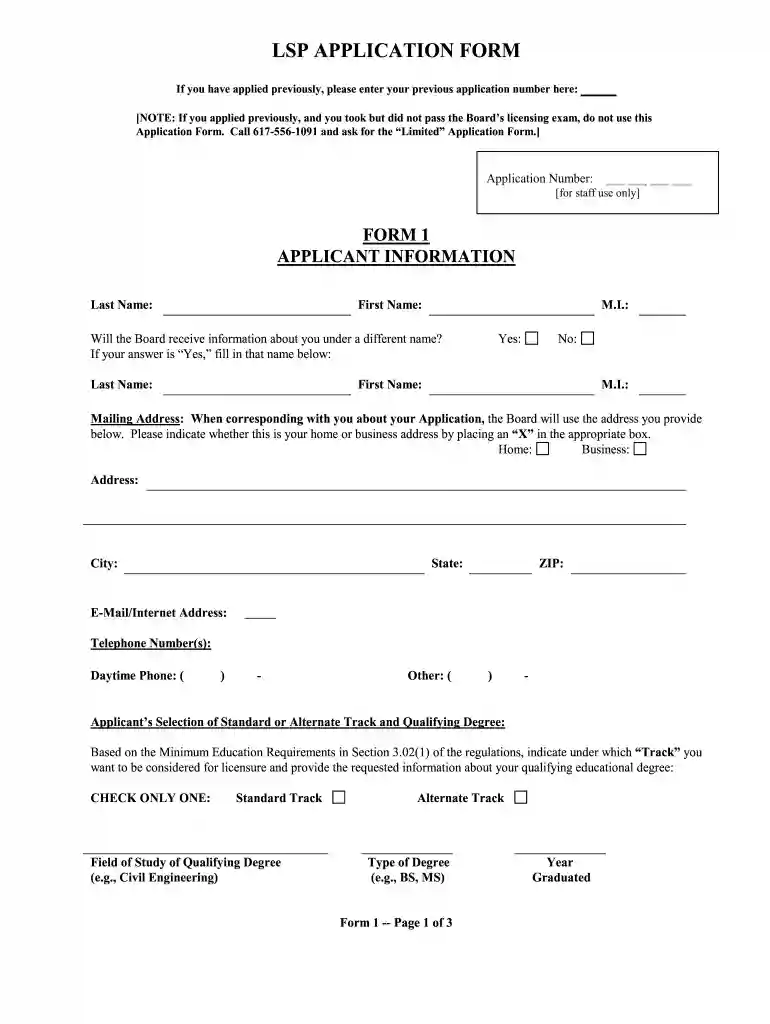
  2. Begin by entering your previous application number if applicable. If you have not applied before, leave this section blank.
  3. Fill out the Applicant Information section, including your first name, last name, and mailing address. Indicate whether this is a home or business address.
  4. Select your track for licensure (Standard or Alternate) and provide details about your qualifying degree, including field of study and year graduated.
  5. Answer the moral character questions honestly. If you answer 'Yes' to any question, be prepared to provide explanations on a separate page.
  6. Complete the Affidavit section last. Write the required statement in your usual handwriting and sign it to declare that all information is true.
  7. Review all sections carefully before submitting your application to ensure accuracy and completeness.

Start using our platform today for free to streamline your mass gov lsp application process!

be ready to get more

Complete this form in 5 minutes or less

Get form

Got questions?

We have answers to the most popular questions from our customers. If you can't find an answer to your question, please contact us.
Contact us

Signing paperwork on a mobile device is quick, straightforward, and doesn’t require software installation if you have an account with DocHub. Log in from any browser, fill in your empty fields with your information, and click on Sign → Create your signature. You can draw your electronic signature just as you usually do on paper, add its picture to your mass gov lsp, or type in your name and stylize its look. No matter what option you choose, your documentation will be valid.

You can easily edit fill out your mass gov lsp on any iOS gadget. Open an internet browser of your liking, visit the DocHub website, authorize or create a new account, upload your file for editing, and make your required changes. Our service is mobile-friendly, so utilizing its features on your smartphone will be a no-brainer, even on the first try.

In Massachusetts, home inspector licenses expire biennially based on first date of issuance. To renew, licensees must complete 12 hours of continuing education courses. After that, you must submit your renewal to the Massachusetts Board of Registration of Home Inspectors.
LSPs are scientists, engineers, and public health specialists who have demonstrated an expertise in waste site cleanup decision making. To be licensed, an LSP must meet minimum education and relevant professional experience requirements and must pass a comprehensive exam.
If contamination has been found on your property, you will need to hire a Licensed Site Professional (LSP) to determine if cleanup work is required. The process for hiring an LSP is very similar to the process you would use to hire any professional who provides a service to you.

Security and compliance

At DocHub, your data security is our priority. We follow HIPAA, SOC2, GDPR, and other standards, so you can work on your documents with confidence.

Learn more
ccpa2
pci-dss
gdpr-compliance
hipaa
soc-compliance

People also ask

Health Social Services Food assistance. Economic assistance (cash benefits) EBT Card to Culture.
If you have any questions concerning E-ZPass MA or Pay-By-Plate MA please contact MassDOT directly: Website: ezdrivema.com. Telephone: (877) 627-7745. Email: customer.service@ezdrivema.com.

Related links