Type text, add images, blackout confidential details, add comments, highlights and more.
02. Sign it in a few clicks
Draw your signature, type it, upload its image, or use your mobile device as a signature pad.
03. Share your form with others
Send writ of ejectment washington state via email, link, or fax. You can also download it, export it or print it out.
How to use or fill out writ ejectment with our platform
Ease of Setup
DocHub User Ratings on G2
Ease of Use
DocHub User Ratings on G2
Click ‘Get Form’ to open the writ ejectment document in the editor.
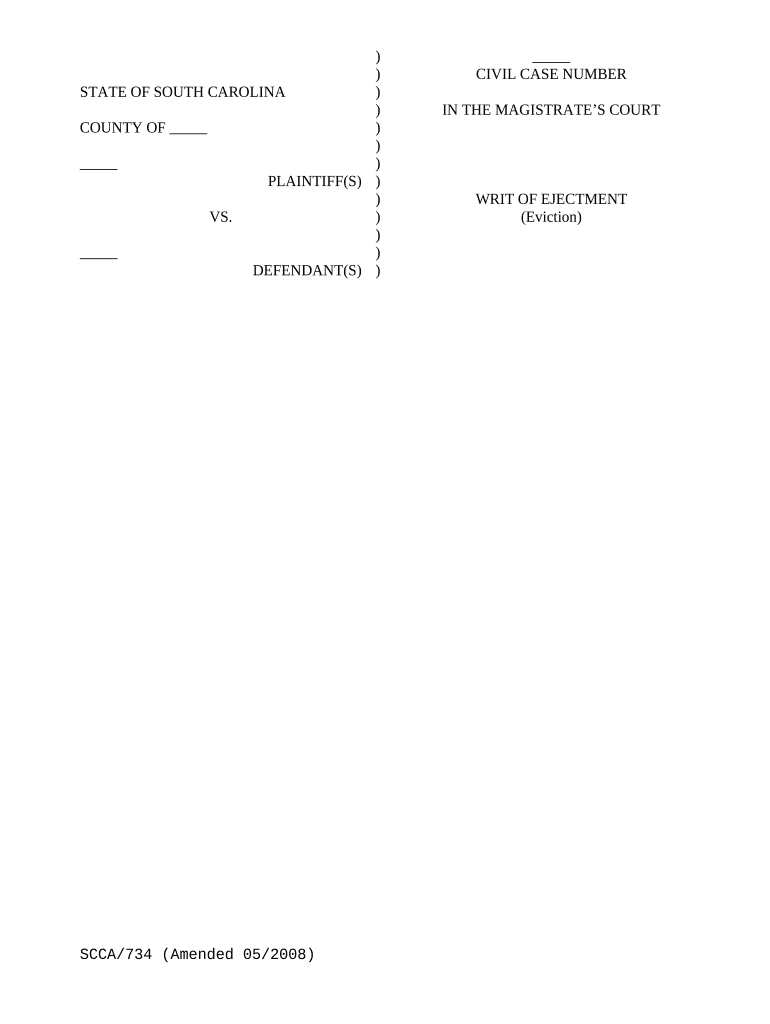
Begin by entering the 'STATE OF' and 'COUNTY OF' fields at the top of the form. This identifies the jurisdiction for your case.
Fill in the names of the PLAINTIFF(S) and DEFENDANT(S) in their respective sections. Ensure accuracy as this information is crucial for legal proceedings.
Input the CIVIL CASE NUMBER assigned to your case, which helps track your document within court systems.
In the section that begins with 'Upon the judgment of this court,' specify the date of judgment and address of the premises from which eviction is sought.
Complete any additional details required for service instructions, including dates and times relevant to serving or posting the Writ.
Finally, ensure all signatures are completed where indicated, including that of the MAGISTRATE and Sheriff/Deputy Sheriff/Constable.
Start using our platform today to streamline your writ ejectment process for free!
Writ of ejectment vs evictionWrit of Ejectment with documentCan a Writ of ejectment be reversedWrit of Ejectment SCWrit of ejectment appealCan you appeal a writ of ejectmentHow to fight an ejectmentIs a writ of ejectment a suit at common law
Security and compliance
At DocHub, your data security is our priority. We follow HIPAA, SOC2, GDPR, and other standards, so you can work on your documents with confidence.
ejectment | Wex | US Law | LII / Legal Information Institute
ejectment. Ejectment is a common law cause of action by a plaintiff who does not actually possess a piece of real property but has the right to possess it,Read more
Cookie consent notice
This site uses cookies to enhance site navigation and personalize your experience.
By using this site you agree to our use of cookies as described in our Privacy Notice.
You can modify your selections by visiting our Cookie and Advertising Notice.