Type text, add images, blackout confidential details, add comments, highlights and more.
02. Sign it in a few clicks
Draw your signature, type it, upload its image, or use your mobile device as a signature pad.
03. Share your form with others
Send it via email, link, or fax. You can also download it, export it or print it out.
How to use or fill out ar financing with our platform
Ease of Setup
DocHub User Ratings on G2
Ease of Use
DocHub User Ratings on G2
Click ‘Get Form’ to open the ar financing document in the editor.
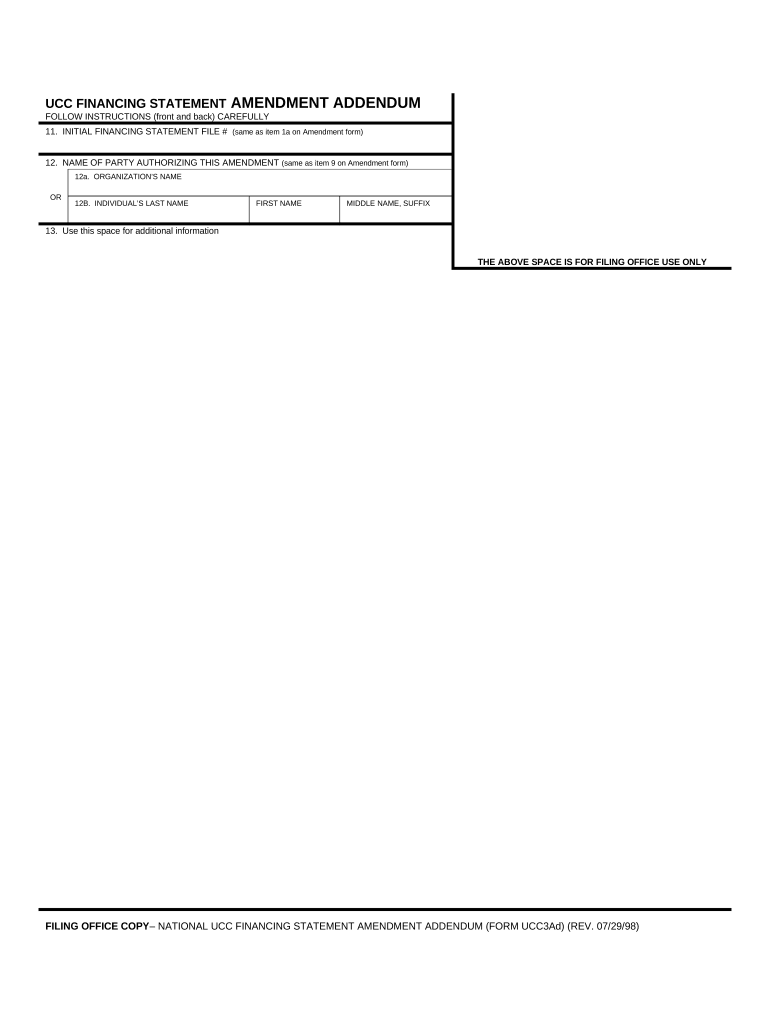
Locate item 11, where you will enter the INITIAL FINANCING STATEMENT FILE #. Ensure this matches exactly with item 1a on the Amendment form.
Proceed to item 12. Here, input the NAME OF PARTY AUTHORIZING THIS AMENDMENT, ensuring it corresponds precisely with item 9 on the Amendment form.
In item 12a, provide the ORGANIZATION’S NAME if applicable. If not, fill in item 12b with the INDIVIDUAL’S LAST NAME, FIRST NAME, and MIDDLE NAME or SUFFIX as needed.
If you require more space for additional information, utilize item 13 to include any necessary details that could not fit on the Amendment form.
Start using our platform today for free to streamline your ar financing process!
Ar financing companiesAR financing vs factoringAr financing lenders4 forms of receivable financingAR in finance stands forAccounts receivable loansAccounts receivable financing lendersBest accounts receivable financing companies
Security and compliance
At DocHub, your data security is our priority. We follow HIPAA, SOC2, GDPR, and other standards, so you can work on your documents with confidence.
by RL Mendoza Cited by 1 SUMMARY: Accounts receivable (A/R) financing refers to cash conversion of an organizations eligible portfolio of outstanding invoices for its operatingRead more
Accounts Receivable and Inventory Financing (ARIF) is the most fundamental form of collateral-based commercial lending. It combines elements of secured
Cookie consent notice
This site uses cookies to enhance site navigation and personalize your experience.
By using this site you agree to our use of cookies as described in our Privacy Notice.
You can modify your selections by visiting our Cookie and Advertising Notice.