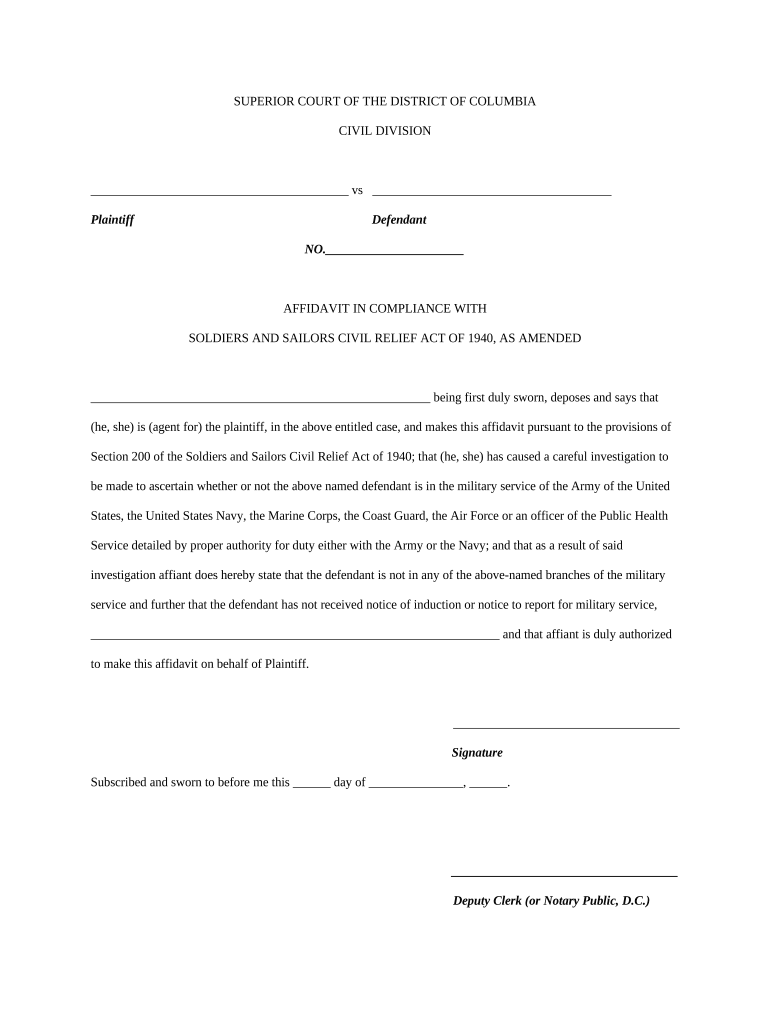
Dc affidavit form 2026

Get Form
affidavit form fill up Preview on Page 1

Here's how it works

01. Edit your affidavit form fill up online
Type text, add images, blackout confidential details, add comments, highlights and more.
02. Sign it in a few clicks
Draw your signature, type it, upload its image, or use your mobile device as a signature pad.
03. Share your form with others
Send it via email, link, or fax. You can also download it, export it or print it out.

How to use or fill out dc affidavit form with our platform

Form edit decoration
9.5
Ease of Setup
DocHub User Ratings on G2
9.0
Ease of Use
DocHub User Ratings on G2
  1. Click ‘Get Form’ to open the dc affidavit form in the editor.
  2. Begin by entering the names of the plaintiff and defendant in the designated fields at the top of the form. Ensure accuracy as this information is crucial for identification.
  3. In the section where it states 'being first duly sworn, deposes and says that', fill in your name or the name of the agent representing the plaintiff.
  4. Next, complete the statement regarding whether the defendant is in military service. This requires a careful investigation; ensure you provide accurate information based on your findings.
  5. Sign your name in the signature field provided. This confirms that you are authorized to make this affidavit on behalf of the plaintiff.
  6. Finally, have a Deputy Clerk or Notary Public witness your signature and complete their section by filling in the date and signing as required.

Start using our platform today to easily fill out and manage your dc affidavit form for free!

be ready to get more

Complete this form in 5 minutes or less

Get form

Got questions?

We have answers to the most popular questions from our customers. If you can't find an answer to your question, please contact us.
Contact us

A lot of software solutions are available out there for document modifying and signing. DocHub is one of the most in-demand online solutions that comply with all data protection and compliance requirements and ensures your eSigned documentation is legally enforceable. All you need to give it a try is to create an account, upload your dc affidavit form, fill out the requested information, and click Sign. Generate your electronic signature by typing, drawing it, uploading its picture to your template, or scanning a unique QR code.

You may complete and sign your dc affidavit form online, even on a tight deadline. All you need to access top-notch editing tools on any device is a DocHub profile, that you can sign up in a couple of moments. After you sign up, upload your file or find what you are searching for in our catalog, complete it using the editing tools you want, and put your electronic signature on it at the end.

Free Affidavit Template for Every State (US) | LawDepot.
Make Your Own Affidavit Online. Now create your affidavit online within minutes using our pre-drafted, ready to use affidavit templates availabe on this portal! You can downlad the soft copy and print it on Stamp papers.
You can make an affidavit at any police station, where an officer will provide you with a standard form and help you complete the process.

Security and compliance

At DocHub, your data security is our priority. We follow HIPAA, SOC2, GDPR, and other standards, so you can work on your documents with confidence.

Learn more
ccpa2
pci-dss
gdpr-compliance
hipaa
soc-compliance

People also ask

To obtain a copy of this affidavit, you need to visit the clerk of courts office where the hearing took place and request access to the court file for the case. You can review the file and make copies of any documents within it (note that there may be a charge for copies).
The following are six critical sections that must be included: Title. This is either your name (Affidavit of Jane Doe) or the specific case information. Statement of identity. The next paragraph tells the court about yourself. Statement of truth. Statement of facts. Closing statement of truth. Sign and docHub.
The legal significance of affidavits The written statement generally is signed both by the person making the statement (the affiant) and by the person attesting the document, usually a person who is legally authorized, such as a notary public or certain court or government officers.
I, Mr./Ms. Age, , occupation R/at: do hereby take oath and state on solemn affirmation as under:- I. state that, I undertake to show all the original documents at the time of submission/admission. I will submit true/attested copies of Marksheet, Passport and Visa.
An affidavit is a written statement made under oath, and notarization is often required to validate the document. Being truthful to the court is vital, whether communicating via an affidavit or in person on the stand.

Related links