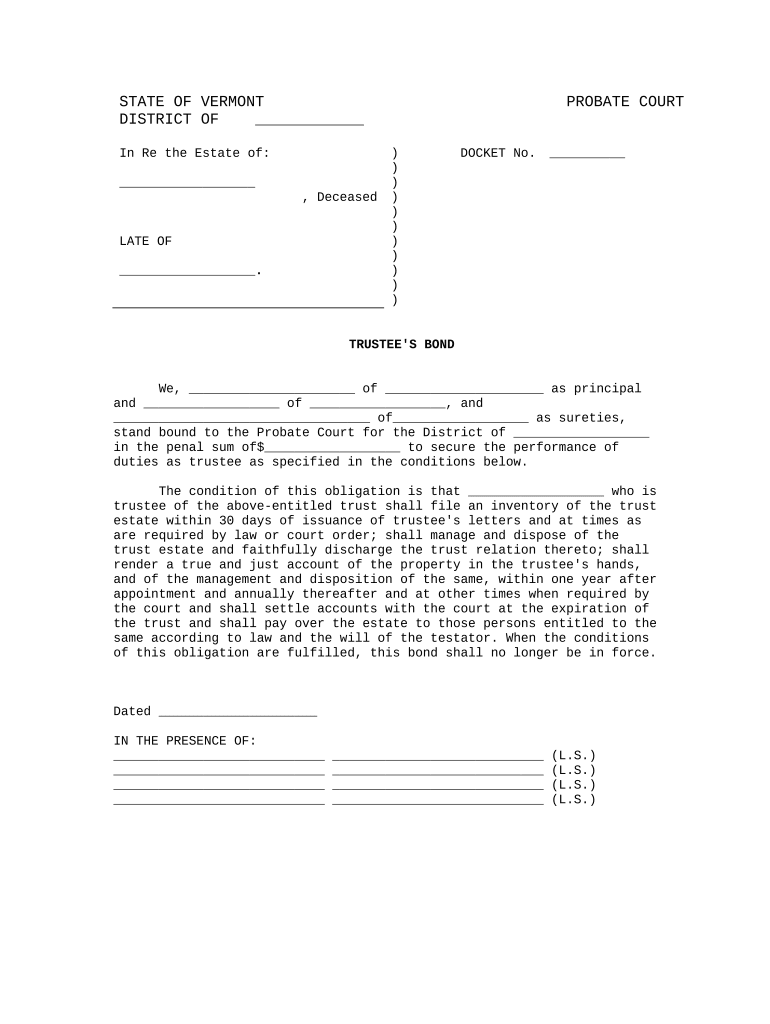
Instructions for Completing the Trustee's Bond - Vermont 2025

Get Form
Instructions for Completing the Trustee's Bond - Vermont Preview on Page 1

Here's how it works

01. Edit your form online
Type text, add images, blackout confidential details, add comments, highlights and more.
02. Sign it in a few clicks
Draw your signature, type it, upload its image, or use your mobile device as a signature pad.
03. Share your form with others
Send it via email, link, or fax. You can also download it, export it or print it out.

How to use or fill out Instructions for Completing the Trustee's Bond - Vermont with our platform

Form edit decoration
9.5
Ease of Setup
DocHub User Ratings on G2
9.0
Ease of Use
DocHub User Ratings on G2
  1. Click ‘Get Form’ to open the Trustee's Bond in the editor.
  2. Begin by filling in the name of the deceased and their last known address in the designated fields at the top of the form.
  3. In the principal section, enter your name and address as the trustee. Ensure accuracy to avoid any legal complications.
  4. Next, provide details for your sureties, including their names and addresses. This is crucial as they are responsible for ensuring compliance with trust obligations.
  5. Specify the penal sum amount that you are bound to, which should reflect the value of the trust estate.
  6. Review and complete all conditions outlined in the bond, ensuring you understand your responsibilities as a trustee.
  7. Finally, date the document and have it signed in front of witnesses as required. Use our platform’s signature feature for convenience.

Start using our platform today to easily complete your Trustee's Bond - Vermont form online for free!

be ready to get more

Complete this form in 5 minutes or less

Get form

Got questions?

We have answers to the most popular questions from our customers. If you can't find an answer to your question, please contact us.
Contact us

eSignatures are a perfect alternative to traditional signing, as they save time, effort, and money people spend on printing, scanning, and paper delivery. You can eSign your Instructions for Completing the Trustee's Bond - Vermont using a trustworthy and powerful online document management tool like DocHub. It complies with primary eSignature policies (ESIGN and UETA), so all forms approved there are legally binding and have the same validity as physically signed ones.

In case your go-to electronic mail service is Gmail, it is simple to integrate your DocHub editor into your work. Modify your Instructions for Completing the Trustee's Bond - Vermont with DocHub tools and attach it to your drafts in Gmail. See how straightforward it can be to exchange documents and collaborate with a swift PDF editing solution at hand.