Type text, add images, blackout confidential details, add comments, highlights and more.
02. Sign it in a few clicks
Draw your signature, type it, upload its image, or use your mobile device as a signature pad.
03. Share your form with others
Send form 1905 download via email, link, or fax. You can also download it, export it or print it out.
How to use or fill out VA Form 28-1905 with our platform
Ease of Setup
DocHub User Ratings on G2
Ease of Use
DocHub User Ratings on G2
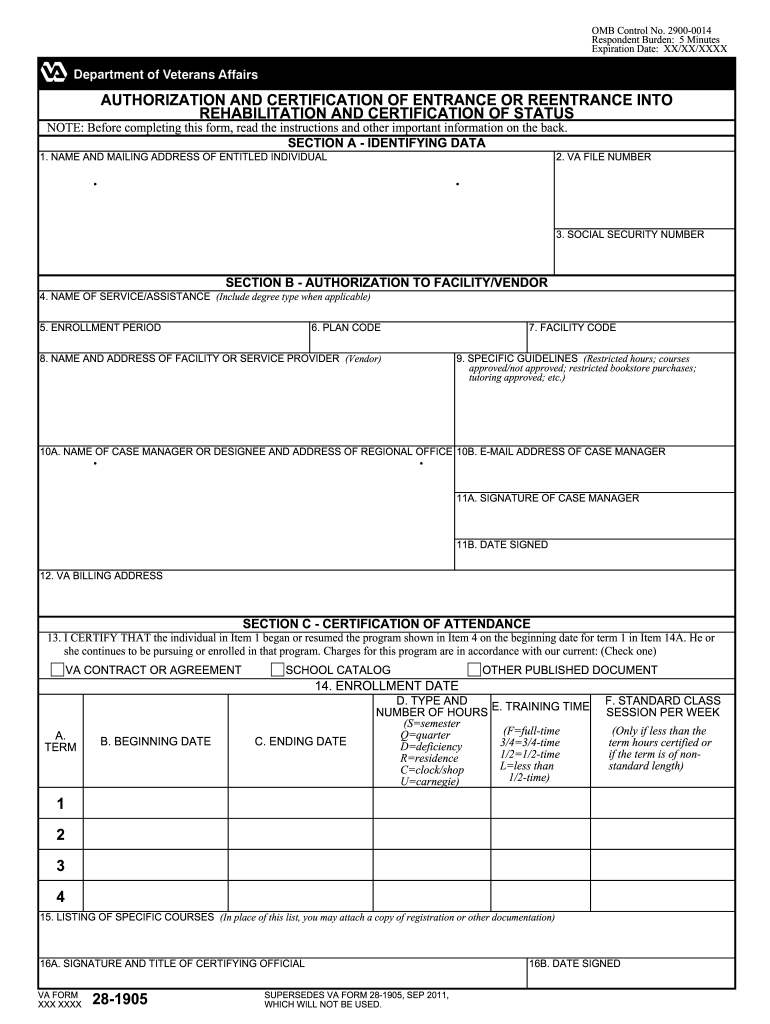
Click ‘Get Form’ to open VA Form 28-1905 in the editor.
In Section A, enter your name and mailing address, along with your VA file number and Social Security number. Ensure all information is accurate for proper identification.
Move to Section B. Here, provide details about the service or assistance you are requesting, including the enrollment period and facility code. Make sure to include any specific guidelines that apply.
In Section C, certify attendance by filling in the program start date and other relevant dates. Indicate whether charges align with a VA contract or school catalog.
Finally, ensure that the certifying official signs and dates the form before submission. Review all entries for completeness.
Start using our platform today to fill out your VA Form 28-1905 online for free!
VA form 28-1905m fillableVA FORM 28-1905cVA form 28 1905m may 2024How to fill out VA form 28-1905MVA FORM 28-1905m exampleVA Form 28-10212VA form 28-1905m redditVA Form 28-1900
Security and compliance
At DocHub, your data security is our priority. We follow HIPAA, SOC2, GDPR, and other standards, so you can work on your documents with confidence.
VA Form 28-1905m - Veterans Benefits Administration
After completing the form, if returning by mail, mail to: Veteran Readiness and Employment (VRE) Intake Center, Department of Veterans Affairs, P.O. Box 5210,.Read more
This form authorizes this veteran or eligible person for training or services at your facility under Vocational Rehabilitation. (Chapter 31, title 38, U.S.C);Read more
Technical Protocol for Implementing Intrinsic Remediation
This report is a work prepared for the United States Government by Parsons Engineering. Science, Inc. and representatives from the United StatesRead more
Cookie consent notice
This site uses cookies to enhance site navigation and personalize your experience.
By using this site you agree to our use of cookies as described in our Privacy Notice.
You can modify your selections by visiting our Cookie and Advertising Notice.