Idaho premises 2026

Get Form
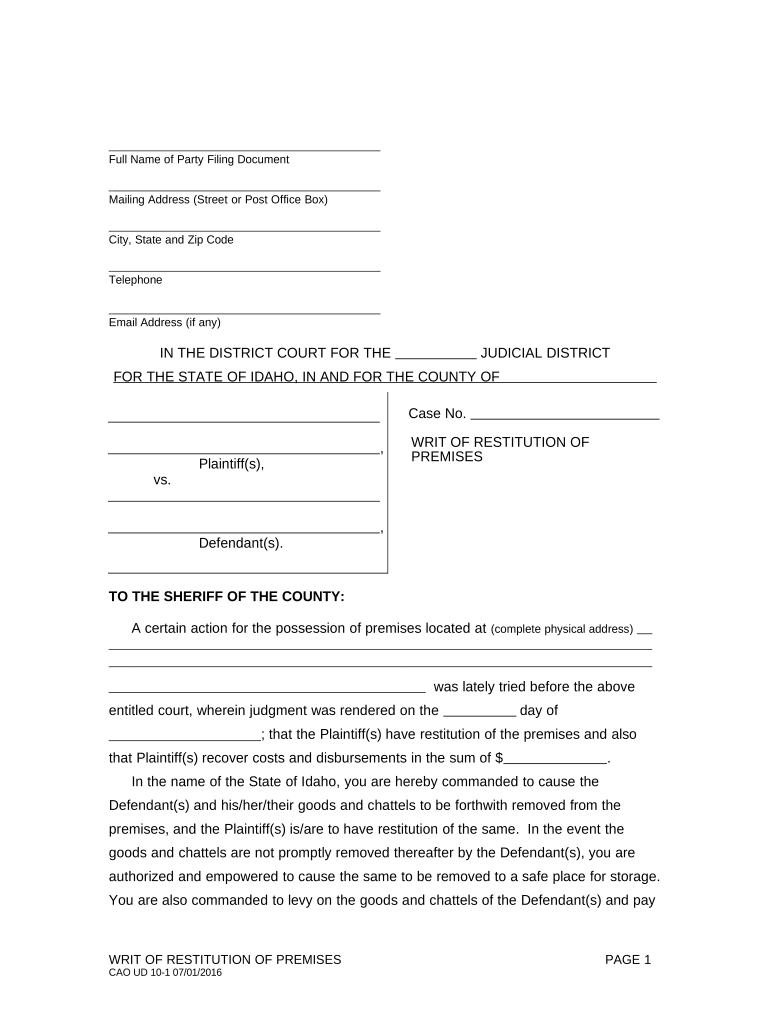
idaho premises Preview on Page 1

Here's how it works

01. Edit your form online
Type text, add images, blackout confidential details, add comments, highlights and more.
02. Sign it in a few clicks
Draw your signature, type it, upload its image, or use your mobile device as a signature pad.
03. Share your form with others
Send it via email, link, or fax. You can also download it, export it or print it out.

How to use or fill out Idaho Premises with our platform

Form edit decoration
9.5
Ease of Setup
DocHub User Ratings on G2
9.0
Ease of Use
DocHub User Ratings on G2
  1. Click ‘Get Form’ to open the Idaho Premises document in the editor.
  2. Begin by entering the Full Name of the Party Filing Document in the designated field. This is crucial for identifying who is initiating the action.
  3. Next, fill in your Mailing Address, including Street or Post Office Box, City, State, and Zip Code. Accurate information ensures proper communication.
  4. Provide a Telephone number and Email Address if available. This allows for quick contact regarding any updates or questions about the case.
  5. In the section labeled 'Case No.', input the specific case number assigned to your legal matter. This helps in tracking and referencing your case efficiently.
  6. Complete the physical address of the premises involved in this action. Ensure that it is precise to avoid any confusion during enforcement.
  7. Finally, review all entered information for accuracy before saving or exporting your completed document for submission.

Start using our platform today to streamline your document editing and form completion process for free!

be ready to get more

Complete this form in 5 minutes or less

Get form

Security and compliance

At DocHub, your data security is our priority. We follow HIPAA, SOC2, GDPR, and other standards, so you can work on your documents with confidence.

Learn more
ccpa2
pci-dss
gdpr-compliance
hipaa
soc-compliance
be ready to get more

Complete this form in 5 minutes or less

Get form