Wisconsin workers compensation 2026

Get Form
injured workers in wisconsin Preview on Page 1

Here's how it works

01. Edit your injured workers in wisconsin online
Type text, add images, blackout confidential details, add comments, highlights and more.
02. Sign it in a few clicks
Draw your signature, type it, upload its image, or use your mobile device as a signature pad.
03. Share your form with others
Send it via email, link, or fax. You can also download it, export it or print it out.

How to use or fill out Wisconsin Workers Compensation with our platform

Form edit decoration
9.5
Ease of Setup
DocHub User Ratings on G2
9.0
Ease of Use
DocHub User Ratings on G2
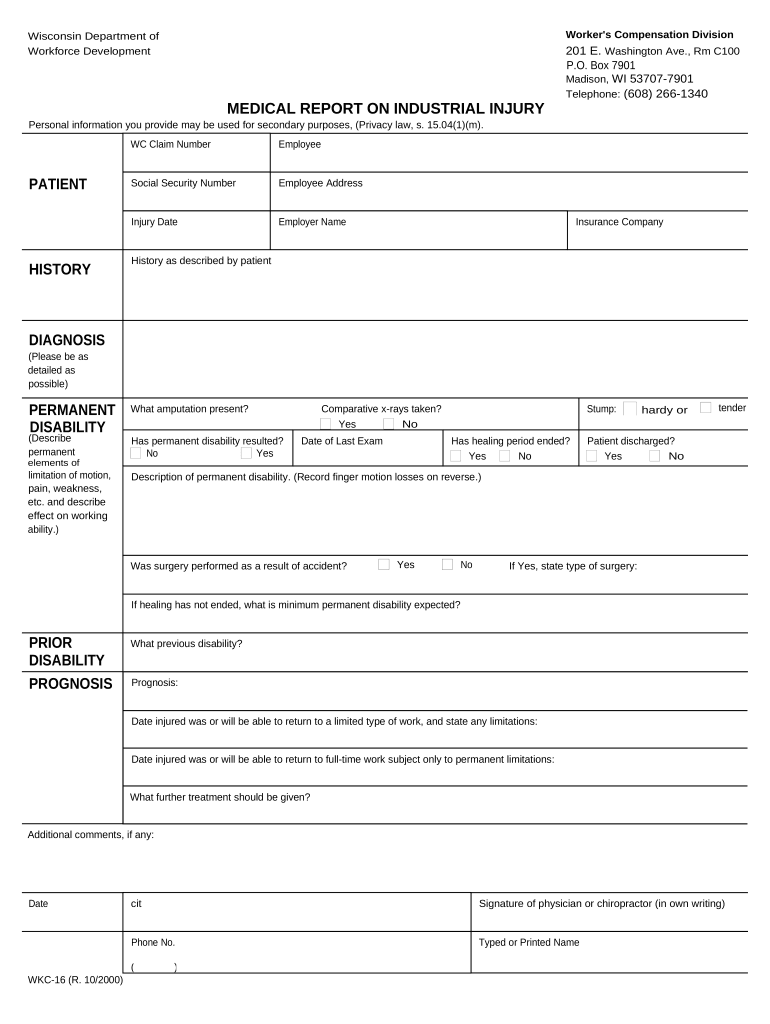
  1. Click ‘Get Form’ to open the Wisconsin Workers Compensation form in the editor.
  2. Begin by entering the WC Claim Number, Employee Name, and Social Security Number in the designated fields. Ensure accuracy as this information is crucial for processing your claim.
  3. Fill in the Employee Address, Injury Date, Employer Name, and Insurance Company details. This section helps establish the context of your claim.
  4. In the 'History as described by patient' section, provide a detailed account of the injury and any relevant medical history that may impact your case.
  5. For the DIAGNOSIS section, describe the injury thoroughly. Include any permanent disabilities and their effects on work ability in the PERMANENT DISABILITY area.
  6. Complete sections regarding prior disabilities and prognosis. Specify expected return dates to work and any limitations that may apply.
  7. Finally, ensure all fields are filled out completely before signing. Use our platform’s tools to review your entries for accuracy before submission.

Start filling out your Wisconsin Workers Compensation form today for free using our editor!

be ready to get more

Complete this form in 5 minutes or less

Get form

Got questions?

We have answers to the most popular questions from our customers. If you can't find an answer to your question, please contact us.
Contact us

If you regularly work with documents stored in your Google Drive, DocHub is a perfect solution for you to easily and quickly complete, edit, and sign them. This editor integrates well with Google services, so you can export your wisconsin workers compensation from your Google Drive to the editor without downloading and re-uploading it. Right-click on your file, select Open With → DocHub PDF Sign and Edit. In our editor, add and assign Signature Fields for all parties involved, then click on the Menu option above → Send → select how you want to share your paperwork.

In addition to a comprehensive toolset for editing PDFs on mobile phones, DocHub enables you to sign your wisconsin workers compensation along the way. Open our editor in your browser, make changes using DocHub’s toolset, and complete your editing by eSigning the finished form.

While workers cannot be fired in Wisconsin while on workers compensation, there are also protections when it comes to returning to the job. For example, employers need reasonable cause to refuse to rehire a worker from their previous job.
Do I get paid if Im injured in a work accident? While you do have some rights after being injured at work, there is no obligation on any employer to pay a staff member their full standard salary if they are off work due to illness or injury even if it was caused by an accident at work, or materials used at work.
Your obligations have a documented return to work program describing the steps you will take if a worker is injured. maintain a record of work-related injuries. notify your insurer of all workplace injuries within 48 hours.

Security and compliance

At DocHub, your data security is our priority. We follow HIPAA, SOC2, GDPR, and other standards, so you can work on your documents with confidence.

Learn more
ccpa2
pci-dss
gdpr-compliance
hipaa
soc-compliance

People also ask

According to Section 3 of the Workmens Compensation Act, an employer is liable to pay damages to its workers under the following conditions: If a worker has an occupational disease mentioned under Part A, B, C of Schedule III. The disease has to be a result of an injury by accident during work hours.
While workers cannot be fired in Wisconsin while on workers compensation, there are also protections when it comes to returning to the job. For example, employers need reasonable cause to refuse to rehire a worker from their previous job.
How much does workers compensation insurance cost in Wisconsin? Estimated employer rates for workers compensation in Wisconsin are $1.49 per $100 in covered payroll. Your cost is based on a number of factors, including: Payroll.
Wisconsin Employers that meet specific requirements are required to carry Workers Compensation insurance unless they qualify for Self-Insured status. Employers receive the assurance they will not be sued for damages, medical care and lost wages if their employees get injured while working.
How much does workers compensation insurance cost in Wisconsin? Estimated employer rates for workers compensation in Wisconsin are $1.49 per $100 in covered payroll. Your cost is based on a number of factors, including: Payroll.

Related links