Stipulation without 2026

Get Form
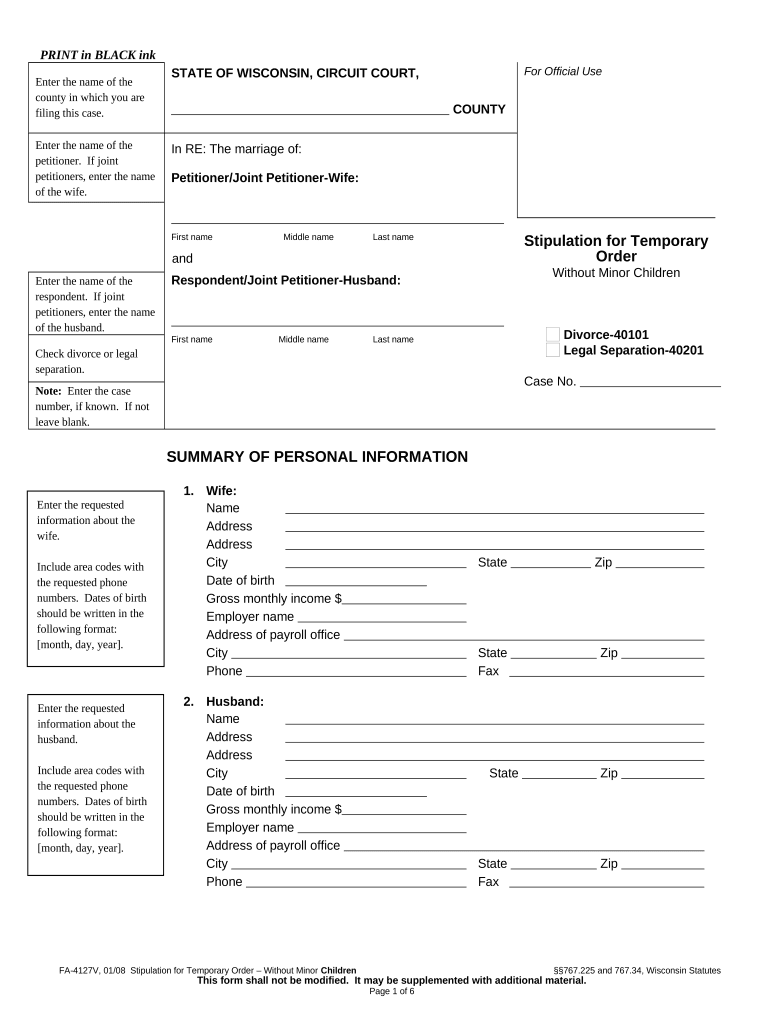
stipulation without Preview on Page 1

Here's how it works

01. Edit your form online
Type text, add images, blackout confidential details, add comments, highlights and more.
02. Sign it in a few clicks
Draw your signature, type it, upload its image, or use your mobile device as a signature pad.
03. Share your form with others
Send it via email, link, or fax. You can also download it, export it or print it out.

How to use or fill out stipulation without

Form edit decoration
9.5
Ease of Setup
DocHub User Ratings on G2
9.0
Ease of Use
DocHub User Ratings on G2
  1. Begin by entering the name of the county where you are filing this case at the top of the form.
  2. Fill in the names of both the petitioner and respondent. If there are joint petitioners, include both names as required.
  3. Indicate whether you are filing for divorce or legal separation by checking the appropriate box.
  4. Complete the summary of personal information section for both parties, ensuring to include contact details and financial information accurately.
  5. In the stipulation section, outline any agreements regarding maintenance (spousal support) and check the relevant options provided.
  6. Detail any agreements related to residence, property division, and debts in their respective sections, making sure to specify who is responsible for what.
  7. Finally, ensure both parties sign and date the document at the end to validate your agreement before submission.

Explore our platform today to streamline your document editing and signing process for free!

be ready to get more

Complete this form in 5 minutes or less

Get form

Got questions?

We have answers to the most popular questions from our customers. If you can't find an answer to your question, please contact us.
Contact us
In a contract dispute, for example, the parties may stipulate as to the existence of the contract, the parties to that contract, and the date of its execution.
a condition, demand, or promise in an agreement or contract. the act of stipulating.
The words No Stipulation mean that the particular document imposes no. requirements related to that section.
Stipulation generally means an agreement, a bargain, proviso, or condition. If the stipulation complies with an applicable statute or rule of court, it will be binding. A stipulation could mean a fact, promise, or provision in a contract agreed by two parties.
A stipulation is simply an agreement between the parties. To be effective, the stipulation must be in writing and signed by the judge or made on the record in open court.

Security and compliance

At DocHub, your data security is our priority. We follow HIPAA, SOC2, GDPR, and other standards, so you can work on your documents with confidence.

Learn more
ccpa2
pci-dss
gdpr-compliance
hipaa
soc-compliance