Type text, add images, blackout confidential details, add comments, highlights and more.
02. Sign it in a few clicks
Draw your signature, type it, upload its image, or use your mobile device as a signature pad.
03. Share your form with others
Send it via email, link, or fax. You can also download it, export it or print it out.
How to use or fill out set show cause with our platform
Ease of Setup
DocHub User Ratings on G2
Ease of Use
DocHub User Ratings on G2
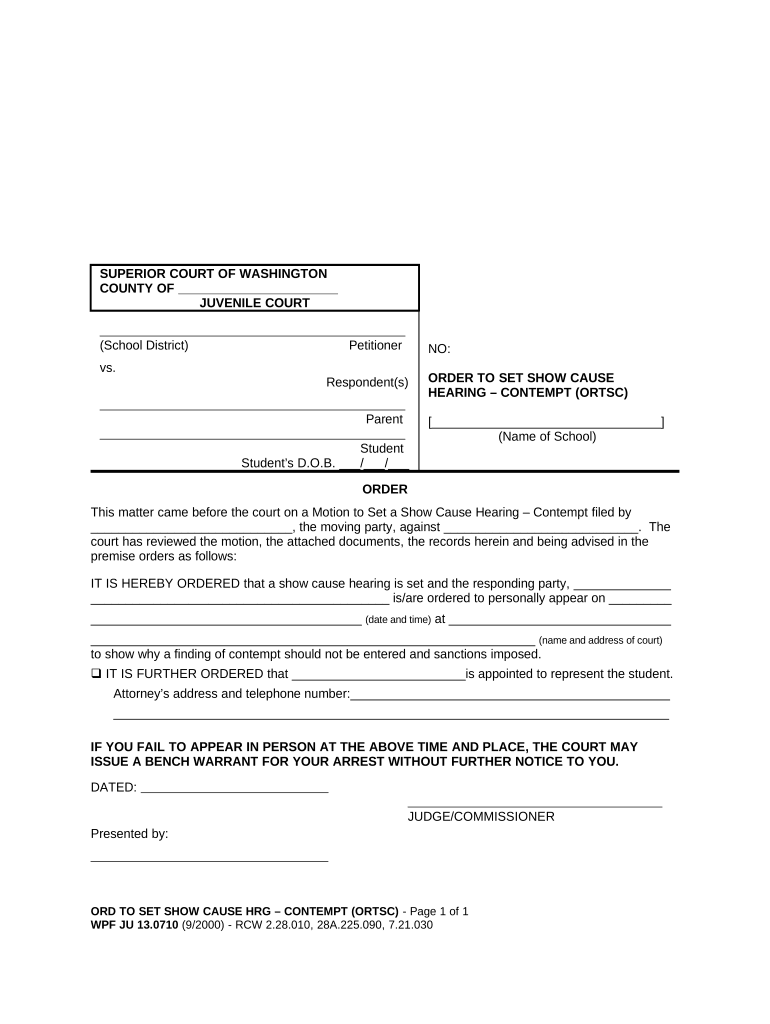
Click ‘Get Form’ to open the set show cause document in the editor.
Begin by filling in the 'County' and 'Petitioner' sections at the top of the form. Ensure that you accurately enter the relevant details for your case.
In the 'Respondent(s)' section, provide the names of all parties involved, including the parent and student. Don't forget to include the student's date of birth in the specified format.
Next, complete the 'Order' section by entering the name of the school and details regarding who is filing the motion. This is crucial for clarity in your case.
Fill in the date and time for the show cause hearing, as well as the court's name and address where it will take place. Double-check these details for accuracy.
If applicable, indicate who will represent the student by filling in their name and contact information in the designated area.
Finally, review all entries for completeness and correctness before saving or printing your document directly from our platform.
Start using our platform today to streamline your document editing process for free!
Order to Show cause exampleCan you go to jail at a show cause hearingOrder to show cause NYCHow to win a show cause hearingWhat happens at an order to show Cause hearingOrder to Show Cause eviction NY formMotion to show Cause exampleIs a show cause a warrant
Security and compliance
At DocHub, your data security is our priority. We follow HIPAA, SOC2, GDPR, and other standards, so you can work on your documents with confidence.
Use this form with the Order to Go to Court for Contempt Hearing (Order to Show Cause), WS. 201, and the Contempt Hearing Order, WS 202. 1. Request for ContemptRead more
Criminal clerk-magistrates hearings (also known as show-cause hearings) occur when the police or the alleged victim of a crime file an Application for aRead more
Cookie consent notice
This site uses cookies to enhance site navigation and personalize your experience.
By using this site you agree to our use of cookies as described in our Privacy Notice.
You can modify your selections by visiting our Cookie and Advertising Notice.