Type text, add images, blackout confidential details, add comments, highlights and more.
02. Sign it in a few clicks
Draw your signature, type it, upload its image, or use your mobile device as a signature pad.
03. Share your form with others
Send it via email, link, or fax. You can also download it, export it or print it out.
How to use or fill out Wisconsin Defect with Our Platform
Ease of Setup
DocHub User Ratings on G2
Ease of Use
DocHub User Ratings on G2
Click ‘Get Form’ to open the Wisconsin Defect document in the editor.
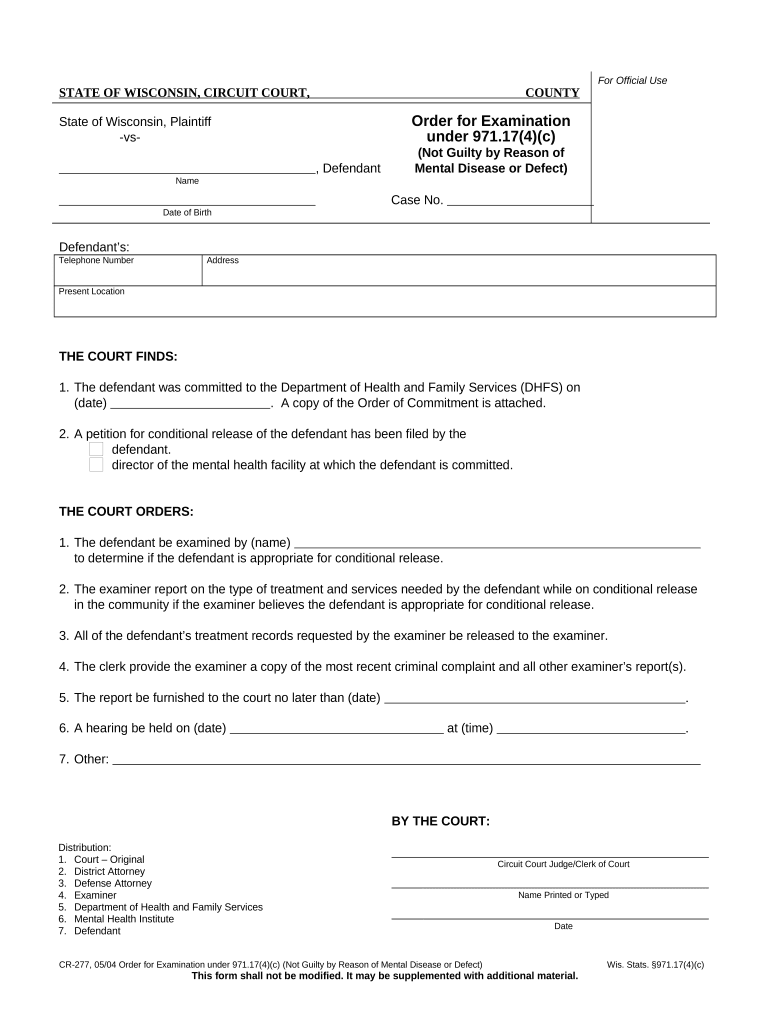
Begin by entering the defendant's name and case number in the designated fields. Ensure accuracy as this information is crucial for identification.
Fill in the date of birth, telephone number, and address of the defendant. This information helps establish the defendant's identity and contact details.
In the section titled 'THE COURT FINDS', input the date when the defendant was committed to DHFS. Attach any necessary documentation as indicated.
Complete the 'THE COURT ORDERS' section by specifying who will examine the defendant for conditional release. Include their name and ensure all required reports are mentioned.
Finally, review all entries for accuracy before saving or exporting your completed form. Utilize our platform’s features to sign and distribute it as needed.
Start using our platform today to fill out your Wisconsin Defect form online for free!
Wis. Admin. Code Department of Health Services DHS 116.04
(1) BIRTH DEFECTS FOR WHICH REPORTING IS MANDATORY. Reporters shall report to the department a birth defect listed in Appendix A for children in whom the
All You Need to Know (2023 Edition) - Wisconsin Lemon Law
Under this law, consumers who purchase or lease a new car, truck, or motorhome with DocHub defects are entitled to a refund or replacement vehicle. In thisRead more
(2m) Defect means a condition of any component of an improvement that a home inspector determines, on the basis of the home inspectors judgment on the day ofRead more
Cookie consent notice
This site uses cookies to enhance site navigation and personalize your experience.
By using this site you agree to our use of cookies as described in our Privacy Notice.
You can modify your selections by visiting our Cookie and Advertising Notice.