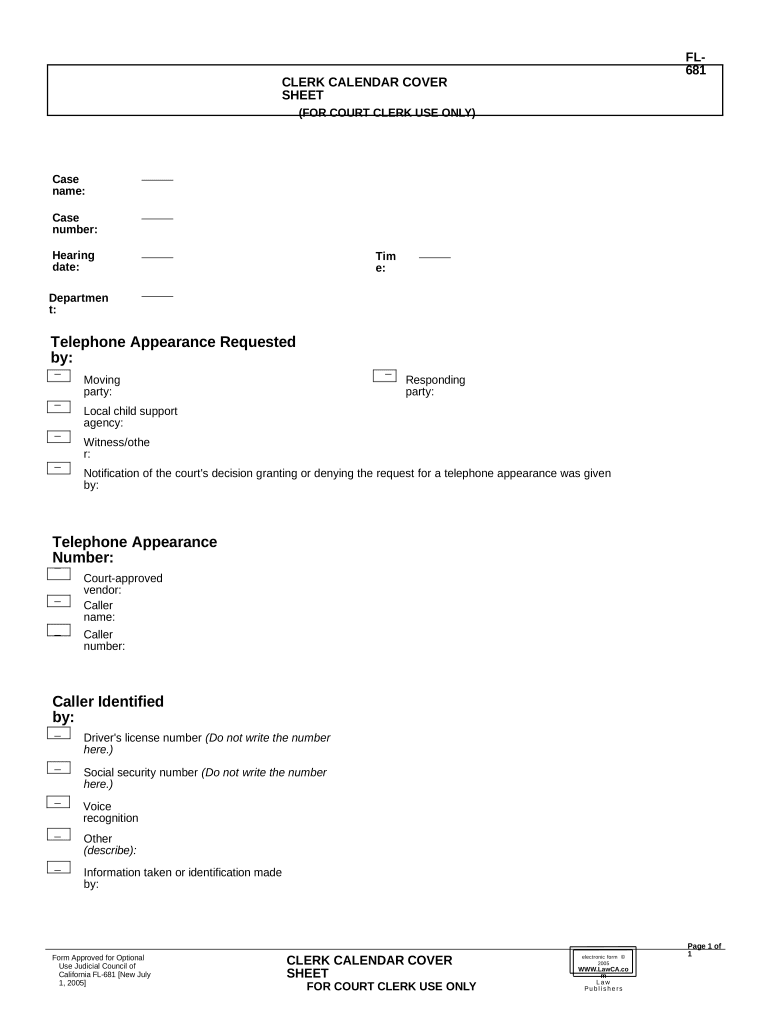
Cover sheet form 2026

Get Form
cover sheet form Preview on Page 1

Here's how it works

01. Edit your form online
Type text, add images, blackout confidential details, add comments, highlights and more.
02. Sign it in a few clicks
Draw your signature, type it, upload its image, or use your mobile device as a signature pad.
03. Share your form with others
Send it via email, link, or fax. You can also download it, export it or print it out.

How to Use or Fill Out the Cover Sheet Form

Form edit decoration
9.5
Ease of Setup
DocHub User Ratings on G2
9.0
Ease of Use
DocHub User Ratings on G2
  1. Click ‘Get Form’ to open the cover sheet form in our editor.
  2. Begin by entering the 'Case name' in the designated field. This identifies the case associated with your submission.
  3. Next, fill in the 'Case number' to ensure accurate tracking of your document within court records.
  4. Specify the 'Hearing date' and 'Time' for your appearance, ensuring that all parties are informed of when to attend.
  5. Indicate if a 'Telephone Appearance' is requested by providing the necessary details in the respective fields.
  6. Complete sections for both 'Moving party' and 'Responding party', which clarify who is initiating and responding to the case.
  7. If applicable, include information about any local child support agency involved, as well as witness or other relevant parties.
  8. Finally, provide contact details such as 'Caller name', 'Caller number', and any identification information required for verification purposes.

Start using our platform today to streamline your document editing and form completion process for free!

be ready to get more

Complete this form in 5 minutes or less

Get form

Got questions?

We have answers to the most popular questions from our customers. If you can't find an answer to your question, please contact us.
Contact us
How to format a cover letter Add your contact information and date at the top. Use a professional greeting. Create an attention-grabbing opening paragraph. Highlight your qualifications in the middle paragraphs. Thank the employer in the closing paragraph. Add an appropriate closing and then a signature.
A cover sheet is a crucial component in the patent document recording process. It provides essential information about the document being recorded and the patents or applications it relates to. The requirement for a cover sheet is specified in 37 CFR 3.31, which states the necessary contents of a cover sheet.
Fax cover sheets help to ensure that faxes get where they need to go and that the recipients have some basic information about whats contained in the fax. A fax cover letter can provide a more comprehensive overview of a faxed document.
Cover pages can include the name of your school, your paper title, your name, your course name, your teacher or professors name, and the due date of the paper. If you are unsure of what to include, check with your instructor. For more help making cover or title pages, visit our title page generator here.
How to write a cover letter in 6 steps Start with your header. Include a greeting. Write an opening paragraph. Add a second paragraph. Finish with a closing paragraph. End with a professional sign-off.

Security and compliance

At DocHub, your data security is our priority. We follow HIPAA, SOC2, GDPR, and other standards, so you can work on your documents with confidence.

Learn more
ccpa2
pci-dss
gdpr-compliance
hipaa
soc-compliance

People also ask

A cover letter and a cover sheet are both professional documents through which you introduce yourself. While a cover letter is a written message that allows recruiters to consider a candidate, a cover sheet is a brief page of details that appears at the front of a document.
What should a cover page look like? A cover page should look like a business letter. It should be professional, clearly formatted, and no longer than one page, with a focus on why youre a strong fit for the role. It should have the same contact information (name, phone number, email address) as your resume.

Related links