Type text, add images, blackout confidential details, add comments, highlights and more.
02. Sign it in a few clicks
Draw your signature, type it, upload its image, or use your mobile device as a signature pad.
03. Share your form with others
Send it via email, link, or fax. You can also download it, export it or print it out.
How to use or fill out claim forfeiture with our platform
Ease of Setup
DocHub User Ratings on G2
Ease of Use
DocHub User Ratings on G2
Click ‘Get Form’ to open the claim forfeiture document in the editor.
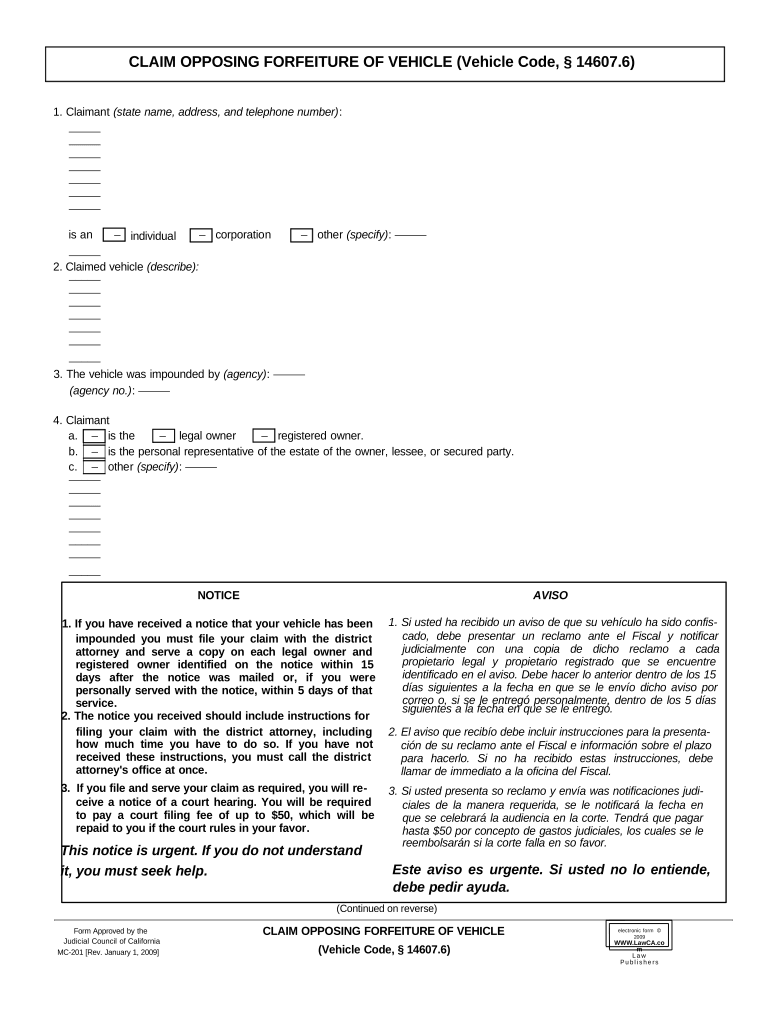
Begin by entering your name, address, and telephone number in the Claimant section. Specify whether you are an individual, corporation, or other entity.
In the Claimed Vehicle section, provide a detailed description of the vehicle that is being claimed.
Indicate the agency that impounded your vehicle and include any relevant agency number.
Clarify your relationship to the vehicle by selecting whether you are the legal owner, registered owner, or a personal representative of the estate.
State your interest in the claimed property by specifying if it is all or part of the value and provide details if necessary.
Request specific actions such as not ordering the vehicle to be forfeited and indicate any costs of suit if applicable.
Finally, verify your claim by signing and dating the form at the bottom.
Start using our platform today to easily complete your claim forfeiture form for free!
Forfeiture gov filing petitionNotice of seizure of property and initiation of administrative forfeiture proceedingsForfeiture of seized propertyAsset forfeitureFederal Asset Forfeiture GuidelinesForfeiture formSeized asset claim formHow to claim seized property
Security and compliance
At DocHub, your data security is our priority. We follow HIPAA, SOC2, GDPR, and other standards, so you can work on your documents with confidence.
To File a Claim: A claim must be filed with the agency that gave notice of the seizure and intent to forfeit. To contest the forfeiture, the claim must be sentRead more
If the court finds that property is subject to forfeiture, it must promptly enter a preliminary order of forfeiture setting forth the amount of any moneyRead more
Cookie consent notice
This site uses cookies to enhance site navigation and personalize your experience.
By using this site you agree to our use of cookies as described in our Privacy Notice.
You can modify your selections by visiting our Cookie and Advertising Notice.