Type text, add images, blackout confidential details, add comments, highlights and more.
02. Sign it in a few clicks
Draw your signature, type it, upload its image, or use your mobile device as a signature pad.
03. Share your form with others
Send it via email, link, or fax. You can also download it, export it or print it out.
How to use or fill out co certificate with our platform
Ease of Setup
DocHub User Ratings on G2
Ease of Use
DocHub User Ratings on G2
Click ‘Get Form’ to open the co certificate in the editor.
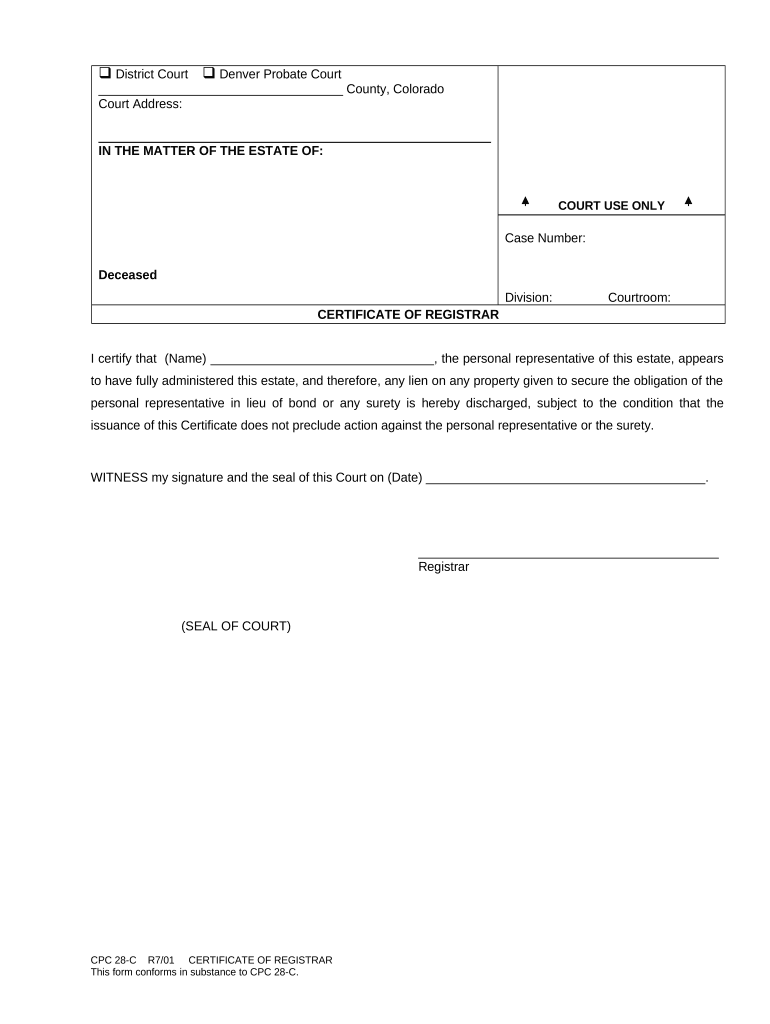
Begin by entering the county and court address at the top of the form. Ensure that this information is accurate as it identifies the jurisdiction.
In the section labeled 'IN THE MATTER OF THE ESTATE OF', fill in the name of the deceased individual. This is crucial for identifying the estate being referenced.
Next, locate the 'Case Number' field and input the relevant case number assigned by the court. This helps in tracking and referencing your case.
Fill in the division and courtroom details as required. These sections are important for proper documentation within court records.
In the 'CERTIFICATE OF REGISTRAR' section, write your name as the personal representative of the estate, confirming that you have fully administered it.
Finally, sign and date where indicated, ensuring that you include both your signature and date to validate this certificate.
Start using our platform today to easily complete your co certificate online for free!
Co certificate meaningCo certificate templateCo certificate for exportCo certificate exampleCertificate of Origin templateCertificate of Origin PDFCertificate of Origin USACertificate of Origin is issued by
Security and compliance
At DocHub, your data security is our priority. We follow HIPAA, SOC2, GDPR, and other standards, so you can work on your documents with confidence.
Jun 21, 2023 The PDF provided on this page is a fillable template that demonstrates how such a Certification of Origin can be structured, and which users may elect to use.Read more
Cookie consent notice
This site uses cookies to enhance site navigation and personalize your experience.
By using this site you agree to our use of cookies as described in our Privacy Notice.
You can modify your selections by visiting our Cookie and Advertising Notice.