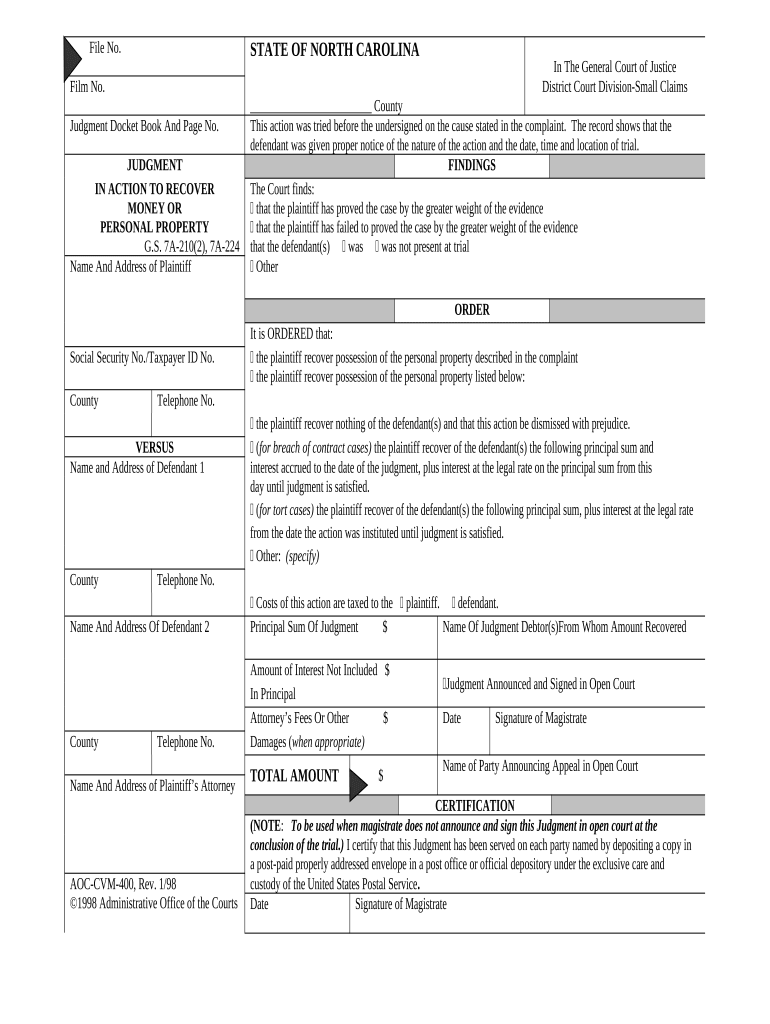
Judgment possession form 2026

Get Form
judgment possession form Preview on Page 1

Here's how it works

01. Edit your form online
Type text, add images, blackout confidential details, add comments, highlights and more.
02. Sign it in a few clicks
Draw your signature, type it, upload its image, or use your mobile device as a signature pad.
03. Share your form with others
Send it via email, link, or fax. You can also download it, export it or print it out.

How to use or fill out judgment possession form with our platform

Form edit decoration
9.5
Ease of Setup
DocHub User Ratings on G2
9.0
Ease of Use
DocHub User Ratings on G2
  1. Click ‘Get Form’ to open the judgment possession form in the editor.
  2. Begin by entering the 'File No.' and 'Film No.' at the top of the form. These identifiers are crucial for tracking your case.
  3. Fill in the 'Name and Address of Plaintiff' along with their 'Social Security No./Taxpayer ID No.' This information establishes who is initiating the action.
  4. In the 'ORDER' section, select whether the plaintiff is recovering possession of personal property as described in the complaint or listed below. Ensure you check the appropriate box.
  5. Complete the 'FINDINGS' section by indicating whether the plaintiff proved their case and if any defendants were present at trial. This section is vital for documenting court findings.
  6. Specify any amounts related to damages, attorney’s fees, or interest accrued in the relevant fields. Accurate financial details are essential for clarity.
  7. Finally, ensure that all signatures are completed where indicated, including that of the magistrate and any parties announcing an appeal.

Start using our platform today to easily fill out your judgment possession form online for free!

be ready to get more

Complete this form in 5 minutes or less

Get form

Got questions?

We have answers to the most popular questions from our customers. If you can't find an answer to your question, please contact us.
Contact us

With DocHub, it’s pretty simple. The editor offers users an add-on called DocHub for Gmail, which you can find in the Google Workspace Marketplace without being charged. Install it and give it access to your Google account. Open your email with your judgment possession form attached and click on the add-on button in the right-side panel. Log in to your DocHub account, and upload the file to our editor, where you can complete it and sign.

As a comprehensive document editing service, DocHub is available on smart phones. Open DocHub in your choice of mobile internet browser and employ our smart mobile-friendly toolset to complete your judgment possession form.

In simplified steps, obtaining a writ of possession in Arkansas involves: Filing an Unlawful Detainer Complaint: This begins the legal eviction process. Serving the Tenant: Legally notifying the tenant of the eviction proceedings. The Court Hearing: Presenting your case to a judge.
Before you are legally evicted, your landlord must serve you a Complaint and get a judgment for possession issued by the Court. Once the judgment is entered, your landlord will need to complete a Writ of Restitution, which is the official paper that tells the U.S. Marshals Service to schedule your eviction.
When a landlord-tenant summary proceeding is resolved, it typically results with a judgment of possession in favor of the landlord. This is different from a warrant of eviction, which is necessary to authorize the eviction of the tenant by a Marshal.

People also ask

To get a judgment for possession, your landlord must sue you by filing a Complaint for Possession of Real Estate in Landlord and Tenant Court. If your landlord wins the case, your landlord will get a judgment for possession.
Typically, a sheriff will serve the writ to the tenant and a law enforcement officer supervises the eviction to ensure the property is secure.
A consent judgment will usually contain payment terms with which the tenant must either comply or risk eviction. It may also include other terms covering the tenants non-monetary obligations. If the tenant defaults, it usually means the tenant will be evicted.

Related links